Loopy Pro: Create music, your way.
What is Loopy Pro? — Loopy Pro is a powerful, flexible, and intuitive live looper, sampler, clip launcher and DAW for iPhone and iPad. At its core, it allows you to record and layer sounds in real-time to create complex musical arrangements. But it doesn’t stop there—Loopy Pro offers advanced tools to customize your workflow, build dynamic performance setups, and create a seamless connection between instruments, effects, and external gear.
Use it for live looping, sequencing, arranging, mixing, and much more. Whether you're a live performer, a producer, or just experimenting with sound, Loopy Pro helps you take control of your creative process.
Download on the App StoreLoopy Pro is your all-in-one musical toolkit. Try it for free today.
Drambo by BeepStreet released
This discussion has been closed.
Comments
ahh! midi note generator! that’s the ticket thank you man
No problem.
Enjoy.
🤔 Sweet! 😁
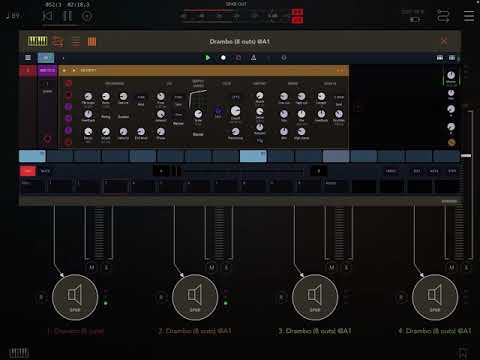
i am having an issue with drambo multi out.
i set up 3 multi out channels in aum
track 1 arp
track 2 drums
track 3 pad
all sequenced and running fine.
when i go to the “main” page to change the channel output, no matter what channel i click on, say 3, it pulls up the “select output” window for channel 2. dosent matter what channel i try to pick, even channel 8... when i change the output to any other out, it’s always effecting chan 2.
i have rebooted aum twice and still the same so i’m wondering what i’m doing wrong. if need i can post a video
If you can see the output keeps changing on the wrong channel, can’t change 3 to save my life lol I have to be approaching this wrong
@reasOne Any reason why you have to change channels from within Drambo?
I've always done it in AUM (although your question is valid of course).
i didn’t know you could do it im aum until you mentioned it 😎 i haven’t really used multi out much!
i just realized what i’m doing wrong i think..
when you get the “select output “ pop up, at that point i am able to just tap the channel i want and then go into it. it was not obvious at first, i just assumed you touched the one you wanted right away... i’ve been wrong before tho haah i knew it was not drambo it was me, drambo never fails
A video may explain things better. And I’d like to use the p lock to record the scratching
@Fingolfinzzz You cannot record the scratching as p-locks since they are discrete values. Sliding p-locks are yet to be developed. ) if you connect the scratch knob to the 2nd Flexi input:

But you can record the scratching action using a second Flexi sampler (it's DC coupled
Wait! Wut?? That is awesome. I had no idea. Thanks for that info @rs2000!
You can even record two CV channels to one Flexi with a L/R to stereo module before the sampler, followed by a stereo to L/R module after.

Scratch mode is extremely cool on CV/Gate pairs. You can mess with time and sample location as usual, but the pitch remains as it was sampled. Some good modules to play around with are the overtone, transpose and pitch ratio modules.
Awesome! Thank you!
why won’t the wave effects work when placed after an instrument ? am i missing something?
Did you place the wave effect in the wavetable rack? They won't work outside of the wavetable oscillator module itself.

see i new it was something simple. thanks !
Transport dosent work properly for me ( what a let down ) after midi mapping an entire system.
You have to keep pressing aum play/pause to get them to work. Then what I thought was just on the first sampler ( not responding like described ) has moved to the next sampler.
Deleted all iaa in case a crash were saved. Deleted the first sampler aum track and made a new aum track with sampler.
A normal question if people cant make out why transport is a problem is.
How do you get sampler ( green line ) to match sequencer?
Anyone mapped transport, record. Monitor to midi?
Seems like it was ok.
Now it cant be used as it will just make me shut ipad down before I begin.
Not remapping an entire system.
This isnt transport problem. Just to show how green line runs faster than sequencer.
I can make a video to show transport problem. To know if I need to remap entire aum session rather than delete aum drambo sampler channels.
This is just a mapping track, not a track by the way.
Is this sampler only 16 beats?
No, it isn't only 16 beats.
Extend the ,'beats in pattern', to 64 beats and make sample or samples at that length.
I haven't tried anything longer than that myself.
How do you get recorder speed to match sequencer at 64 beats?
Thanks.
@sigma79 is that the flexi sampler or the recorder?
I still haven't used the recorder so someone else will need to give advice there.
This is how I use the Flexi sampler module.
I leave a note on the track.
I set the Flexi sampler to record by pattern and when I need to ,'grab', a section
I simple press the ,'REC', button and when it loops round
it starts recording on the 1 and then, dependent upon the length I need,
press the red button again and it stops at the end of the pattern.
It will immediately playback because there is the trigger note on the sequencer track.
After that I can tweak the recording to my hearts content.
Grav.
I will just use Drambo recorder if flexi sampler cant record 64 beats.
I hear you.
I do think the Flexisampler will record that length, I simply haven't tried it yet.
lol. Flexi sampler could work still.
Thanks.
I recorded a 64 beat length sample using the Flexi Sampler.
It works.
Il just use recorder module. No sequencer but no overdub or monitor.
recorder isnt going to work for loops lol.
Im done with loops at the mo.
What are you trying to achieve and let's see if we can assist???
The way I thought flexi sampler worked ( and it can )
Its just un-reliable or iv learnt wrong technique.
Pull note across all sequencer. Hopefully recorder follows sequencer speed ( not always )
Press record before near end of sequence ( with trigger via pattern set ) then press stop record as soon as it passes the first note in sequencer.
This way ( when it decides to trigger ) it loops and i can concentrate on the audio of recording because record on off was close together.
Add transport though ( which also dosent always work )
I then I guess have the option of triggering manually and stopping if manual trigger wasnt correct.
But iv never even looped. So transport looping ( without music ) will just cut end off because of sequencer.