Loopy Pro: Create music, your way.
What is Loopy Pro? — Loopy Pro is a powerful, flexible, and intuitive live looper, sampler, clip launcher and DAW for iPhone and iPad. At its core, it allows you to record and layer sounds in real-time to create complex musical arrangements. But it doesn’t stop there—Loopy Pro offers advanced tools to customize your workflow, build dynamic performance setups, and create a seamless connection between instruments, effects, and external gear.
Use it for live looping, sequencing, arranging, mixing, and much more. Whether you're a live performer, a producer, or just experimenting with sound, Loopy Pro helps you take control of your creative process.
Download on the App StoreLoopy Pro is your all-in-one musical toolkit. Try it for free today.
Comments
@dwrae thanks , that’s good news
@dwrae not sure if I asked already. Is there any option to arm a track to record and it just starts recording as soon as audio signal comes in? (some record threshold thingie)
tried searching the documentation and could not find it. Thanks
Those drums sound ridiculously good : Is that digistix?
An AUv3 cannot end up in the AU MIDI list if it isn't one. You can record MIDI from the AUv3 instrument onto the instrument track it's on, but you cannot route it to other tracks (except use it as MIDI input of effects on another track like Vocal Tune Pro).
AEMS has always done PDC for audio tracks, just not for instrument tracks. Although I could just enable it, you would miss the attack of the first note (if positioned at 0:00) which is also the case for audio tracks, but people tend to use MIDI drum tracks/machines more often than recording a real drum kit on mobile. But I would need to disable it when the track is armed, since it doesn't make much sense to play live on a track which has plug-ins that delay your playing.
No, I don't think you will find that often in a DAW, perhaps I'm wrong.
Just to make sure: next release will not contain 'the' new look.
So, what do you guys expect what will happen (to PDC) when you put an effect with a large latency on an instrument track and arm it to play live?
@yellow_eyez : TB integratesd with it ? Seriously ? Cool!
Yes
Any idea why Loopy Pro can treat the same application as an AU instrument and MIDI?
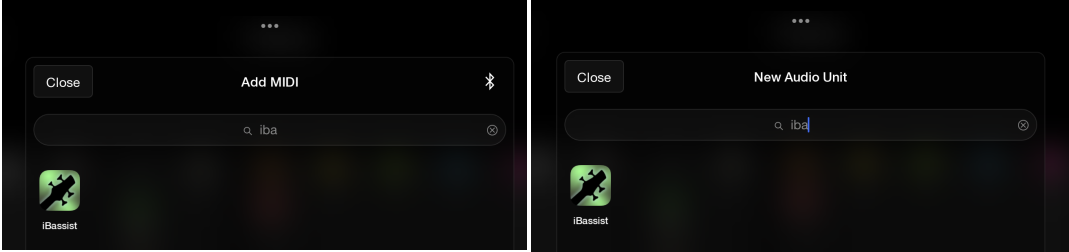
It means the plugin advertises to the OS that it can be an audio or midi instrument
So is MIDI instrument very similar to MIDI effect or not? I mean that it receive(generate) + modify MIDI signal and send it further to its receivers. Is I wrote earlier I don't see iBassist in MIDI effect AEMS list even though it does the same thing as, say, ChordBud2.

I'm trying to understand why I can't use iBassist in AEMS as MIDI generator like I can in Loopy. Your statement implies that it's either my fault because I'm doing something wrong, or it is a limitation of AEMS.
EDIT: I'm sorry I didn't notice earlier - it is not just about iBassist because Digistix is also not presented in MIDI list = I can't use it as generator for e.g. OneShot. So I think I now finally understand what @dwrae tried to tell me all that time: "In AEMS, an instrument track cannot output MIDI, it only outputs audio." So the general statement for AEMS is that if an application is an audio instrument, it cannot also be a MIDI effect, even if the OS allows it.
My fault, sorry for my ignorance, @dwrae.
Hmm, that can’t be it. I’m seeing Hilda synth available as both AU instrument and AU MIDI; likewise Drambo is available in both options. Could it be to do with how individual apps ‘advertise’ themselves as being available as a AU MIDI processor as well as instrument? @dwrae?
Yes, there is a button called MIDI for AUv3 instrument and effects that opens a dialog where you can assign a CC or Channel pressure to a parameter. It has a MIDI learn button as well.
Actually, scrub what i last said, I’ve just checked in other apps and Digistix 2 isn’t shown as an AU MIDI option because it’s not got an AU MIDI element - it doesn’t show up in AUM or Drambo as an AU MIDI option either, only as an instrument. As such, i don’t see anything unusual about AEMS’s behaviour - all of my MIDI AUs show up as options correctly - apologies @dwrae.
I don’t see anything in the iBassist app description to suggest that it contains an a MIDI AU as well as a AU instrument. I think this might be a peculiarity with Logic @filo01? Can you see it as a MIDI AU in anything other than Logic? Is it definitely being shown in Logic as a MIDI AU and not just a MIDI source?
All my screens was from Loopy Pro, I don't have any other DAW now. I can use Digistix2 as AU MIDI in LP and can send MIDI from it to e.g. Ting or OneShot. Scaler2, Riffler (both are also available as AU instrument) works as MIDI AU too in LP.
Yes, but what i was trying to establish was whether you’re sure that Digistix/Riffler are being offered in LP as MIDI AUs and are not just available as MIDI sources? Those are different things.
Your screenshot from LP (apologies, i thought it was from Logic) says ‘Add MIDI’ not ‘Add MIDI Audio Unit’. Not being a user of LP i don’t know whether this is the case or not, but that could just mean ‘add a MIDI source’.
For example, i can use Digistix 2, loaded as an AU instrument, as a MIDI source to control other instruments within AUM. This is not the same though as Digistix 2 having a dedicated MIDI AU, which as far as i can establish, it doesn’t.
As such, i think your question might concern the MIDI routing options in AEMS and not MIDI AUs. Apologies if I’m wrong though.
@Robin2 : in loopy pro Add MIDI is for adding controllers or AU that can send midi
I just checked: iBassist is definitely not a AU MIDI effect. It can show up as MIDI input though when you run it standalone, but I didn't manage to send MIDI events from it to either AEMS or CB3. I just tried to see what happens if I force iBassist to be detected as AU MIDI and it just 'consumes' MIDI that is already on the track since it is not outputting the MIDI. It doesn't output any MIDI from itself either in this case.
When I use it as AUv3 instrument, then MIDI from iBassist can be recorded onto the track.
But even if it did work as AU MIDI, you wouldn't be able to route the MIDI to other tracks in AEMS.
Thanks @espiegel123.
As such, Digistix 2 or iBassist could show up there as an option in Loopy Pro without that indicating that they are AU MIDI plugins, but just that they are available as MIDI sources? Correct?
Scrap that. For some reason, when forced as AU MIDI, it now started to play using the instrument selected on the track. It still won't help you with the MIDI split though (although you could do that afterwards by splitting the recorded MIDI into separate tracks based on the MIDI channel).
Edit: I figured out why it didn't work the first time. It only records when the additional Rec button in the AU display is also enabled. When just pressing play with Rec disabled, it would play as well.
Ok, so in next release, iBassist (and perhaps others, I only found Koala sampler) will be available as AU MIDI option. It is a bit weird though, since you cannot play your actual instrument when active since it doesn't pass on MIDI, so it only 'generates' MIDI.
I think people use this ability so that iBassist ad s sequencer can be driving better bass samples than iBassist has.
Seems i was wrong all along @filo01 - my sincere apologies.
Thank you all so much for moving this in the right direction! Really looking forward to the next release of AEMS, @dwrae.
It is not as unusual situation as it looks like. For example I'm also using Riffler for generating bass riffs and use it as a MIDI driver for GM Bassalicious2. And I'm sure there many other apps with this (wanted) behaviour.
Loopy Pro takes a more "liberal" approach to listing plugins that may or may not output MIDI. It lists all plugins, some of which may not output midi at all. You may notice, if you scroll down far enough that some have a question mark on their icon. The question mark means Loopy isn't sure if the plugin does or doesn't.
The upside is not being restricted based on the 4-letter app type the plugin developer choses. The downside is people sometimes being confused that midi out isn't working.
I wish that all host apps allowed all plugins and left it to us to discover if they work or not, but can understand why most don't.
I expect that in this case the PDC will not work, of course. 😄
My request only applied to the PDC when playing an instrument track in the context of a project:
When I work on the sound of an instrument and use plug-ins, I need the project to be synchronized during playback. Exactly how it works in Logic Pro.
Even if you can implement PDC only when the track is frozen, it will be much better than the complete absence of PDC for instrument tracks.
So maybe someone else knows if any DAW is capable of starting recording upon receiving a signal that exceeds a specified dB level? That thing would come in handy.
Loopy Pro has threshold recording. Most people don't think of it as a traditional DAW though.
As @yellow_eyez mentioned, BM3 has it for its sampler. While recording to the timeline doesn't use threshold recording, you can record to the sampler and then place the audio into the timeline.
I sort of achieved it in AUM paired with Neon Recorder. Additionally, Fac Envolver triggered ‘Start Play’ in AUM, which gave me a metronome.