Loopy Pro: Create music, your way.
What is Loopy Pro? — Loopy Pro is a powerful, flexible, and intuitive live looper, sampler, clip launcher and DAW for iPhone and iPad. At its core, it allows you to record and layer sounds in real-time to create complex musical arrangements. But it doesn’t stop there—Loopy Pro offers advanced tools to customize your workflow, build dynamic performance setups, and create a seamless connection between instruments, effects, and external gear.
Use it for live looping, sequencing, arranging, mixing, and much more. Whether you're a live performer, a producer, or just experimenting with sound, Loopy Pro helps you take control of your creative process.
Download on the App StoreLoopy Pro is your all-in-one musical toolkit. Try it for free today.
Comments
The randomization within scale (including custom) is a great feature, especially the way it is set up allows you to set both the midrange of the randomization as well as the range above and below the value with the white bars by dragging across and up and down. It's a very clever implementation for someone like me who relates to it visually.
Also, I would like to note that combining the randomization as above with a probability trigger automation can do something in BAM that often find difficult to do in other sequencer scenarios, which is to target particular notes in a scale to bring out the character of a scale, but without using a predefined set of notes - it's super easy. An example would be emphasizing the occurrence of the b3 in a minor mode or the b7 in mixolydian mode by increasing the relative probability.
Is it possible to put a whole drum kit on one track? Or can you only put one part per track? (Kick, snare, etc.)
I would like to record my own live drumming, but can't figure out how to make a whole kit on one track. Is the only solution to use an auv3 such as One Shot?
Thank you.
There is a workaround for that. You can load some samples in the pool and them automate the "Sample" parameter of the Sampler so each step can play the sample you want. You won't be able to play multiple sample at once though. A multi layer sampler is on the roadmap so in the future you'll be able to use only one track to play a drum kit.
Edit: See correction below
That's an interesting workaround. I've tried it out myself in a project just now and it works fine. I believe there's a demo of how that works somewhere in a video on YouTube - if I can find the link I'll post it. Also, if anyone would like to use BAM as a drum sequencer for an external instrument, such as in AUM that can be done as well - it's very easy to record in a drum pattern from another source to get it into the piano roll, ** Correction - you an import a MIDI file directly into a clip as noted below ** and then you can play it back, and of course edit it as well.
In a slightly related question, is midi file import to the piano roll on the agenda?
Right now, midi import only works on iOS, but you can already import midi in clips. Not directly in the composer, but in the matrix panel. If you long press a clip you'll see the option to import:
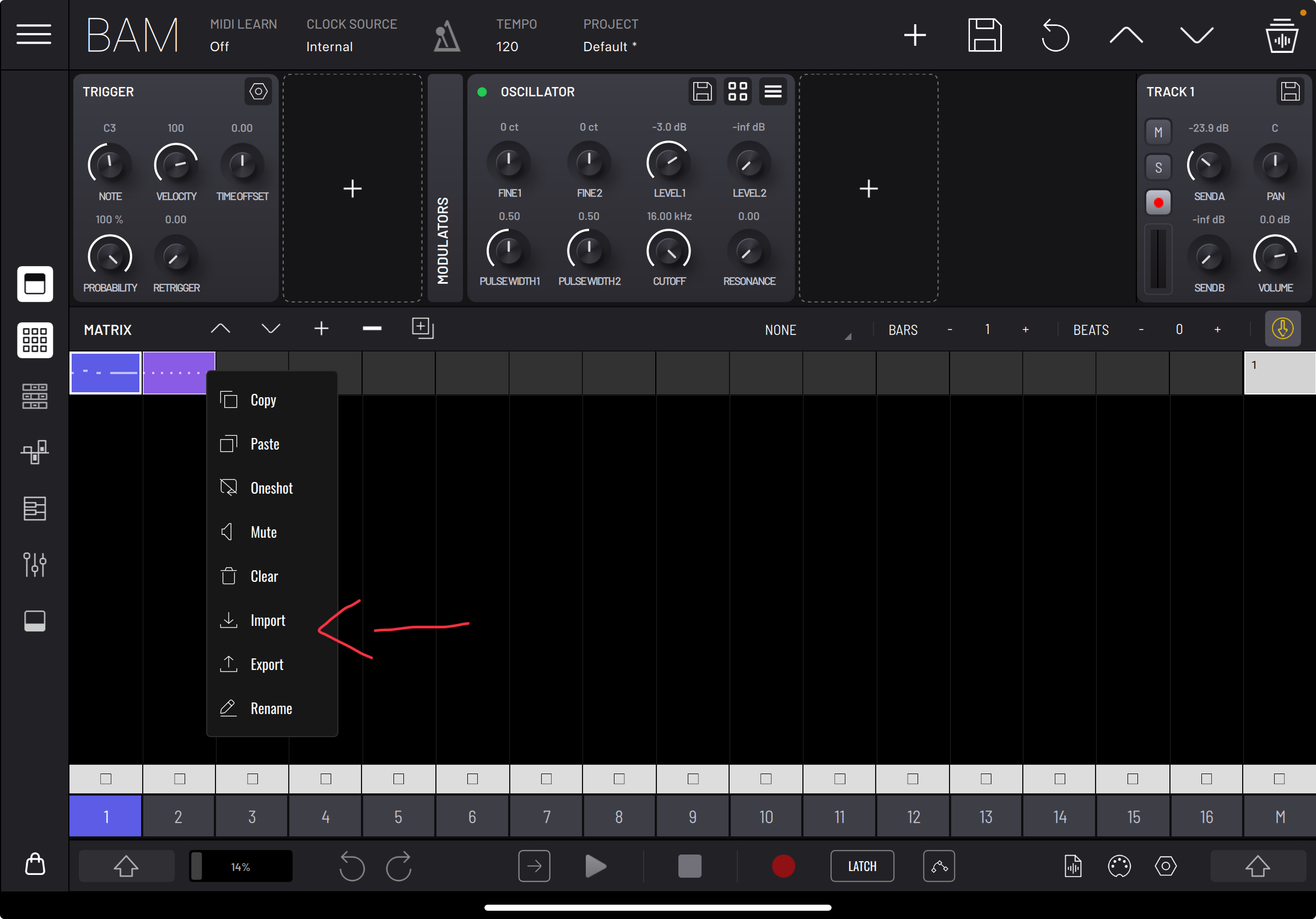
Were you specifically asking for a quick import button in the composer panel?
That might be useful. I actually don’t know that midi could be imported to the matrix; I’ve only ever used it for audio and thought that was the limit. In my attempts to import midi I had been trying to drag a .mid file into the composer from a linked folder in the BAM browser. Drag n’ drop directly into the composer window seemed like an obvious thing at the time. 😀
How to create a random melody in a certain octave? When you press the button, the notes are randomly placed in the third octave (C3)
That's actually a nice suggestion. I'll add that to BAM's list. You can also drag a MIDI file from browser directly on a matrix clip, I forgot to say that.
Matrix clip's represent the clips being displayed in the timeline panel and in the composer panel. If you have midi on them, you'll see the clips displaying the midi notes. These clips can work with MIDI or audio.
Right now it is not possible to select an octave range for the melody generation. But I'll add a ticket for that as well
I would also like to see the display of notes when placing steps
The steps will always create a note linked to the Note parameter in the TRIGGER panel unless there is note automation on that step. Or are you asking for a note label to be displayed on all steps?
When I open the timeline, I don't understand which notes are where
I see. Displaying the notes might make the panel feel a bit cluttered.
What if the labels were only displayed when pressing Shift? That way, it would be a temporary toggle rather than a permanent change.
The shift button, in my opinion, will be inconvenient to use, because you will have to hold the button down with one hand and set the steps with the other. The most successful implementation is in Drambo. It is very clear and convenient to use. In BAM, it is much more important for me to see the display of notes, not velocity.
If I make a random melody, I do not know which notes were set. To do this, you need to open the piano roll and zoom in. And to change a note, I just sort through them with my fingers by ear. This is very inconvenient.
You can lock the Shift button by double tapping it
Thank you! I didn't know.
👍
Also about generating melodies and chords. I would like to choose the number of notes that will be played, the range, the number of key notes. I like how it is done in the Riffer app. If you do it here, it will be very cool. There is a place for this setting on the right. And in the right corner, the scale application settings are all selected at once and I do not understand which one is currently active.
Well, I also want more drums, not just 808. I am ready to buy them additionally.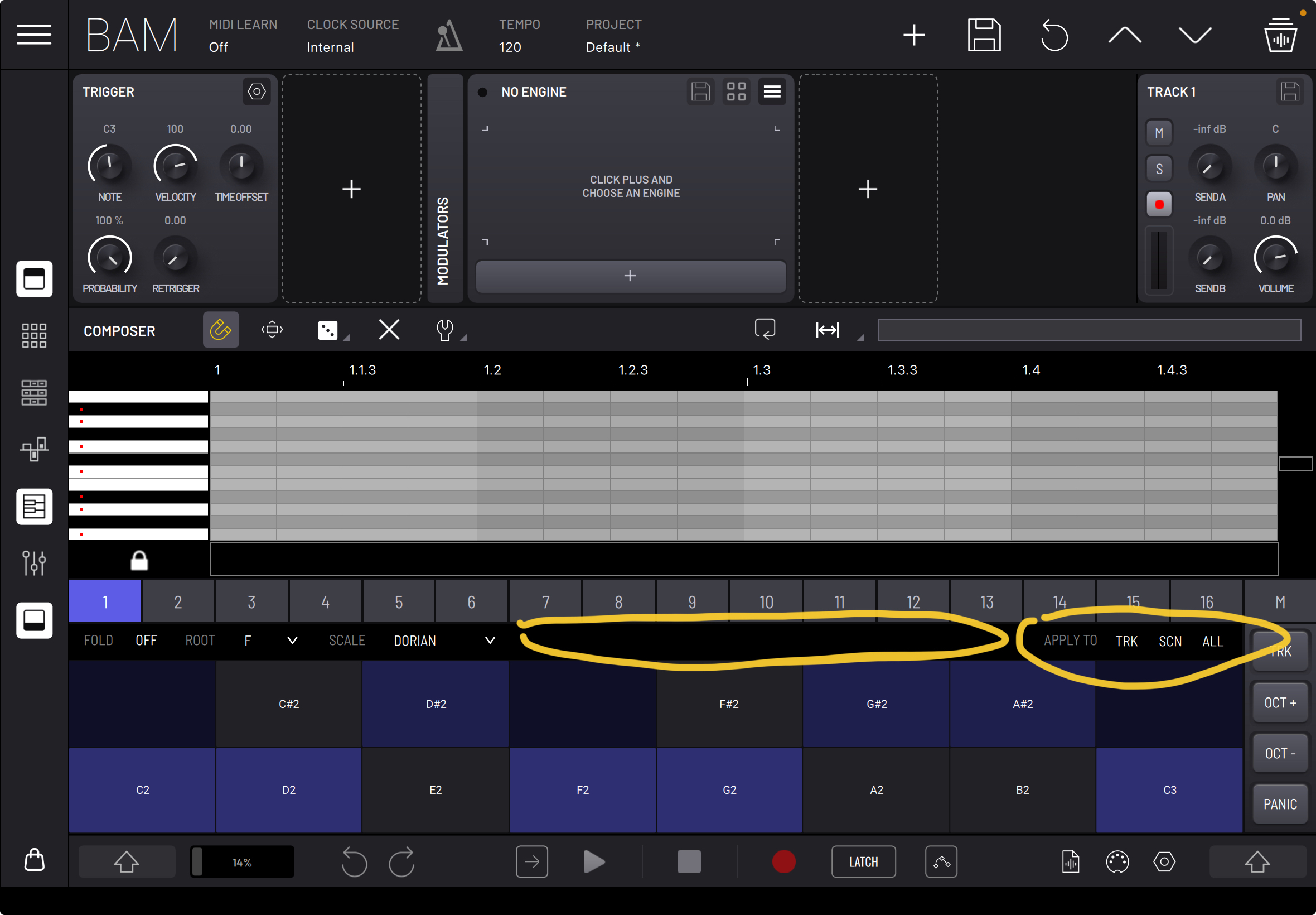
Currently, scales work as follows: whenever you change a scale setting on the left, you're applying that scale specifically to the currently selected clip. This means all scale changes are clip-based.
If you want to apply the selected scale settings more broadly, you can use the actions on the right. These allow you to apply the current scale settings to all clips within the current track, scene, or entire project. Please note that the buttons on the left are not persistent states but one-time actions.
I picked up a launchpad pro Mk3 today. It is an absolute joy to use with Bam. It really gives the feel of a Groovebox. You should definitely promote this feature more. I am having an awesome time, thank you for Bam.
Just had a little play around now, couldn’t find a way to edit a clip with it tho, is there some way to go into a clip sequence and change it all on the lp?
I was just using the sequencer on the launchpad and the session view. Sorry for the confusion. At least the session view reflects what’s on Bam. Editing clips would be awesome.
BAM was updated to version 1.5.2. What's new:
Could someone explain what the expansion packs in BAM offer? Is it just samples? Or are there added modules? Or are they just presets that you can tinker with?
Most of BAM expansion packs include samples, loops, projects and sounds for the built in engines.
Thank you @sinosoidal
Is BAM on sale right now?
No, it isn’t.
Oh ok thanks!