Loopy Pro: Create music, your way.
What is Loopy Pro? — Loopy Pro is a powerful, flexible, and intuitive live looper, sampler, clip launcher and DAW for iPhone and iPad. At its core, it allows you to record and layer sounds in real-time to create complex musical arrangements. But it doesn’t stop there—Loopy Pro offers advanced tools to customize your workflow, build dynamic performance setups, and create a seamless connection between instruments, effects, and external gear.
Use it for live looping, sequencing, arranging, mixing, and much more. Whether you're a live performer, a producer, or just experimenting with sound, Loopy Pro helps you take control of your creative process.
Download on the App StoreLoopy Pro is your all-in-one musical toolkit. Try it for free today.
Comments
This thing is never going to land is it.
it’s out!!!
https://apps.apple.com/dk/app/battalion-drum-machine/id6743767101
So, so, soooo good
It's not so much a drum machine, as a way of life." (Drums Scotus)
Bigups Mike & Josh! Fab port!
it even works on my old iPad Air 3.
fantastic noise maker!:)
How’s this compare to OneShot and Patterning 3? Been eyeing those for a minute and they’re all in the same price range.
All different beasts, I’d say OneShot is the more organic of the three
Still pretty steep for an intro price. I was on the beta, had high expectations but I have to admit I hardly used it and it didn’t really click. It’s UI is also a bit on the petite side for my taste.
Here is my video walkthrough for Battalion.
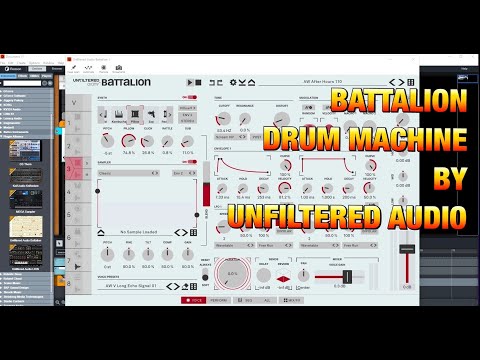
I made this last week for the desktop version, it’s the same on iOS.
I will also be making a video for the iOS version soon.
But this tell you most thing you need to get started, I hope you enjoy the video😊🤯
Will there be a pattern switch / song mode before the intro price closes ?
Seems a bit steep for a 1 bar loop machine at the moment ,
& buy for existing features not dev promises is the usual advice .
or is there already a way to play a sequence of patterns not shown in video ?
on the other hand , seems like a digitakt/syntakt hybrid , so with a songmode worth the intro price .
@RetroNewb You can change length/speed for each channel sequence. You have probability, mutation etc.
great that it's out!
@ChrisG thanks , but I meant every preset seems like a 1 bar looping pattern - is there a way to sequence those presets to work through a song with variations , build ups etc (dare I say verse , chorus …)
Battalion seems to be mostly designed for live use and improvisation, rather than groovebox/song-building, and I for one hope it keeps that focus. There are plenty of grooveboxes and drum machines out there already which have song production features built in, I'm glad there are some which really lean into live use and experimentation.
Not contradicting your comment in any way, it's just me speaking as someone who thrives on live performance and tweaking rather than production.
Agreed, that's the focus, and this app is so excellent in that regard. I really hope other devs take some cues from what Unfiltered Audio have done here, as so many apps would benefit from taking a similar approach to tweaking and modulation
They have said that pattern mode will be next, once the iOS app is out. It has been a recurring request from desktop users.
After that, hopefully that Randomize page they mentioned, similar to the Perform page.
WOW - it’s better than I expected - does presets made in the standalone not show up in the au3?
They do 😀
I own this on laptop but it‘s such a different (and to my tastes, better) experience on iPad. You feel right on top of it, faster tweaking, swifter workflow and lots of fun along the way
Can't see anywhere what is in a save file. Does it include the sample data as one file?
Holy moly.
I may be the last one to learn this, but I was unable to save user presets when running Battalion as an AUV3 in AUM until I saved ONE user preset running standalone. I suppose a folder had to be created. After that it was smooth sailing.
I'm reposting my take on this from the Beta discussion... I will add, as far as discovering new and exciting drum sounds, I first started using Seekbeats, ElasticDrums or even Skiid to cull together interesting drums through randomness generators or tweaking a preset. Then Drum Computer came out, and hitting random until something piqued my curiosity was a great way to source new sounds. But this beast? I'm finding stuff that I could not create before, and new drum sounds that make me excited to play.
I do have a question, which would be how to export these drum sounds efficiently? I like using Patterning's interface a lot, and want to integrate some of these sounds as samples.
Anyway....
@coloringpad said:
I often say: if it was hardware, with a dedicated touch screen, these devices would cost 1 to 2 grand, easy.
Samplr as hardware? Patterning 3 as hardware? About 2 grand a piece. I might be adding Battalion to this list. It looks delicious. 30 bucks is nothing compared to hardware, IMO.
I know, I know... How could I compare hardware to iOS stuff? Well, I was exclusively hardware for fifteen years.... before Samplr entered my life. There is, simply put, no other instrument in hardware form that does what it does so easily and beautifully. Painting with music. And Patterning is a hardware Drum Machine/Sampler worshipper's dream to program and to build an original groove. Yes, I worship Drum Machines and Samplers, love them so much. And I hate working on a laptop.
Now, this Battalion app ALREADY exceeds my experience with Elektron instruments, and advanced sound sculpting in general. No menu diving, it's tactile, it has variations and randomness galore. Simple to program. Limitless memory, bring your own sounds too!!! And, best of all, it SOUNDS better than the Electron stuff I've had. Yeah, I said it. In my first hour with it I had more fun hitting the randomization button than looking at a tiny screen trying to learn which menu to dive into and what shift button I had to press and what parameters I had to link to where is that damn manual again?... Hey, this thing is FUN TO PLAY, and I can't say that about the Octatrack or the Digitakt, which became tedious and I needed to cut them loose because they dragged my workflow down.
Wish I could afford a brandy new latest model iPad Pro, but this sings on my now "legacy" device.
Dude, fucking awesome app! Wow! Made my top three.
I'd record them to Loopy Pro one-shots, or into Koala, or Drambo Flexi Sampler, or ...
You miss the juicy variations if you only sample single hits, but this should be lighter on CPU.
I've got a low powered device too. What I do for this and all other heavier synths is just dump a suitable number of bars to a loop in Loopy Pro, then idle the plugin. I can get a massive amount of stuff going on all while keeping CPU below 20% that way, but still instantly be back in business if I want to add or modify parts.
Thanks for responding. I do agree that the "juicy variations" is where it is at, and I think that should be the go-to description from now on! I think grabbing a set of eight samples though would be fantastic for Patterning 2's multiple ports, so I can do the more polyrhythmic stuff and use each sound with its own effect in Aum.
Earmarked your advice for future experimentation, as I should just be enjoying messing around with all the neat little nuances of crafting each sound in this beast. So many choices!
I’m not seeing how to lock/unlock parameters. Manual says to right-click but doesn’t mention how to do it in iOS. Can anyone offer a clue?
Tap the padlock on the top toolbar, then tap each of the controls you want to lock, then tap the padlock again to return to normal operating mode.
You can also use Patterning 3 with midi out to sequence Battalion. 😎
Good lord, I can’t believe I overlooked that. Thanks so much!
I use jAmp Percussive, it's lots of fun while you can keep a down to earth rhythmic pattern.
That's a seed that's going to grow.
This way, Battalion does what it does best while Patterning 3 offers developing rhythmic patterns with something like 256+ steps available, polyrhythms, euclidian mode, etc. And song mode might work as well, so make great patterns and then let Battalion get juicy.