Loopy Pro: Create music, your way.

What is Loopy Pro?Loopy Pro is a powerful, flexible, and intuitive live looper, sampler, clip launcher and DAW for iPhone and iPad. At its core, it allows you to record and layer sounds in real-time to create complex musical arrangements. But it doesn’t stop there—Loopy Pro offers advanced tools to customize your workflow, build dynamic performance setups, and create a seamless connection between instruments, effects, and external gear.

Use it for live looping, sequencing, arranging, mixing, and much more. Whether you're a live performer, a producer, or just experimenting with sound, Loopy Pro helps you take control of your creative process.

Download on the App Store

Loopy Pro is your all-in-one musical toolkit. Try it for free today.

Drambo generative question

245

Comments

  • @MonsieurCheval thanks a lot! Will have a look when I understand everything a bit more, it will have a great value then!

  • Another question : how can I trigger a gate bigger than 1s using the clock generator?

  • @oscillotus said:
    Another question : how can I trigger a gate bigger than 1s using the clock generator?

    Use the trigger to trigger an envelope instead.

  • @oscillotus said:
    Another question : how can I trigger a gate bigger than 1s using the clock generator?

    Use the clock generator's gate to trigger another gate output. Which could be lots of different modules. For example:

    • A Graphic env. This can go up to 5 seconds or 16 bars. Create a gate shape in the envelope window.
    • A Graphic modulator. Similar to the envelope. You can create a super long gate with this, and you can also modulate the gate length by hooking up LFOs to the rate/speed knobs.
    • A CV sequencer or Gate+velocity sequencer. With a CV sequencer I would probably connect it to an LFO, so that it doesn't reset when the sequencer resets. You can have a slow LFO step through the CV sequencer, giving you the potential for incredibly long gate signals. And with a random LFO you could output gates of varying lengths.
  • edited October 2025

    @oscillotus said:
    Another question : how can I trigger a gate bigger than 1s using the clock generator?

    Why would you need a gate bigger than 1? Just curious…
    If you want to count things either you adapt the range to 1 (doing 1/N) or there are gate counters, accumulators (the differentiators integrator) that can help with that

  • @Squishy said:
    I’ve strayed a bit from my drambo learning journey (damn you mirack!) but bookmarking this thread for when I come back. Lotta great info in here! Future thanks to everyone who contributed 👍

    Funny, I was just thinking how well my journeys in miRack using Omri Cohen's excellent videos provided all the background I need for exploring generative patches in Drambo. The concepts transfer just fine.

  • @wim said:

    @Squishy said:
    I’ve strayed a bit from my drambo learning journey (damn you mirack!) but bookmarking this thread for when I come back. Lotta great info in here! Future thanks to everyone who contributed 👍

    Funny, I was just thinking how well my journeys in miRack using Omri Cohen's excellent videos provided all the background I need for exploring generative patches in Drambo. The concepts transfer just fine.

    Didn’t know about that guy, gotta check his videos, thanks

  • edited October 2025

    @wim said:

    @Squishy said:
    I’ve strayed a bit from my drambo learning journey (damn you mirack!) but bookmarking this thread for when I come back. Lotta great info in here! Future thanks to everyone who contributed 👍

    Funny, I was just thinking how well my journeys in miRack using Omri Cohen's excellent videos provided all the background I need for exploring generative patches in Drambo. The concepts transfer just fine.

    Very true! I think for me it’s more just matching the modules to what I learned in mirack, if that makes any sense. Drambo has “more work” if you’re creating with just the in-house stuff imo. The concepts are the same, but the pieces are different and there’s a lot of them haha. A lot of stuff in mirack is “prebuilt” where I would have to build them from scratch in drambo. I find it more rewarding tho! I wouldn’t be able to build the things that are pictured in this thread out of the blue on my own, but I’m happily at the point now where when I look at said pictures, they make sense to me and I can recreate. It’s also why patchstorage is so clutch for me. Drambo doesn’t have a module like, say Geodesics Energy, but PS does and I can open it up and see how it’s made drambo style.

    Those Omri videos are very helpful too 👍

  • @pedro said:

    @oscillotus said:
    Another question : how can I trigger a gate bigger than 1s using the clock generator?

    Why would you need a gate bigger than 1? Just curious…
    If you want to count things either you adapt the range to 1 (doing 1/N) or there are gate counters, accumulators (the differentiators integrator) that can help with that

    I'm just experimenting around and tried to randomly play parts of a long sample in flexi sampler. I tried to have the sample play for longer than 1s. I was pretty sure it was possible in another way than having the gate past 1s, but couldn't figure out.

    Thanks again for all your answers, will try those out tonight!

  • @oscillotus said:

    @pedro said:

    @oscillotus said:
    Another question : how can I trigger a gate bigger than 1s using the clock generator?

    Why would you need a gate bigger than 1? Just curious…
    If you want to count things either you adapt the range to 1 (doing 1/N) or there are gate counters, accumulators (the differentiators integrator) that can help with that

    I'm just experimenting around and tried to randomly play parts of a long sample in flexi sampler. I tried to have the sample play for longer than 1s. I was pretty sure it was possible in another way than having the gate past 1s, but couldn't figure out.

    Thanks again for all your answers, will try those out tonight!

    Try setting Flexi mode to 1-Slice, then slice the sample the way you want it. You won't need a long gate if you do it that way.

  • Yeah I was no envisioning your scenario @oscillatus, but what @wim said might be just what you need…

  • @pedro said:

    @wim said:

    @Squishy said:
    I’ve strayed a bit from my drambo learning journey (damn you mirack!) but bookmarking this thread for when I come back. Lotta great info in here! Future thanks to everyone who contributed 👍

    Funny, I was just thinking how well my journeys in miRack using Omri Cohen's excellent videos provided all the background I need for exploring generative patches in Drambo. The concepts transfer just fine.

    Didn’t know about that guy, gotta check his videos, thanks

    Go for the older ones to minimize being confused by newer VCV modules not available in miRack.

  • @wim said:

    @oscillotus said:

    @pedro said:

    @oscillotus said:
    Another question : how can I trigger a gate bigger than 1s using the clock generator?

    Why would you need a gate bigger than 1? Just curious…
    If you want to count things either you adapt the range to 1 (doing 1/N) or there are gate counters, accumulators (the differentiators integrator) that can help with that

    I'm just experimenting around and tried to randomly play parts of a long sample in flexi sampler. I tried to have the sample play for longer than 1s. I was pretty sure it was possible in another way than having the gate past 1s, but couldn't figure out.

    Thanks again for all your answers, will try those out tonight!

    Try setting Flexi mode to 1-Slice, then slice the sample the way you want it. You won't need a long gate if you do it that way.

    I'd prefer finding a way not to slice it up to be able to have varying lengths.

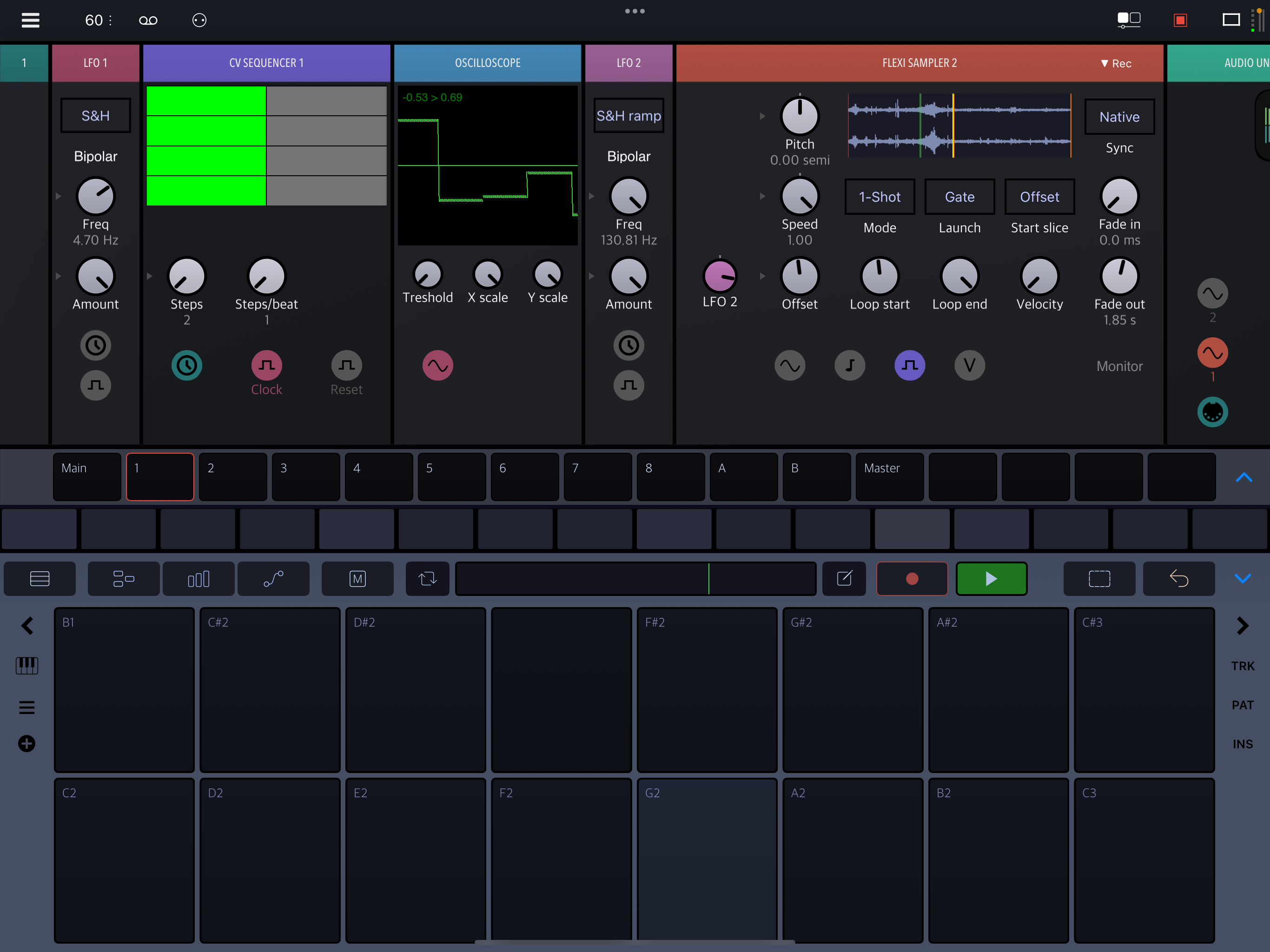
    The CV Sequencer way seems to do exactly what I needed. @timfromtheborder here’s how I did it. Is this right? I let a gap at the end of the sequencer so it resets. Btw, how would do it with the gate+velocity module?

  • edited October 2025

    The gate+velocity sequencer has two outputs. The velocity output is the same as the output on the CV sequencer. The gate output sends a gate signal for every step above 0, still limited to a length of 1 sec. So just a way to have some flexibility.

    Also note that with your CV sequencer you can easily adjust the ratio (timing) of gate open to gate closed.

  • edited October 2025

    Yeah the CV sequencer seems the most flexible for that. Here’s what I did, a more simplified version. I have a feeling it's not the most elegant, but it works!
  • Nice! Honestly, elegance isn’t the ideal goal. You learn something and next time you can build it better, that’s the modular workflow. No wrong answers. And creating horribly tangled incomprehensible patches is part of the process. The only things that matters is the sound that comes out of the end 🫡

  • edited October 2025

    If I have an lfo module set to s&h modulate an amount button of a transpose module, how can I avoid that it sends out decimals values. I set the interval to 12 but would like the lfo to only change amount values to 0, 1, 2, etc. Not 1.3, 2.7, etc. So it stays in tune. I tried the quantize module but to no avail.

    Thanks in advance!

  • edited October 2025

    @oscillotus said:
    If I have an lfo module set to s&h modulate an amount button of a transpose module, how can I avoid that it sends out decimals values. I set the interval to 12 but would like the lfo to only change amount values to 0, 1, 2, etc. Not 1.3, 2.7, etc. So it stays in tune. I tried the quantize module but to no avail.

    Thanks in advance!

    Yes, I ran into that, too. Instead of the teanspose-module, use a midi2cv, route the pitch signal through a pitch osc semi cents (under misc) and add a note generator. Then add a morph module (modulators),turn it down, hit assign, crank the semi-knob up, hit assign again. Then modulate the morph knob with your LFO.

  • @oscillotus said:
    If I have an lfo module set to s&h modulate an amount button of a transpose module, how can I avoid that it sends out decimals values. I set the interval to 12 but would like the lfo to only change amount values to 0, 1, 2, etc. Not 1.3, 2.7, etc. So it stays in tune. I tried the quantize module but to no avail.

    Thanks in advance!

    I'm not sure I understand. Output of the S&H direct to the midi transpose module should be fine. It won't care if what it gets is in decimals or not, it can only output midi note numbers, not tuning information.

    The interval should be 1, not 12. That would shift in octaves.

  • @tyslothrop1 said:

    @oscillotus said:
    If I have an lfo module set to s&h modulate an amount button of a transpose module, how can I avoid that it sends out decimals values. I set the interval to 12 but would like the lfo to only change amount values to 0, 1, 2, etc. Not 1.3, 2.7, etc. So it stays in tune. I tried the quantize module but to no avail.

    Thanks in advance!

    Yes, I ran into that, too. Instead of the teanspose-module, use a midi2cv, route the pitch signal through a pitch osc semi cents (under misc) and add a note generator. Then modulate the semi-knob.

    @wim said:

    @oscillotus said:
    If I have an lfo module set to s&h modulate an amount button of a transpose module, how can I avoid that it sends out decimals values. I set the interval to 12 but would like the lfo to only change amount values to 0, 1, 2, etc. Not 1.3, 2.7, etc. So it stays in tune. I tried the quantize module but to no avail.

    Thanks in advance!

    I'm not sure I understand. Output of the S&H direct to the midi transpose module should be fine. It won't care if what it gets is in decimals or not, it can only output midi note numbers, not tuning information.

    The interval should be 1, not 12. That would shift in octaves.

    I guess it works like pitch bend internally, try it out, it's bendy.

  • @wim said:

    @oscillotus said:
    If I have an lfo module set to s&h modulate an amount button of a transpose module, how can I avoid that it sends out decimals values. I set the interval to 12 but would like the lfo to only change amount values to 0, 1, 2, etc. Not 1.3, 2.7, etc. So it stays in tune. I tried the quantize module but to no avail.

    Thanks in advance!

    I'm not sure I understand. Output of the S&H direct to the midi transpose module should be fine. It won't care if what it gets is in decimals or not, it can only output midi note numbers, not tuning information.

    The interval should be 1, not 12. That would shift in octaves.

    Sorry, just saw you did try, and maybe something has changed, but I remember it gliding weirdly between pitches. Although try putting a synth behind it, does it sound like stepped pitches on your side?

  • edited October 2025

    @wim said:

    @oscillotus said:
    If I have an lfo module set to s&h modulate an amount button of a transpose module, how can I avoid that it sends out decimals values. I set the interval to 12 but would like the lfo to only change amount values to 0, 1, 2, etc. Not 1.3, 2.7, etc. So it stays in tune. I tried the quantize module but to no avail.

    Thanks in advance!

    I'm not sure I understand. Output of the S&H direct to the midi transpose module should be fine. It won't care if what it gets is in decimals or not, it can only output midi note numbers, not tuning information.

    The interval should be 1, not 12. That would shift in octaves.

    Sorry, I should have mentionned that I wanted to change the octave only of a note. C2, C3, C4, etc. Twisting the knob works, but with the s&h lfo I get intervals as well.

  • @tyslothrop1 said:

    @wim said:

    @oscillotus said:
    If I have an lfo module set to s&h modulate an amount button of a transpose module, how can I avoid that it sends out decimals values. I set the interval to 12 but would like the lfo to only change amount values to 0, 1, 2, etc. Not 1.3, 2.7, etc. So it stays in tune. I tried the quantize module but to no avail.

    Thanks in advance!

    I'm not sure I understand. Output of the S&H direct to the midi transpose module should be fine. It won't care if what it gets is in decimals or not, it can only output midi note numbers, not tuning information.

    The interval should be 1, not 12. That would shift in octaves.

    Sorry, just saw you did try, and maybe something has changed, but I remember it gliding weirdly between pitches. Although try putting a synth behind it, does it sound like stepped pitches on your side?

    An AUv3 synth after the transpose module works fine, there are no stepped pitches. There are ways you could hook things up that would result in such stepped pitches, but not the setup in my screenshot.

  • @oscillotus said:
    Sorry, I should have mentionned that I wanted to change the octave only of a note. C2, C3, C4, etc.

    That does change things.
    Hold my beer.

  • wimwim
    edited October 2025

    @oscillotus - I'm sure you can do that but I don't know offhand how.

    One basic problem is you have values of 0.00 - 1.00 coming out of the LFO. The quantize module will just be putting out 0 or 1 in that case.

    Next, you don't want the full output because that's going to give a range of 128 octaves with the interval setting on 12 in the transpose module. The output needs to be scaled to 0-9, then also be clipped so the output doesn't exceed valid midi note numbers.

    I could probably figure it out given time, but I'm sure there are others who can answer it a lot better and quicker than I can.

  • edited October 2025

    Instead of S&H into the Amount, use a Square wave. Then it'll go from 0 to 12 instead of hitting values in between*. Then I'd use a Meta Randomizer to modulate the Interval. That gives you either 0 or +12 at any random interval.

    *if bipolar is on, the LFO will go from -12 to +12. If it's off, it'll go from 0 to 12 whatever direction you pull the knob. If you want it to hit -12, 0 or 12, you could use a custom LFO shape.

    **you can also adjust the modulation knob of course. But it can be tricky to map values that way. Find your settings using the MIDI monitor

  • edited October 2025

    For random octaves, instead of the transpose-module, use a midi2cv
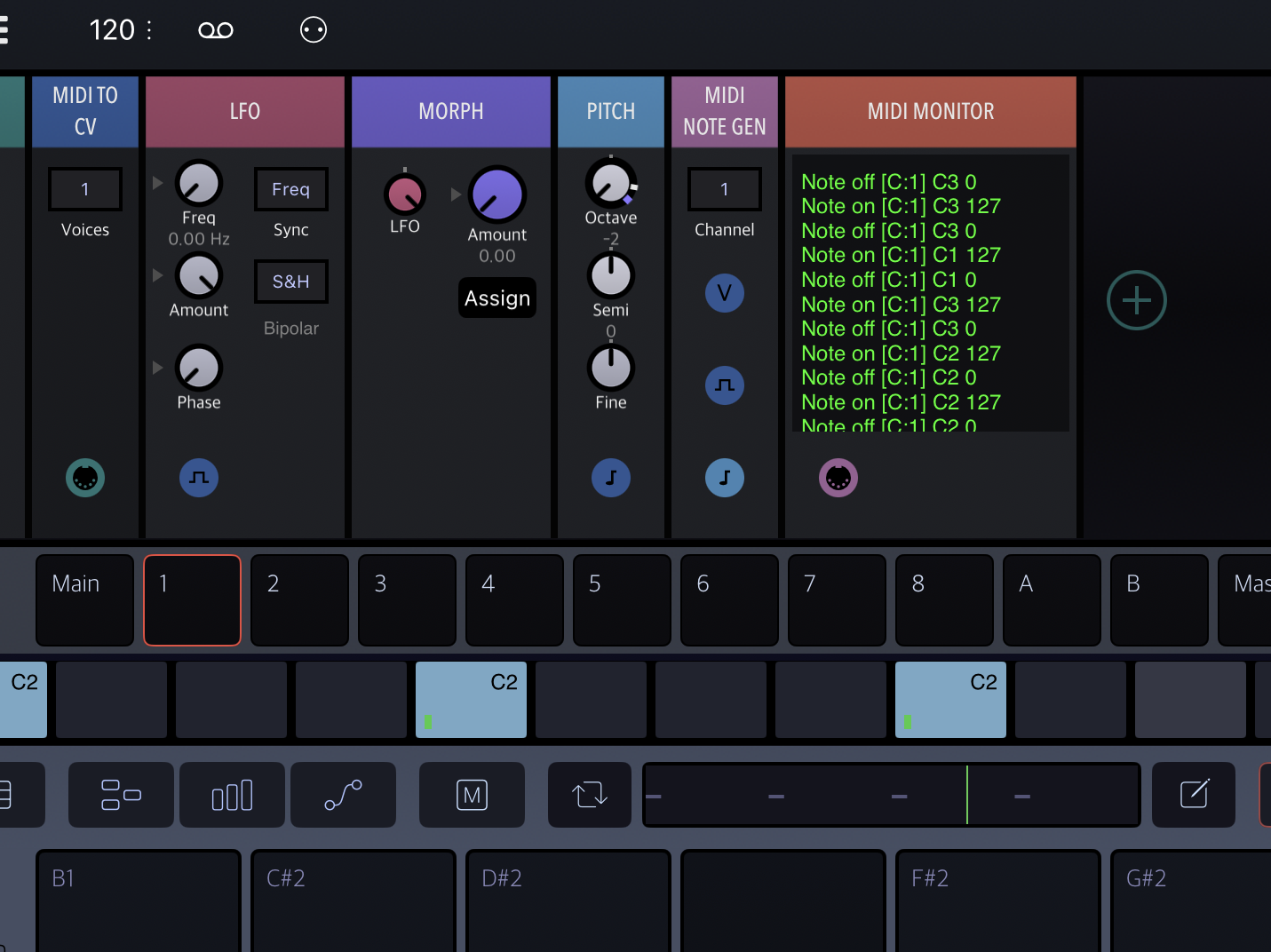
    route the pitch signal through a pitch osc semi cents (under misc) and turn the octaves all the way down
    add a note generator
    add a morph module before the pitch oct...(modulators),turn it down, hit assign, crank the octavei-knob up, hit assign again.
    Then modullate the morph knob with your LFO. Now you have random octaves with a 5 octave range.

  • @wim said:

    @tyslothrop1 said:

    @wim said:

    @oscillotus said:
    If I have an lfo module set to s&h modulate an amount button of a transpose module, how can I avoid that it sends out decimals values. I set the interval to 12 but would like the lfo to only change amount values to 0, 1, 2, etc. Not 1.3, 2.7, etc. So it stays in tune. I tried the quantize module but to no avail.

    Thanks in advance!

    I'm not sure I understand. Output of the S&H direct to the midi transpose module should be fine. It won't care if what it gets is in decimals or not, it can only output midi note numbers, not tuning information.

    The interval should be 1, not 12. That would shift in octaves.

    Sorry, just saw you did try, and maybe something has changed, but I remember it gliding weirdly between pitches. Although try putting a synth behind it, does it sound like stepped pitches on your side?

    An AUv3 synth after the transpose module works fine, there are no stepped pitches. There are ways you could hook things up that would result in such stepped pitches, but not the setup in my screenshot.

    Sorry, I didn’t put that right. I did have a problem modulating the transpose module and I seem to remember, without being able to replicate it, that it was bending, and what I meant was, that you don’t get stepped, quantised notes, but bendy stuff. Anyway, what I took away from it is, if I want to transpose by modulation, I take the pitch module instead and that works fine for me.

  • @timfromtheborder said:
    Instead of S&H into the Amount, use a Square wave. Then it'll go from 0 to 12 instead of hitting values in between*. Then I'd use a Meta Randomizer to modulate the Interval. That gives you either 0 or +12 at any random interval.

    *if bipolar is on, the LFO will go from -12 to +12. If it's off, it'll go from 0 to 12 whatever direction you pull the knob. If you want it to hit -12, 0 or 12, you could use a custom LFO shape.

    **you can also adjust the modulation knob of course. But it can be tricky to map values that way. Find your settings using the MIDI monitor

    That’s a cool solution!

  • @tyslothrop1 said:

    @wim said:

    @tyslothrop1 said:

    @wim said:

    @oscillotus said:
    If I have an lfo module set to s&h modulate an amount button of a transpose module, how can I avoid that it sends out decimals values. I set the interval to 12 but would like the lfo to only change amount values to 0, 1, 2, etc. Not 1.3, 2.7, etc. So it stays in tune. I tried the quantize module but to no avail.

    Thanks in advance!

    I'm not sure I understand. Output of the S&H direct to the midi transpose module should be fine. It won't care if what it gets is in decimals or not, it can only output midi note numbers, not tuning information.

    The interval should be 1, not 12. That would shift in octaves.

    Sorry, just saw you did try, and maybe something has changed, but I remember it gliding weirdly between pitches. Although try putting a synth behind it, does it sound like stepped pitches on your side?

    An AUv3 synth after the transpose module works fine, there are no stepped pitches. There are ways you could hook things up that would result in such stepped pitches, but not the setup in my screenshot.

    Sorry, I didn’t put that right. I did have a problem modulating the transpose module and I seem to remember, without being able to replicate it, that it was bending, and what I meant was, that you don’t get stepped, quantised notes, but bendy stuff. Anyway, what I took away from it is, if I want to transpose by modulation, I take the pitch module instead and that works fine for me.

    There is no bendy stuff in the patch that I posted. The transpose module sends midi notes and that's all. Midi notes can't bend. You have to send pitch bend to get what you describe if using midi.

    You can get bendiness or steppiness if sending CV, but the transpose module doesn't send CV, it sends only midi notes. I guess if you converted the midi back to CV, and didn't have the same triggers for the target Drambo module as for the S&H you could end up with that.

    I'v had that steppy or bendy behavior with many a CV based patch for sure. It usually comes down to trigger timing, such as more than one trigger on the S&H module for just one trigger or a long envelope for the target.

Sign In or Register to comment.