Loopy Pro: Create music, your way.

What is Loopy Pro?Loopy Pro is a powerful, flexible, and intuitive live looper, sampler, clip launcher and DAW for iPhone and iPad. At its core, it allows you to record and layer sounds in real-time to create complex musical arrangements. But it doesn’t stop there—Loopy Pro offers advanced tools to customize your workflow, build dynamic performance setups, and create a seamless connection between instruments, effects, and external gear.

Use it for live looping, sequencing, arranging, mixing, and much more. Whether you're a live performer, a producer, or just experimenting with sound, Loopy Pro helps you take control of your creative process.

Download on the App Store

Loopy Pro is your all-in-one musical toolkit. Try it for free today.

Outgrowth by Aqeel Aadam Sound (Released)

24567

Comments

  • @wim said:

    @Robin2 said:
    How long is the intro pricing on for? Would like to see some reviews before making a decision.

    I think the excellent video manual video is worth more than any reviews could be. If that doesn’t clarify if it’s for you or not, I’d be really surprised.

    Thanks @wim, I’ll be sure to check it out. I’m trying to establish whether the more unique engines (Radiate and Delve) are worth the cost of entry (to me) really. The other engines, it seems (from reading the text manual), are covered in other apps I already have. I’m trying not to duplicate functionality too much at this stage and that means making harsh calls sometimes however much I’d like to have a new toy to play with!

    Your comment that it’s ‘right up there with Samplr’ has certainly got me even more intrigued though. Cheers.

  • @Robin2 said:

    @wim said:

    @Robin2 said:
    How long is the intro pricing on for? Would like to see some reviews before making a decision.

    I think the excellent video manual video is worth more than any reviews could be. If that doesn’t clarify if it’s for you or not, I’d be really surprised.

    Thanks @wim, I’ll be sure to check it out. I’m trying to establish whether the more unique engines (Radiate and Delve) are worth the cost of entry (to me) really. The other engines, it seems (from reading the text manual), are covered in other apps I already have. I’m trying not to duplicate functionality too much at this stage and that means making harsh calls sometimes however much I’d like to have a new toy to play with!

    If this one is anything like Aqeel's other apps, he'll probably regularly post videos diving into all the engines. His videos for Ridgewalk and Weeping Wall really opened my eyes.

    Of course, by then the intro price may be over.

    Your comment that it’s ‘right up there with Samplr’ has certainly got me even more intrigued though. Cheers.

    Take that with a huge grain of salt. While I recognize Samplr's greatness based on other people's use of it, I've never gotten a single useful thing out of it myself. 😂

  • edited December 2025

    @wim said:

    @Robin2 said:

    @wim said:

    @Robin2 said:
    How long is the intro pricing on for? Would like to see some reviews before making a decision.

    I think the excellent video manual video is worth more than any reviews could be. If that doesn’t clarify if it’s for you or not, I’d be really surprised.

    Thanks @wim, I’ll be sure to check it out. I’m trying to establish whether the more unique engines (Radiate and Delve) are worth the cost of entry (to me) really. The other engines, it seems (from reading the text manual), are covered in other apps I already have. I’m trying not to duplicate functionality too much at this stage and that means making harsh calls sometimes however much I’d like to have a new toy to play with!

    If this one is anything like Aqeel's other apps, he'll probably regularly post videos diving into all the engines. His videos for Ridgewalk and Weeping Wall really opened my eyes.

    There already are a bunch!! This should link to the playlist.

  • edited December 2025

    @craftycurate said:
    @aqeelaadam

    In the desktop demo, there seems to be an issue with downloading Factory samples.

    1. I click "Choose Save Location, and choose a folder"
    2. A second or so later, the message jumps to the following, without downloading anything

    I'm in Ableton Live 10 on Windows 10.

    Hope I can get this to work before the week's trial runs out :)

    Hey, thanks for flagging this. I might need a bit more info, would you mind reaching out at [email protected] (just so we don't blow up the forum with troubleshooting :smile:). In particular, it would be helpful to know a few things, such as if you're using a VPN, if you're trying to download to a system folder (sometimes OSes don't like if you try to download straight to something like Documents), etc. Maybe a screen recording video of the behavior as well. Thanks

  • @aqeelaadam said:

    @craftycurate said:
    @aqeelaadam

    In the desktop demo, there seems to be an issue with downloading Factory samples.

    1. I click "Choose Save Location, and choose a folder"
    2. A second or so later, the message jumps to the following, without downloading anything

    I'm in Ableton Live 10 on Windows 10.

    Hope I can get this to work before the week's trial runs out :)

    Hey, thanks for flagging this. I might need a bit more info, would you mind reaching out at [email protected] (just so we don't blow up the forum with troubleshooting :smile:). In particular, it would be helpful to know a few things, such as if you're using a VPN, if you're trying to download to a system folder (sometimes OSes don't like if you try to download straight to something like Documents), etc. Maybe a screen recording video of the behavior as well. Thanks

    Thanks for getting back to me ... will email with details.

  • @craftycurate said:

    @aqeelaadam said:

    @craftycurate said:
    @aqeelaadam

    In the desktop demo, there seems to be an issue with downloading Factory samples.

    1. I click "Choose Save Location, and choose a folder"
    2. A second or so later, the message jumps to the following, without downloading anything

    I'm in Ableton Live 10 on Windows 10.

    Hope I can get this to work before the week's trial runs out :)

    Hey, thanks for flagging this. I might need a bit more info, would you mind reaching out at [email protected] (just so we don't blow up the forum with troubleshooting :smile:). In particular, it would be helpful to know a few things, such as if you're using a VPN, if you're trying to download to a system folder (sometimes OSes don't like if you try to download straight to something like Documents), etc. Maybe a screen recording video of the behavior as well. Thanks

    Thanks for getting back to me ... will email with details.

    Following up on this as it might affect others ... my internet settings (not sure which ones yet) were interfering with Outgrowth's ability to download factory samples/updates, but it worked OK on my mobile internet.

    Also, shout out to @aqeelaadam for some speedy and top quality customer service! :)

  • wimwim
    edited December 2025

    OK, I guess I do wish one thing ... that there was an FX version so that I could record into it rather than only loading samples. That's the only thing though.

    I can understand why it's not an option though, since that would cause people to want to use it as a life FX, which I can see wouldn't work. But still ...

  • @wim said:
    OK, I guess I do wish one thing ... that there was an FX version so that I could record into it rather than only loading samples. That's the only thing though.

    I can understand why it's not an option though, since that would cause people to want to use it as a life FX, which I can see wouldn't work. But still ...

    Why wouldn’t it work? It works well enough for Ridgewalk, with its multiple methods for filling the buffer, including live input.

    But then maybe if the additive and wavetable options need preprocessing, live input could be disabled for those.

  • wimwim
    edited December 2025

    @craftycurate said:

    @wim said:
    OK, I guess I do wish one thing ... that there was an FX version so that I could record into it rather than only loading samples. That's the only thing though.

    I can understand why it's not an option though, since that would cause people to want to use it as a life FX, which I can see wouldn't work. But still ...

    Why wouldn’t it work? It works well enough for Ridgewalk, with its multiple methods for filling the buffer, including live input.

    This is more in-depth than just playing back grains. It just seems to me like trying to do all that they're doing on the moving target of live input would be a nightmare.

    But being able to record directly to a static buffer would be a time saver.

  • edited December 2025

    @wim said:

    @skiphunt said:
    I’m only asking you because you tend to have a good way of describing what you like about an app, and I know you at least dabble in the Mozaic stuff as well… so, I value your opinion when condensing and describing an app’s use and it’s strengths, etc.

    Thanks for the kind words.

    This one is hard to sum up because ... it's huge ... and I can tell I'm going to be using it in a lot of different ways. I mean, I picked it up and loaded a random sample that I honestly don't remember at all what it sounds like. In seconds I had a unique and interesting atmospheric texture. Over the next 30 minutes I goofed with three of the engines and had playable instruments of really different types. By the time I hit Radiate, I couldn't help but react here. I haven't even touched the modulation section yet.

    One standout thing to me is how thoroughly they've thought through the details of what people might want from the app. It's truly impressive. Usually in just a couple of minutes I can start to think of things I would have added or done differently. This is the opposite. In that video they describe so many things that I wouldn't have even thought of that they've already added. I love apps like that.

    But, it's not the kind of thing that would be useful for everyone.

    (btw, at first I though Ridgewalk and Waymaker were OK for the bundle price, but I didn't figure I'd get much use out of them, being too different from anything I'm used to. Now they creep more and into all kinds of projects.)

    Thx. I’m definitely intrigued. And, your recommendation means something to me. Might see if I can win a copy before the intro sale ends first

    Side note: you’d be an excellent app and/or audio gear reviewer that I’d tune into. Probably not much money to be made, but you’d be very good at it. You always seem, direct, honest, and fair

  • wimwim
    edited December 2025

    @skiphunt said:
    Side note: you’d be an excellent app and/or audio gear reviewer that I’d tune into. Probably not much money to be made, but you’d be very good at it. You always seem, direct, honest, and fair

    Ha ha! I could be corrupted so easily though. 😉

  • edited December 2025

    @wim said:

    @craftycurate said:

    @wim said:
    OK, I guess I do wish one thing ... that there was an FX version so that I could record into it rather than only loading samples. That's the only thing though.

    I can understand why it's not an option though, since that would cause people to want to use it as a life FX, which I can see wouldn't work. But still ...

    Why wouldn’t it work? It works well enough for Ridgewalk, with its multiple methods for filling the buffer, including live input.

    This is more in-depth than just playing back grains. It just seems to me like trying to do all that they're doing on the moving target of live input would be a nightmare.

    But being able to record directly to a static buffer would be a time saver.

    Ridgewalk doesn’t work by just playing back grains through … that’s not what I’m suggesting, but rather it has a several ways of filling its buffer from live input e.g. a continuously refreshed buffer of a certain length and overdub amount, , or buffer refresh triggered by exceeding a gain threshold … I think this could work for some of the processing methods in Outgrowth.

    In Ridgewalk, it can take several seconds for the live input to emerge from the processing system as something audible, depending on how it’s set up, so it’s live in the sense that the buffer can constantly be refreshed without the need to manually intervene by hitting Record or loading samples (though it can work like that).

    Ridgewalk has 2 different kinds of playhead … one for recording, and 1 or more for playback, and the first one shows what part of the buffer is currently receiving fresh audio, whereas the others dance around the buffer showing what part the buffer they are currently basing their grains on. In that sense it’s similar to Silo or GRFX or many other granular processors I’ve used.

    i.e. it’s not live in the sense that it’s always playing back the audio that just entered the buffer milliseconds ago, if I’m understanding what you meant, but live in the sense of continually listening to live input and incorporating it into an ever-changjng audio buffer.

  • wimwim
    edited December 2025

    @craftycurate - those two aren't doing polyphonic per-note pitch shifting, with time stretch, and looping, on the fly. Not to mention that all that can happen on more than one layered sample at a time and be modulated every which way from Sunday at the same time.

  • Well, I'm going to treat myself to both this app and the complete bundle. I feel an Ambient era coming on, either in Cubasis, or performed live in AUM and mastered in Cubasis. These apps are sick! Perfect for any twisted Ambient concoctions.

  • @wim said:
    @craftycurate - those two aren't doing polyphonic per-note pitch shifting, with time stretch, and looping, on the fly. Not to mention that all that can happen on more than one layered sample at a time and be modulated every which way from Sunday at the same time.

    I’m sure they aren’t, but no-one’s talking about “just playing back grains” whatever that means! Maybe some of the simpler playback methods would work with live audio. Maybe not. Maybe there’s just too much going on. We shall see!

  • @wim said:
    OK, I guess I do wish one thing ... that there was an FX version so that I could record into it rather than only loading samples. That's the only thing though.

    I lied. Paste from the audio clipboard to get samples in would be super useful.

  • @jwmmakerofmusic said:
    Well, I'm going to treat myself to both this app and the complete bundle. I feel an Ambient era coming on, either in Cubasis, or performed live in AUM and mastered in Cubasis. These apps are sick! Perfect for any twisted Ambient concoctions.

    You’re in for a treat then. My favorite purchase all year. And pairs with his other mind phuck tools perfectly

  • @aqeelaadam I don’t seem to be able to move the Stem End, Retain Window Length, or Reflect Length controls via MIDI - either via LFO apps, or an external MIDI controller (Launchkey Mk4), though they seem to be fine using the built-in LFO.

    Just wondered if you’re able to test this, or if anyone else is having the issue?

  • @wim said:

    @wim said:
    OK, I guess I do wish one thing ... that there was an FX version so that I could record into it rather than only loading samples. That's the only thing though.

    I lied. Paste from the audio clipboard to get samples in would be super useful.

    I actually had this exact thought in the middle of last night - I wonder if you incepted me :smile:

    Regarding recording, that's certainly something we want to address. Currently I'll admit that Outgrowth is a bit more desktop-focused where recording clips of audio in most DAWs is pretty trivial. But we definitely want to improve the experience for folks that use lighter weight hosts on iOS like AUM.

    @craftycurate is right that there are some effects and engines that require significant analysis and processing (namely Subvert, Submerge, Radiate, and Delve to some extent) but I can cheat and do a lot of that analysis while a recording rolls in rather than having to do it all at once when a big audio file is dropped in and loaded from disk.

  • @oldsynthguy said:
    @aqeelaadam I don’t seem to be able to move the Stem End, Retain Window Length, or Reflect Length controls via MIDI - either via LFO apps, or an external MIDI controller (Launchkey Mk4), though they seem to be fine using the built-in LFO.

    Just wondered if you’re able to test this, or if anyone else is having the issue?

    Just to be clear, that's with MIDI CC assignment in the mod matrix? It's possible that there's a bug in the CC processing. I'll look into it for one of the next updates!

  • @aqeelaadam said:

    @oldsynthguy said:
    @aqeelaadam I don’t seem to be able to move the Stem End, Retain Window Length, or Reflect Length controls via MIDI - either via LFO apps, or an external MIDI controller (Launchkey Mk4), though they seem to be fine using the built-in LFO.

    Just wondered if you’re able to test this, or if anyone else is having the issue?

    Just to be clear, that's with MIDI CC assignment in the mod matrix? It's possible that there's a bug in the CC processing. I'll look into it for one of the next updates!

    Yep, that's the one! Tested on both my iPads in standalone and hosted in AUM, and can replicate the issue.

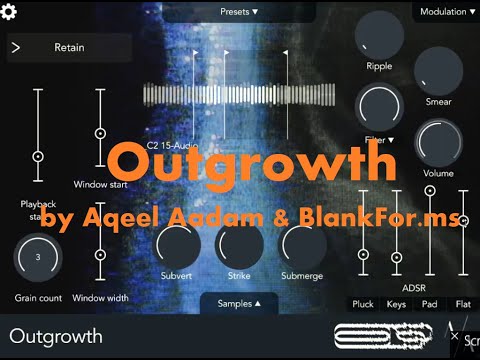
  • Desktop version demo (I'll also post a different iOS version demo shortly)
  • @aqeelaadam said:

    @wim said:

    @wim said:
    OK, I guess I do wish one thing ... that there was an FX version so that I could record into it rather than only loading samples. That's the only thing though.

    I lied. Paste from the audio clipboard to get samples in would be super useful.

    I actually had this exact thought in the middle of last night - I wonder if you incepted me :smile:

    Regarding recording, that's certainly something we want to address. Currently I'll admit that Outgrowth is a bit more desktop-focused where recording clips of audio in most DAWs is pretty trivial. But we definitely want to improve the experience for folks that use lighter weight hosts on iOS like AUM.

    @craftycurate is right that there are some effects and engines that require significant analysis and processing (namely Subvert, Submerge, Radiate, and Delve to some extent) but I can cheat and do a lot of that analysis while a recording rolls in rather than having to do it all at once when a big audio file is dropped in and loaded from disk.

    If live input is not going to be practical, then the ability to manually record a clip from live audio would be useful, and also the ability to trigger that Record operation via MIDI CC etc so it could be triggered without hitting a Record button in the GUI would be super useful.

  • @cuezaireekaa said:

    @jwmmakerofmusic said:
    Well, I'm going to treat myself to both this app and the complete bundle. I feel an Ambient era coming on, either in Cubasis, or performed live in AUM and mastered in Cubasis. These apps are sick! Perfect for any twisted Ambient concoctions.

    You’re in for a treat then. My favorite purchase all year. And pairs with his other mind phuck tools perfectly

    Today is the day I have a go with all four apps. Whether all four apps end up being used is another story, but gonna have a play in AUM!

  • @craftycurate said:

    @aqeelaadam said:

    @wim said:

    @wim said:
    OK, I guess I do wish one thing ... that there was an FX version so that I could record into it rather than only loading samples. That's the only thing though.

    I lied. Paste from the audio clipboard to get samples in would be super useful.

    I actually had this exact thought in the middle of last night - I wonder if you incepted me :smile:

    Regarding recording, that's certainly something we want to address. Currently I'll admit that Outgrowth is a bit more desktop-focused where recording clips of audio in most DAWs is pretty trivial. But we definitely want to improve the experience for folks that use lighter weight hosts on iOS like AUM.

    @craftycurate is right that there are some effects and engines that require significant analysis and processing (namely Subvert, Submerge, Radiate, and Delve to some extent) but I can cheat and do a lot of that analysis while a recording rolls in rather than having to do it all at once when a big audio file is dropped in and loaded from disk.

    If live input is not going to be practical, then the ability to manually record a clip from live audio would be useful, and also the ability to trigger that Record operation via MIDI CC etc so it could be triggered without hitting a Record button in the GUI would be super useful.

    Yeah that's a great idea! MIDI CC, parameter, and also maybe a particular MIDI note as well (like C-1) which you know you're not going to use.

    My other app, Waymaker, has something similar already where you can start/stop it with CC or with a MIDI note.

  • @aqeelaadam said:

    @craftycurate said:

    @aqeelaadam said:

    @wim said:

    @wim said:
    OK, I guess I do wish one thing ... that there was an FX version so that I could record into it rather than only loading samples. That's the only thing though.

    I lied. Paste from the audio clipboard to get samples in would be super useful.

    I actually had this exact thought in the middle of last night - I wonder if you incepted me :smile:

    Regarding recording, that's certainly something we want to address. Currently I'll admit that Outgrowth is a bit more desktop-focused where recording clips of audio in most DAWs is pretty trivial. But we definitely want to improve the experience for folks that use lighter weight hosts on iOS like AUM.

    @craftycurate is right that there are some effects and engines that require significant analysis and processing (namely Subvert, Submerge, Radiate, and Delve to some extent) but I can cheat and do a lot of that analysis while a recording rolls in rather than having to do it all at once when a big audio file is dropped in and loaded from disk.

    If live input is not going to be practical, then the ability to manually record a clip from live audio would be useful, and also the ability to trigger that Record operation via MIDI CC etc so it could be triggered without hitting a Record button in the GUI would be super useful.

    Yeah that's a great idea! MIDI CC, parameter, and also maybe a particular MIDI note as well (like C-1) which you know you're not going to use.

    My other app, Waymaker, has something similar already where you can start/stop it with CC or with a MIDI note.

    Heck yeah, recording triggered via midi note? Now we’re talking!

  • edited December 2025
    The user and all related content has been deleted.
  • Still pondering this one. Doesn't look like the file size is too large, but is this one of those apps that after you buy/install, you have to also download a huge library of samples, etc. to go with it?

  • @skiphunt said:
    Still pondering this one. Doesn't look like the file size is too large, but is this one of those apps that after you buy/install, you have to also download a huge library of samples, etc. to go with it?

    It’s optional, roughly 200 Mb if I remember correctly, and the factory patches the use them can be loaded with or without samples

Sign In or Register to comment.