Loopy Pro: Create music, your way.
What is Loopy Pro? — Loopy Pro is a powerful, flexible, and intuitive live looper, sampler, clip launcher and DAW for iPhone and iPad. At its core, it allows you to record and layer sounds in real-time to create complex musical arrangements. But it doesn’t stop there—Loopy Pro offers advanced tools to customize your workflow, build dynamic performance setups, and create a seamless connection between instruments, effects, and external gear.
Use it for live looping, sequencing, arranging, mixing, and much more. Whether you're a live performer, a producer, or just experimenting with sound, Loopy Pro helps you take control of your creative process.
Download on the App StoreLoopy Pro is your all-in-one musical toolkit. Try it for free today.
Roland Zenbeats by Roland Corporation (Auv3)
This discussion has been closed.
Comments
Thanks for the tip @Samu this has help a bit.
They really need to. it’s sad that not a lot of people use the APP, it has potential to be one of the best on the platform if ironed out.
@MatthewAtZenbeats please have a look at this midi video
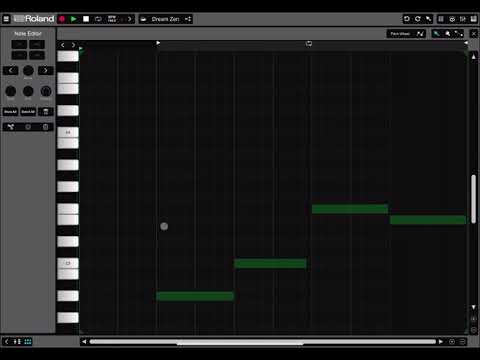
Thanks for the visual examples. All good stuff.
Hi!
I just thought of another area where Zenbeats gives me some headaches, that is the freezing functionality. Here’s some points:
I don’t know how easy it’d be to replicate since these issues are pretty random, but I’m certain I’ve encountered all these quite frequently.
Thanks 🙏
You are welcome 😊
OK, so I figured I should download it and give it a try, so I'm hoping I can get some insight from those who might be more used to it by now.
Firstly, can I edit AUv3 automation? I don't see how to do it, but if it doesn't have that ability, I don't see how it's any different than GarageBand other than GarageBand can host 3rd party plugins without having to pay for it.
Why this points system rather than just showing how much IAPs cost? Does anyone know why Roland does this? It makes me feel like I'm being treated as a kindergartener.
Has anyone found the ability to host it on multiple platforms useful? I'm assuming I could just host it on iPadOS and use IDAM to get audio and MIDI to my MacBook?
Overall it's better than I expected, but if it doesn't have any automation, I'm thinking I'll ditch it, as I don't really want to spend my 'points' on getting plugin capabilities that already exist in GarageBand.
To draw in or edit automation press the icon at the top-right in the pattern editor that looks like a line graph.
I don't remember specifically, but I think it has something to do with making it work with the App Store when those purchases are really cross-platform.
I think I'd find it useful if I ever composed on desktop or maybe Android. But I don't.
It has automation. One thing though, you can't record AU automation by interacting with the UI. You can only record it from if you map parameters to an external controller. You can draw it in though if using an external controller isn't an option. Hopefully they will address that shortcoming sometime.
Thanks. Maybe I just haven't spent enough time with it, but I didn't see any obvious way to draw it in the UI.
OK, will take a look. I should probably check the Roland site for a manual…
Someone posted the manual in the group here
It's on their site:
https://www.roland.com/global/support/by_product/rc_zenbeats/owners_manuals/
Probably just need to browse it once by the look of things, but have it downloaded already.
Well that was a waste of $15. I bought the plug-in upgrade, but Zenbeats doesn’t recognize it and asks me to purchase it again. The App Store recognizes it, but not this piece of crap. Shutting down the app and rebooting do nothing either.
Does anyone else find it buggy? It has crashed a few times, doing something completely different each time, and I can’t get the startup view setting to do anything. I don’t want to start pieces of music with a drum machine, but the setting to change this doesn’t work.
Roland needs to do a lot of work on this. Right now it’s just a toy that doesn’t work very well.
Have you created a Roland account and signed in with it in the app? Check the manual section 1-2 for installation details. You only need to sign in once. There's a "hamburger" menu at the top-left of the opening screen, where you can sign in (or see that you're already signed in).
If that doesn't help, you should contact Roland Support. They're very responsive. You can find a direct link under Help from the same hamburger menu.
With the exception of the silly initial AU plugin scanning process, which you may have to restart multiple times to get to complete, Zenbeats has been at least as stable as any other host for me. I'm on iOS 14.8, though. 15 could be different though I've not read any reports of problems on 15.
Many people like it a lot and would not characterize it as a toy. ymmv of course.
Yep, created an account, logged in, and tried everything I can think of to get it working, but all to no avail.
You’re right, it’s not really a toy, but I can’t help feel that Roland is just half-assing this and focusing on selling content rather than creating a solid platform.
I’ll check it again tomorrow and contact support, but I really think this app needs a lot of work to bring it up to par with other hosts.
Anyone had success in getting in contact with Roland support for Zenbeats? Following support links from the Zenbeats page on their website takes me to a contact form that has registered product as a required field, but Zenbeats is not a product that can be registered on their site...
I honestly can't say I am impressed with anything that Roland is doing right now based on my experience with Zenbeats.
If you go to Help > Support in the app you'll get to a contact form that doesn't require anything but a subject and body. I haven't contacted them in some time, but they were very responsive on the two occasions when I did.
Didn’t realize it was there as I haven’t gone back to the app for anything other than trying to figure out how to get the IAP to work.
I ended up doing it through the App Store, so we’ll see what happens.
You would if you had read my post up-thread more carefully.
DOH! Right there and I missed it.
Keep searching and not finding...is there any way of setting up sidechaining in Zenbeats? Mostly just want to gate/trigger using Pro-G and Pro-C2 and maybe some other stuff. Would prefer that over using Envolver or using an external process. I have the full unlock btw.
Cubasis 3 is decent for this, but gets pretty sluggish after a while during a long session and so AUM is where I do pretty much all of that kinda stuff. But it would be nice to have it all in Zenbeats if possible..
Also, I’d love to hear anyone’s opinions on a good way to trigger drum fills and accents in Zenbeats a-la the way you can do it on one of their physical models like the TR-8S for example... There’s a dedicated drum fill button and you can program in your own fills...can’t seem to find any easy way to do that in Zenbeats that would suit my longer improv-style workflow. I can obviously program them and think it all through, but I’d prefer not to flesh out all my beats in such a ...cerebral fashion, if you catch my drift haha
Also I saw a soundtestroom video out there about sidechaining using Zenbeats in drambo, but I don’t use drambo. Maybe someday, but not today lol
Hopefully someone from Roland will read this, as I just started really paging through this thread and noticed there was a dev or pr dude here.... So please let me know if you have questions or clarification needed, or if you perhaps want me to draw out what I picture these requests to look like within Zenbeats. After doing a deep dive into Zenbeats over the past few days, I am convinced that this really could become my iOS workhorse daw because certain things it does are very good - like the the SOUNDS (!), and the drum sequencer overall, and loops, for example. So I will continue to use it, but if you REALLY wanna win me over, and perhaps stand out as the best DAW out there, and even snag a bunch more subscribers and hardware sales, then please integrate these features that I’m BEGGING for. The first few things are kinda Roland-specific features that are already on the TR-8S (and probably others, this is my only current frame of reference haha) - but with Roland being a legendary, historic pioneer in the drum machine world, I’m surprised that these first few features aren’t already in zenbeats. The rest is stuff that you can already do in other iOS music production apps that are must-need features for Roland to integrate if they want zenbeats to really be taken seriously. And thank you for your time..we’re all out here just doing our best, and trying to help make ‘mobile music production’ be taken more seriously. It comes a long way every year, because of communities like this. Or maybe even just because of this specific community...I can’t tell 😆
Im adding a photo of a TR-8S with some of my wishlist features (or - if these ARE already possible, someone please let me know!
1: drum fills - via a manual ‘button press’ for adding on-the-fly drum fills AND via automatic per-interval basis (shown in upper right corner of pic) ideally this would be somewhere on the interface right by the drum pads or perhaps it could be located near the sequencer on the right corner somewhere
———I understand that there are already hundreds of premade loop patterns out there - I’m not asking that we get every one updated with custom drum fills —— all I want is the ability to program my own and then kick them on and off on the fly
2: ‘motion recording’ for automation (and an ‘on/off’ button) instead of painstakingly selecting the automation feature for each drum in a kit, for each effect module, for each parameter, and then the drop downs every time. Also, for individual drums in a kit, I don’t think the current model records parameter adjustments as automations, such as effect changes, pitch, and gain, etc. this would be a very dynamic for drumming. Please add this! Shown in the pic on the left, you simply press the motion control ‘REC’ button during a loop and any parameters you change will be put into the loop. Then you can easily turn all automations on and off for more intriguing developments in the music. Which leads me to next one on the list...
Those are my requests that are already staples of other Roland product, which would really make the app stand out as a performance tool more fitting of Roland’s legendary status. I hope to see those features someday soon 🙏
My other very important wishlist items that are serious ‘musts’ for my workflow have also been emphatically requested by several other members of the audiobus forums right here in this thread. Here’s what I would love to see in Zenbeats:
!!!!Sidechaining support.
I need to have AU multi-in/out on certain plug-ins. For example, fabfilter’s pro-G plugin has the external side chain option to use another instance of the AU from a different track to trigger gating or expansion of the audio. I use it alllllll the time in sooo many ways, too, it’s an absolute must.
!!!!Bus routing. aaaand my bus-routing request leads me to my last one:
Example: I need to be able to take channels 1 and 2 and have them routed to another channel thru a virtual port, we’ll call it ‘bus A’, and the ability to route that bus channel even further, etc. there are tons of production reasons why you may need to do this, which requires a need that is beyond what the ‘send tracks’ already can do. Obviously the sidechaining being one of the biggest ones for me. It doesn’t need to be hyper-complicated...just a channel that accepts the audio from another channel. Simple right? Set up some limitations to prevent feedback or whatever and boom, we’re all mixing and mastering like the pros
!!!!Audio routing flexibility. (and midi)
And by audio routing flexibility, I mean the ability to route audio to and from virtual ports between other music apps. This means selecting the channel’s output options and seeing an input option for another app, or seeing zenbeats as an input source when I’m using AUM. Sometimes it’s necessary for me to do this with live mixing, when playing with audio sources that I am not running through zenbeats for various reasons. This would also mean selecting another app’s audio-out bus as an input for a channel input in Zenbeats, because there are times when I wanted to run a mix from korg Gadget or cubasis right into zenbeats but it won’t let me. Right now I have 2 iPads set up and the output on one of them is going into the other’s audio interface input. Zenbeat’s intuitive looping grid and amazing drum machine can be further enhanced for live performance purposes in this fashion, without having to use two iPads. I get the importance of advertising the product as a self-contained environment for branding purposes and what have you....but in order to be taken seriously by the masses, these features are standard.
In this same regard, having the midi-learn option be able to take commands from the virtual midi port (example: having an option, since Zenbeats IS a host app afterall, to be assigning one AU plugin to control another AU plugin, and allowing the assignment of parameters between plugins such as CC, parameter, range, etc - again...I apologize if any of these features are already possible - please, someone, let me know if they are! But after a deep dive into Zenbeats over the past couple days, this is the most important feedback I can currently think of. If you made it this far - thank you. Please send to the boss of Roland and tell them how smart I am after y’all change the industry once again, from implementing my suggestions
Hey ZBers! How is it going with integration options? Can you use ZB in AUM as AUv3? Or can you route audio recording options only with new Tracker?
No. And it's unlikely it ever will be an AUv3.
Sorry, I don't understand what you mean by "new Tracker"?
Roland's new DAW: zentracker
https://apps.apple.com/gb/app/roland-zentracker/id1582634903
Interesting.
Well, as regards @bot0vod 's question, I don't think this new tracker changes anything. You can record external audio into Zenbeats the same as you can Zentracker. I don't see anything about Zentracker that says you can host as an AUv3 AUM to record into it that way.
So, Zentracker is really just a free, stripped down subset of Zenbeats. It doesn't bring anything new to the table for a Zenbeats user that I can see.
My point of using ZB was to mix it down in AUM with everything I have. I don't want to stay at Roland ecosystem only. So I was looking of workaround on how to do it. Is there a way that I can use ZB along with Drambo (as I could do if ZB cound do IAA or AUv3 channel export)?