Loopy Pro: Create music, your way.
What is Loopy Pro? — Loopy Pro is a powerful, flexible, and intuitive live looper, sampler, clip launcher and DAW for iPhone and iPad. At its core, it allows you to record and layer sounds in real-time to create complex musical arrangements. But it doesn’t stop there—Loopy Pro offers advanced tools to customize your workflow, build dynamic performance setups, and create a seamless connection between instruments, effects, and external gear.
Use it for live looping, sequencing, arranging, mixing, and much more. Whether you're a live performer, a producer, or just experimenting with sound, Loopy Pro helps you take control of your creative process.
Download on the App StoreLoopy Pro is your all-in-one musical toolkit. Try it for free today.
Comments
So the new update is up.
I've improved the latency on the pads a little bit.
You can play multiple pads easily because I've removed the gestures to long press and drag pads. To enable those there's an edit switch at the bottom.
Also the export button is a little more self explanatory.
And a few under the hood tricks
Oh. An you can force the app into dark mode or light mode independently of your system. Check the settings button
Pro tip: you can add AudioShare as a source in locations and browse AudioShare app from SampleCrate
Hot salsa, baby! 💃🕺
The CookinSoul pack is actually hot salsa. It is 🔥
It happened again. To collect some samples, have something going ok let's open koala to start recording open koala and sample crate crashes and I lose the samples I selected 😰
Can you make a copy of the sounds I add to the crate player so I can have them there if the app crashes?
Are you on the latest version? Did it happen before this version? I'll look into the crash reports but they don't come in real-time
It happened before on the old version and this time was in the new version when using the three dots menu to open koala on the other half screen. What I'll m doing now is collecting samples directly to koala to not lose them in case it crashes.
Or from the Crate tap Share > Tag and save them to a tag.
Not sure why this happens. It works ok on both my phone and iPad.
Thanks man!
so is it possible to make a crate of 6 drum samples and export them all into Koala in one click?
or do you ha e two import one sample at a time ?
You do a samples chain in Crate and drag+drop it in koala...and that's it!! (of course you will have to split it in Koala but it is a one button function too)
[edit] Well, in fact it is easier. Select your 6 samples and drag and drop them in Koala...
oh awesome! that’s perfect! thanks so much
You got it wrong
Put your samples in the crate then HOLD AND DRAG the export button to Koala
Ps check out @thesoundtestroom video from yesterday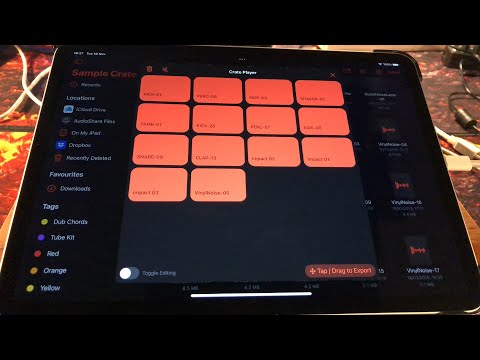
Just noticed your PS
@alecsbuga I kept getting error code 4 when I tried to export a sample chain. All the files are 16 bit wavs (small 1 shots) stored in the same folder in sample create directory. I am on the release version so I just installed the old beta to see if it worked because I remembered it working before. It worked fine, I reinstalled the store version and it worked perfectly too. I try again a few minutes later and now I’m getting the error again, any ideas?
I’m getting the same error. Just tested with 3 snare samples.
I don't know why the heck that happens, I'm pulling my hair over here with that stupid Apple Library that does that.
I"m trying do do it the old fashion way by concatenating audio buffers but it's a bit tricky.
But I'm actively working on it.
can you guys send over some of those samples? What sample rate are they? maybe they're 48khz or smth?
Apparently plain 16bit 44100 HZ files. They’re from Samples from Mars library, very standard. Hope it helps and you can reproduce the error.
Thanks, will test at home, I need to test on the iPad because on the simulator it works with every sample.
A-ha! Your samples are mono. So apparently the "silence" i'm inserting between samples is a stereo file
So it doesn't like when I'm mixing and matching sample formats.
I guess I need to convert them prior to chaining.
You mean convert mono samples to stereo?. I don’t know if that’s a good idea… can’t you check if the sample is mono/stereo and process accordingly?. Ok, they might be a combination… Id like to keep mono samples mono in the chain. Maybe if there’s a stereo one, make the chain stereo?.
Man, I’ve been meaning to ask this for a while and this a great opportunity. Why do you need to insert silence between samples?.
I mean convert them all to the same format. The average format
Can confirm my file were also mono so sounds like that could be the one 👍
In this tutorial for Sample Crate, I show you how you can make kits, tag them and save and recall Crates.
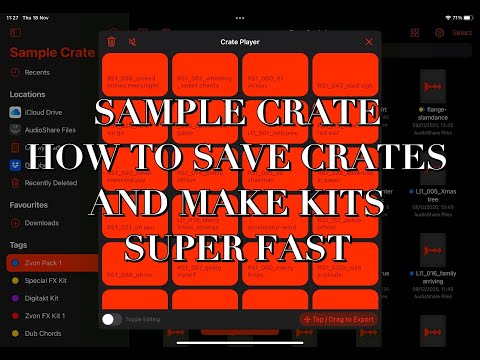
Sample Crate is a really great way to manage all your samples on your iPad or iPhone.
I hope you find the video useful.
Ladies and gentlemen I freaking did it. I fixed the sample chain export. Not only does it work... I've put ALL THE SAMPLES users have sent, in a single crate (mono, stereo, 32bit, 24bit, 48khz, 44khz) AND IT WORKS
  and it's fast.
I need to polish the code a bit and fix the gap silence between the files and I'll let you know when the update will be up.
Thanks for the support!