Loopy Pro: Create music, your way.
What is Loopy Pro? — Loopy Pro is a powerful, flexible, and intuitive live looper, sampler, clip launcher and DAW for iPhone and iPad. At its core, it allows you to record and layer sounds in real-time to create complex musical arrangements. But it doesn’t stop there—Loopy Pro offers advanced tools to customize your workflow, build dynamic performance setups, and create a seamless connection between instruments, effects, and external gear.
Use it for live looping, sequencing, arranging, mixing, and much more. Whether you're a live performer, a producer, or just experimenting with sound, Loopy Pro helps you take control of your creative process.
Download on the App StoreLoopy Pro is your all-in-one musical toolkit. Try it for free today.
Comments
Yes, that would be great. Ape Matrix and Drambo have this and I like it a lot.
In the meantime, you can add a new channel for the new AU, then drag any fx to the new channel.
Have a view + listen while I build a groove with the new Bleass SampleWiz2 and Loopy Pro:
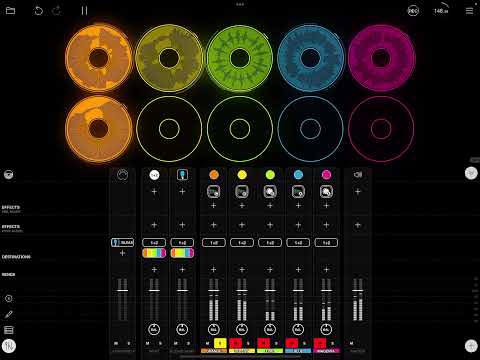
And here is the Project file if you'd like to expand upon it:
https://www.icloud.com/iclouddrive/040_0ERe957N8SpzMIwpwWU2Q#High_View
If the file wasn’t zipped, zipping might help. Project “files” are really bundles which are actually folders and not all download and upload clients handle them correctly.
Here's a zip file in case it anyone wants to try: https://www.dropbox.com/s/nfadosmg0541u8h/4x4 Grid with Scenes v0.2.zip?dl=0
Created an inofficial discord channel for Loopy Pro: https://discord.gg/5JmvYNmc
I might be wrong...
I'm on the 7 days trial. I was trying all kind of AUv3 and record some "donuts". Got fun. Got some nice groove but I said to myself "it sounds bad, it sounds all squeeshy-muddy!". So I decided to reproduced the same groove in AUM and my gosh... night and day. It sounds way better. Full dynamic range. Bright. Clear. I might be wrong but for now, I'll stick with AUM.
Would be interested in seeing a video of this to hear the difference.
Did you maybe change the tempo after recording your loops? Time stretch, no matter how good it is, will do stuff like that to sound.
I thought of it but honestly, don't feel like it.
fwiw, been running it since late Beta and the sounds being captured in Loopy Pro sound just fine to my ears. Haven't noticed any difference in the recording quality of it over AUM or Drambo. Sounds seem identical to my ears. But, as with all things audio related, ones MMV
No, but thanks for the tip. I mean the ability to swap the AU for a different one without having to add/remove channels. Similar to ejecting the AU in AUM
Ahhh...gotcha. Yeah, that seems like a good thing to add in an update. Be sure and ping Michael about that.
If it's louder and distorted you may need to switch off Echo Calibration in the settings on the mic channel I think. Lots of people, including me, ran into this issue on the Beta.
Thanks. I'll try that, might be the problem.
So what hardware controllers have folks tried with LP, and what do you think?
Part of me is tempted to get some hardware to go with this, e.g. like a launchpad mini. Another part of me says the power and beauty of the customizable on-screen controls is all that’s really needed, and keeps it lean, portable, small.
Thoughts?
Nope
Yes yes Audioshare drag-and-drop yes please very much yes. Please.
Umm so is this AudioBus compatible? Because when I usually do a loop recording workflow I use Blocs Wave as the AudioBus output and the pop up AudioBus toolbar is a big part of that.
The AUv3 version can be used in an AudioBus FX slot at this time. I believe IAA / AudioBus support for the standalone is in the pipeline.
A little Lofi looping with the incredible Loopy pro.
Amazing job with this masterpiece @Michael
Nice...
Hey,
Is it possible to change a cycle IS already in your layout to a rectangle shape? I like to view all loops in rectangle shapes, not cycles, if possible.
Yep. Go to the edit page and Just drag a corner of up until the loop turns into a rectangle.
There are currently two pieces of functionality lost if you do that.
I tried that. But the rectangle loop won't be played automatically after recording like a circle loop.
So I deleted the rectangle clip and added again a circle and playing automatically after recording works fine again.
Maybe I missed just the correct setting (?).
It would be very handy if we can change forms (rectangle to circle and vice-versa).
Ahh, I think you're adding a rectangle, not resizing a donut to a rectangular shape.
There are two buttons to add a clip. The round one adds a Loop. The square one adds a "one-shot". You want to add a round loop, then tap the pencil icon to get to get to the edit page. Now place your finger just slightly outside the loop and drag toward the center. This will briefly add four tiny square handles around the loop. Drag a corner up or down until the shape turns into a rectangle.
Is it resembles Output Arcade.??
Perfect, wim! Exactly this was needed. Thanks!
Man, this app is so ultra powerful!
Hopefully some bar and state informations for the rectangular shape like Ableton Live looper device or Quantiloop will be added. 👍❤️
One routing thing is missing at the moment if I'm not wrong:
I'm using Melda Production MSuperLooper. And it's possible to record all loops dry. But playing all loops with effects. In this looper it's possible to stay with you input channel let's say in loop #4. Means: your instrument goes through channel loop 4. Means: your instrument uses always the effects in what armed loop channel you are right now. As soon as you switch to Looper Channel 5, your guitar (Input Channel) will play through the effects located in Looper Channel 5. And so on...
Oh dear, I probably just explained this in a very roundabout way. 😂