Loopy Pro: Create music, your way.
What is Loopy Pro? — Loopy Pro is a powerful, flexible, and intuitive live looper, sampler, clip launcher and DAW for iPhone and iPad. At its core, it allows you to record and layer sounds in real-time to create complex musical arrangements. But it doesn’t stop there—Loopy Pro offers advanced tools to customize your workflow, build dynamic performance setups, and create a seamless connection between instruments, effects, and external gear.
Use it for live looping, sequencing, arranging, mixing, and much more. Whether you're a live performer, a producer, or just experimenting with sound, Loopy Pro helps you take control of your creative process.
Download on the App StoreLoopy Pro is your all-in-one musical toolkit. Try it for free today.
Comments
I wish I could afford to hire even one programmer to help me out! At least I'm planning to get it onto Mac as an AU. Everything is coded in Apple-specific frameworks, so porting it to PC is to re-write it from scratch unless there's some magic I don't know about.
Thanks @espiegel123 for helping out with this one! I have to admit I'm not super proficient with all of Loopy's ins and outs.
Hey @benkamen the recent update broke the auv3 showing up in hosts again.
Edit: temporary glitch. Restart fixed.
Never mind! Had to restart the iPad for the auv3 I had saved in several AUM and Drambo projects to show up.
There’s a compatibility problem with Patterning 3 and some hosts (Loopy Pro, BeatMaker 3). When adding a loop to the timeline, Patterning stops playing on the first loop. In fact, Patterning continues to play as long as you move the playhead forward, but if you move the playhead backward while playing, Patterning stops. If you restart playback in the host, it plays again
How can I import a whole folder of samples? Is it only possible to import files? And is there some tool to create sample sets?
Use the files app to copy the folder into
On My <device> -> Patterning 3 -> Samples.I don't understand what you mean by "sample sets".
@benkamen nice to see P3 being used as a Eurorack sequencer here
Its quite the amazing piece of drum machinery!
My most wanted feature would be instead of only having ratchet decay, you could control the velocity/volume of each step in the ratchet pattern individually…. Then i could create some really nice hh variations. Like say you do a 5 slice ratchet and you turn the 2nd and 4th ratchet down all the way… and get a lil more glitchy with it and do variable volumes on the remaining triggers… would be pure blissss
I replied to you on discord - but will respond here also.
There is a time signature for the project - via the tempo dropdown menu. But, since patterns can have loops of different lengths (aka time signatures) it’s not always necessary to set it.
The time signature does affect the measure length in the timeline, though. In your situation, you might even just want to set the time sig to 1/4 (I know, weird) just so that the measure markers line up with your intended changes. You could also set it to 4/4, (or 6/8) but you’ll want the snap amount to be a quarter note so that you can have the pattern lengths set appropriately.
Lastly, you’ll probably want to enable “reset rotation” in the timeline blocks, so that the patterns start from the beginning when they are triggered in the timeline.
Hey folks how do I import patterning 2 projects?
https://forum.audiob.us/discussion/comment/1326245/#Comment_1326245
Thanks 🙏
I have a Question about Patterning 2. I bought it for 14.99 last April. And I am completely happy with it. Now I wanted to install it on my new iPad and I don't see the app in the AppStore. Instead I see Patterning 3 at a price of 34.99. I want to be able to access Patterning 2 for the iPad I bought last year.> @benkamen
Open the App Store, then your account settings (picture in the top right corner). It should still be listed in the Apps and Purchase History sections.
I’ve had the same experience @novich, it seems to be deleted from te store… I’ve also tried the Purchase History, as @catherder mentioned, gives me an error when I try to download unfortunately.
Try again. Not being for sale in the store should not affect its availability for download. You may have encountered a temporary App Store glitch. Contact the developer if the issue persists.
Oops, you’re right @espiegel123, works now!
@catherder @Jer4 Thank you! Yes, it is in the purchase history. But it's not in the shop. So I can't download it.
Search in the ‘Apps’ section above Purchase History. That should allow you to download it.

@Robin2 Thank you so much! It worked, it uploaded)
Very pleased to have helped! Cheers.
Finally got a chance to deep dive P3 and am utterly blown away at how fantastic and futuristic it is. completely worth the price, brilliant stuff
Hello @benkamen, a little suggestion : in the mixer view, a double tap on the name of a sample go in the according circle view 😊 thx 😎
Hello all, I need a little help please. When Jade increases the steps from 16 to 32 in their video it works by simply increasing the step value, and the grid is sliced into 32 equal steps.
When I try it creates a 2nd page and the grid has 2 pages of 16 slices.
I am a bamboozled buffoon. Am I missing something very obvious?
Thanks.
Two pages? I've never seen that.
Is this what you mean? If so, then it's because you have Divide mode set. To fix that, tap at the top of the sidebar to set it back to Standard mode
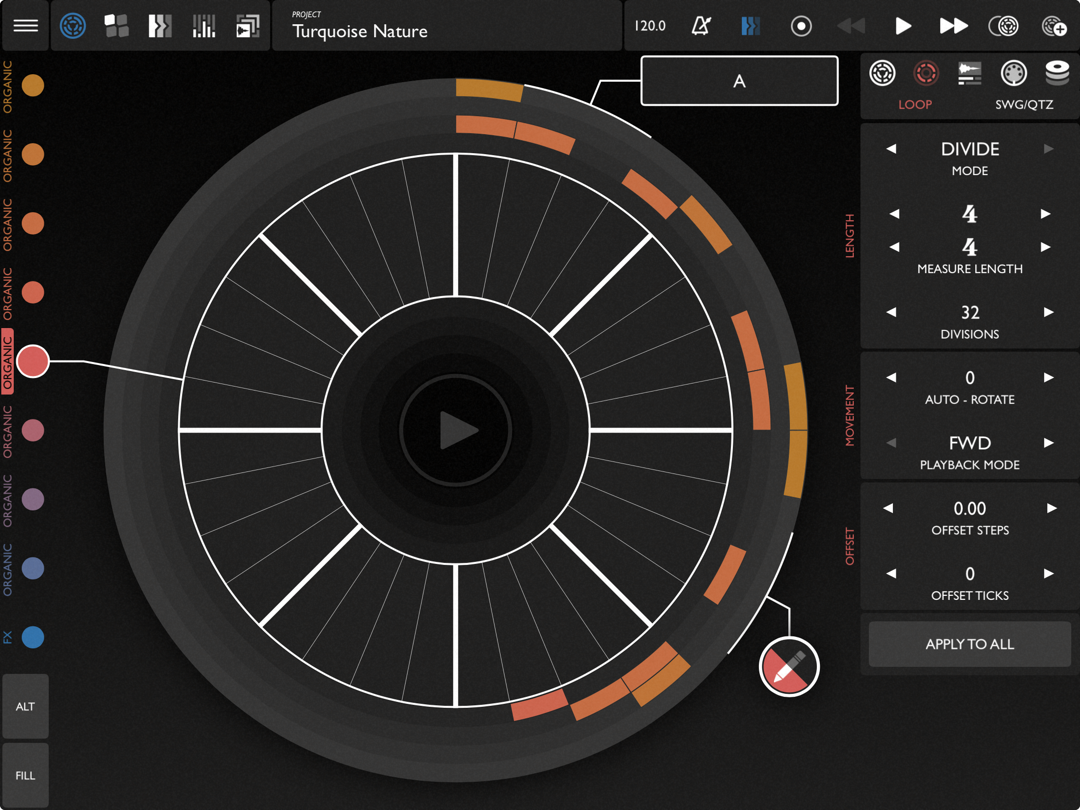
Thank you @offbrands and @wim for the help.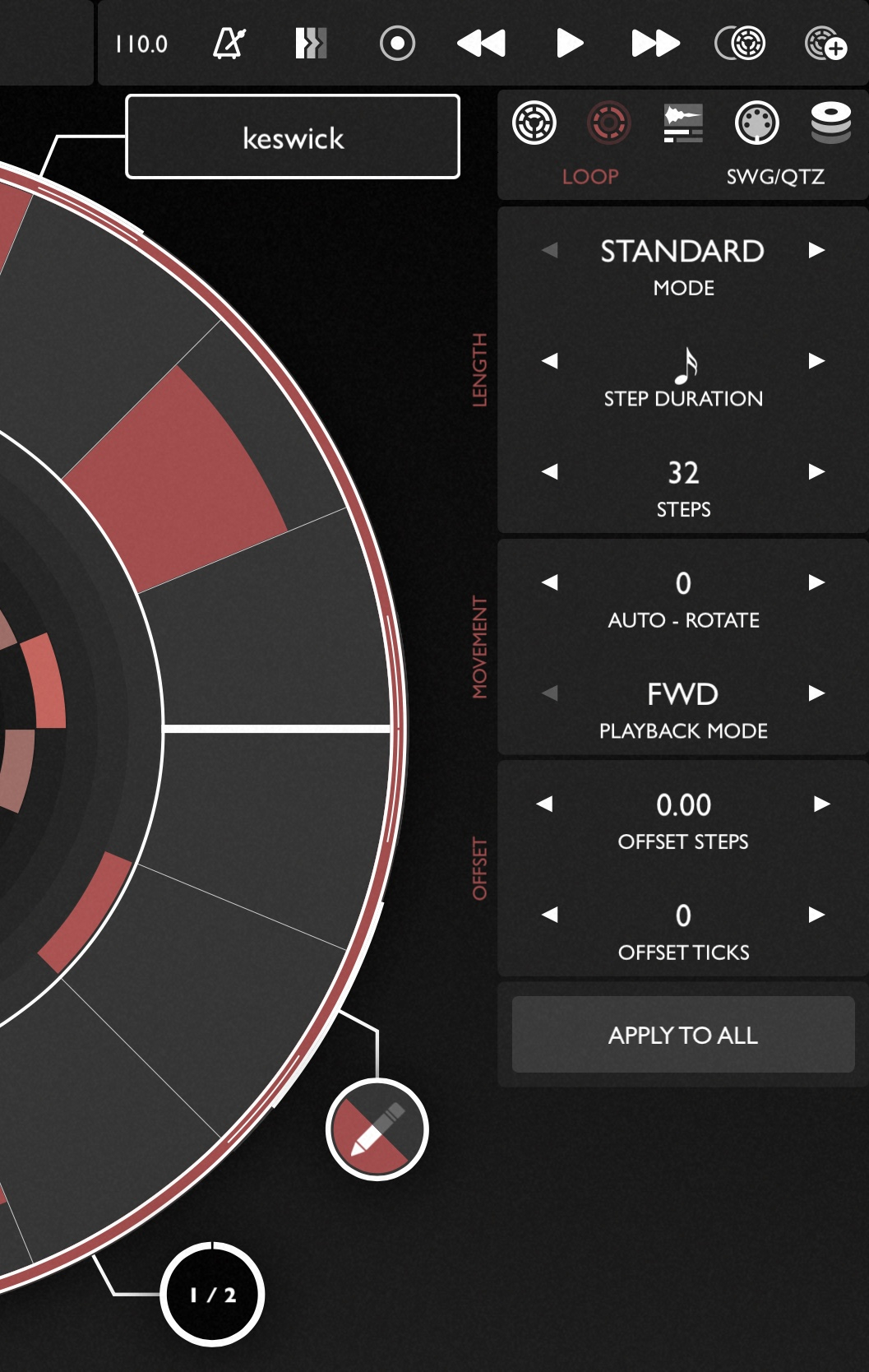
I hope the photo shows that I have 32 steps selected, and in the lower left side it shows what I referred to as ‘pages’. It says 1/2, so it doesn’t allow me to see the whole 32 steps, it goes from 1 to 2.
I hope this makes more sense.
Thanks again, I really appreciate the help.
huh. It doesn't split until 33 steps or more for me.