Loopy Pro: Create music, your way.
What is Loopy Pro? — Loopy Pro is a powerful, flexible, and intuitive live looper, sampler, clip launcher and DAW for iPhone and iPad. At its core, it allows you to record and layer sounds in real-time to create complex musical arrangements. But it doesn’t stop there—Loopy Pro offers advanced tools to customize your workflow, build dynamic performance setups, and create a seamless connection between instruments, effects, and external gear.
Use it for live looping, sequencing, arranging, mixing, and much more. Whether you're a live performer, a producer, or just experimenting with sound, Loopy Pro helps you take control of your creative process.
Download on the App StoreLoopy Pro is your all-in-one musical toolkit. Try it for free today.
Comments
@offbrands and @wim thanks again.
I’m on a 2017 iPad Pro and I only bought the app a few days ago. Maybe I’ll delete and reinstall, then I’ll try and contact the dev if no joy.
The world is a crazy place, but this forum is the best place. Thanks.
Deleted and reinstalled and I now have 32 steps…
Yup. Uninstalled and reinstalled.
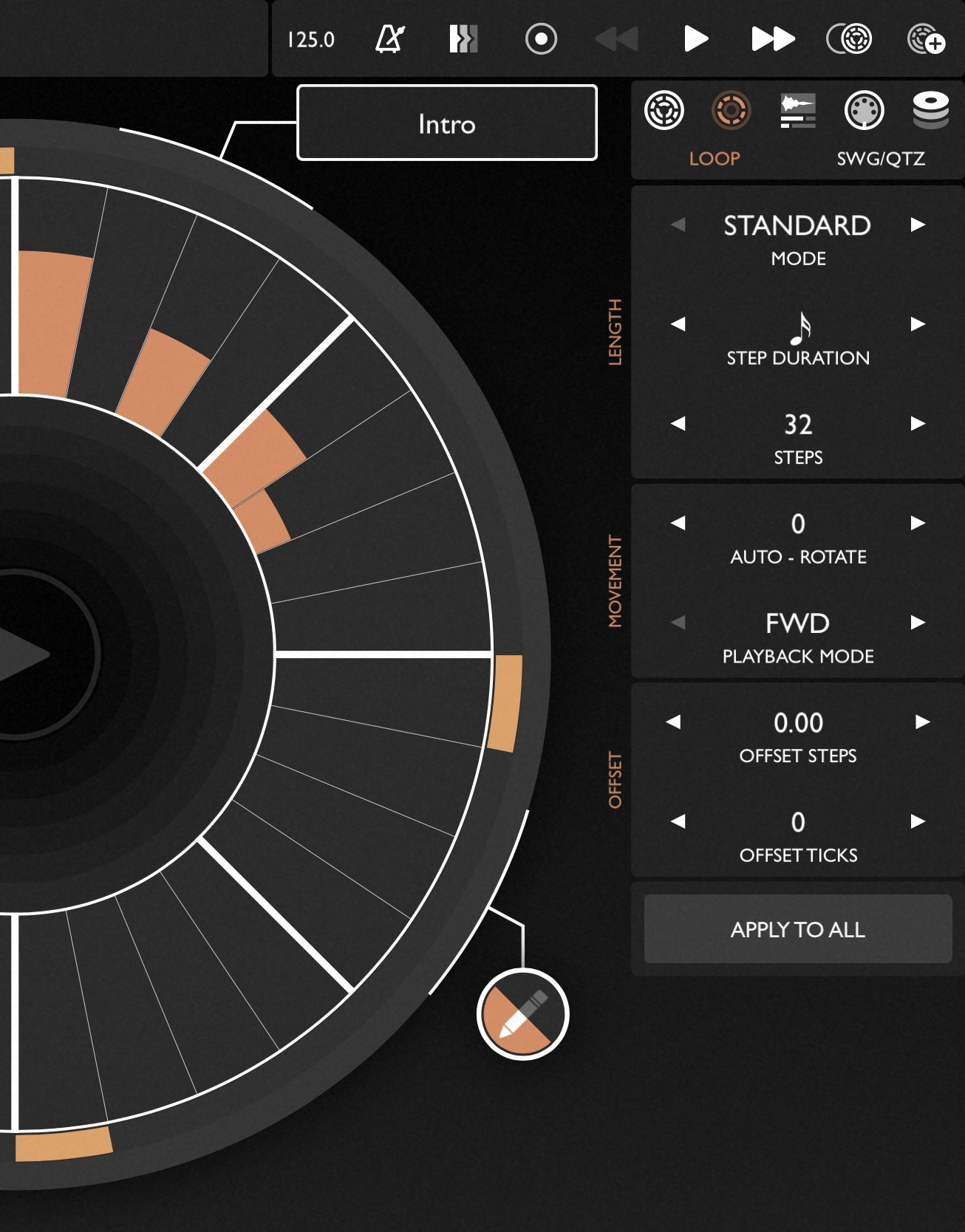
I have 32 steps on the grid. Once I go to 33 steps it gives me the 1/2 symbol in the bottom left.
Bought this a couple weeks ago, absolutely loving it. What are some kits I should check out? There's just so many, any favourites here?
Press ALT & you can change the Page Step Size , it seems set to 32 by default .
Set to 64 & you can have 64 on one page , never see a page 2 .
(edit this function has been moved , it was long press on steps parameter in Patterning 2)
Does does someone know if it is possible if a multi- bar pattern is playing to switch to another multibar pattern so that the second pattern starts from the beginning even if the currently playing preset has not completed.
Let’s say patterns 1&2 are both 4 bars long and after two bars of pattern 1 you want pattern 2 to start from its beginning. Normally, it seems that Patterning will play the second pattern from bar 3 in that situation.
From the manual :
Setting the Page Size
Use the ALT button while editing the Loop Settings to set the page size for the current loop. The default page length is 32 steps. You can change the Page Length to be up to 64 steps. If you wish to set the page size for all loops in your project to use by default, tap the "SET AS DEFAULT" button.
@espiegel123 I’m working on that! Right now you can only do it via the timeline - using the “reset” trigger mode.
Tx
This is now live in version 3.2!
https://www.olympianoiseco.com/blog/patterning-3.2-new-features/
@Zsolt
Hey all, I see in a recent update you can save a default kit but I'm unsure how to do this? I use patterning primarily for midi so it's a bit of a hassle to switch tracks to just send midi every time I open it
Edit: found it
Friday.
Just wondering if somebody (youbody?) want a stable velocity option? Soft 0-50, medium 51-120, hard 121-127?
I have not found a way to either
-make all steps into the value I hold on the coarse tuning slider
-make instrument steps the same valueo
or similar
Nope. I do not want that kind of mechanized rigidity in Patterning 3. I have that up to my eyeballs elsewhere. But I could see how some kind of snap to grid might be helpful to others though.
Do you watch the numeric display at the top? It shows the coarse tuning in semitones, the velocity, etc, clearly. I find it easy to make steps exactly the similar watching the numbers.
Not sure if this is what you’re after but if you hold down the alt button and select the ‘vel’ option that pops up you can set course tune for all the steps
@FordTimeLord helleu
I tried holding down course tune, but I still have to set vel on individual steps with each step slider, right ? If that is the case it is almost impossible to get the same vel for 16 CHH.
Ah, I think I misunderstood what you’re trying to do. It might be worth reaching out to the dev about it
A workaround could be to just reduce your CHH pattern to one step and modulate the course tune
Ah my bro but I need to be able to variation. It’s that thing of silence between notes creates the importance of them? I like to insert variation in the beats but on the back of stability. So yea, maybe I will run mostly the same velocity or pitch on 16/16 hats, but then I will take out some hats. I would need to make a whole new pattern only to make variation in the hats, ending up with many fluff patterns to switch between.
-The perfect solution would be to hold a slide on the right that snaps to grid between Soft Medium Hard and place the hits with the left hand.
-The easy solution would be having simply that the values you place on the drumtrack (between 0-127) could fall within those ranges, with a tick box.
-The slightly worky solution would be to have the slider dictate the velocity of all hits on that instrument, and you would retroactively go back and adjust the variations
What do you all think?
The dev is quite active on his discord and you can make feature requests there too, maybe try reaching out to him there?
In the meantime there are still ways to add variation. For example, you could add an empty step to the pattern or you could play around with the different step duration settings.
I mean if everything is different all the time, no set velocities I can’t do variation. If I cant have something it be regular I can’t punctuate with a difference, that kind of thing. Its seems counter intuitive to me to have every CHH be slightly different, i prefer sometimes mediom, sometimes high, and then break it up with parts that are mudulated. I would like a way to even all hits to be the same value at least
Couldn't you use the LFO to do what you want?
I'm a bit surprised that there is no bundle for owners of Patterning 2, not only that, P2 is gone from the AppStore.
If you already own Patterning 2 it can still be downloaded from your purchase history
very nice video