Loopy Pro: Create music, your way.
What is Loopy Pro? — Loopy Pro is a powerful, flexible, and intuitive live looper, sampler, clip launcher and DAW for iPhone and iPad. At its core, it allows you to record and layer sounds in real-time to create complex musical arrangements. But it doesn’t stop there—Loopy Pro offers advanced tools to customize your workflow, build dynamic performance setups, and create a seamless connection between instruments, effects, and external gear.
Use it for live looping, sequencing, arranging, mixing, and much more. Whether you're a live performer, a producer, or just experimenting with sound, Loopy Pro helps you take control of your creative process.
Download on the App StoreLoopy Pro is your all-in-one musical toolkit. Try it for free today.
Comments
I’m gonna have to check out this note chopping and warping thing. ☝️
If it's like FL Studio (PC)'s, I might finally buy this.
In the step sequencer I can't place steps and press play. I always have to press the record button first. It's very inconvenient. Is there any way to disable this?
My guess is you aren't creating a clip first. Does the Notes area say "No clip selected on this part"? If so, then tap at the top left where it says "CLIP ---" then select New. You can also create a clip from the clip launcher screen, but this way is more convenient.
Hey all. I just updated today from a few older versions past cause i didn’t want to break my project till i finished (glad i did).
The version i had was pre-Launchpad X integration. Now that i updated, when monitoring my incoming MIDI channel inside Drambo, which resides on GR2 track 7, it shows as receiving channel 1, even though i verified that it’s sending on channel 7. I work with GR2 MIDI setting set to Poly mode. Any ideas on what else i should look at or what happened?
Essentially, Drambo is only responding to GR two’s native keyboard, no longer external mini. I do see launchpad still visible as the incoming midi in settings.
I figureded it out. Settings>Launchpad, I enabled Set Mode from UI. It seems if one works with the LPX’s Custom Mode like i do, that needs to be enabled for it to work. Well, at least when working in Poly Mode as the MIDI input option. Cause the only thing working before was whatever i had mapped to Dambro. But now all my Flexi Slices are responsive again, and my other GR2 channel is responding again all from the single Custom Page 👍
Any way to fit auv3 plugins by height rather than width? They all fit by width which means a lot of them get cut off.
Depending on the Auv3 plug-in, some allow pan/scroll of the UI primarily because things would get way, way to small if they were scaled by height to fit the plug-in view port.
If you use the down arrow key on the RHS above the pads/keys - you can minimize/hide the pads/keys and this will show more of the Auv3. For example when doing it with Koala sampler, you can nearly see the page as if you were using it in standalone.
Can you send midi externally using GR 2 and does it have audio tracks yet ?
It has MIDI OUT option - so for example you can send it to AUM, Network Session etc...
It doesn't have traditional audio tracks. It uses a sampler module that can hold up to 5 minutes of audio. If you wanted longer you can add up to 3 Samplers on 1 track - and trigger them from different keys on keyboard.
Then you can use song mode to create a track.
Audio tracks would be an stunning update.
Cheers for the information.
+1 and 3 cheers for Audio Tracks
I feel I would use this a lot more if it had audio tracks.
Turns out some resize themselves, to adjust to that height of the pad section, so apparently auto adjustment is currently up to the individual synth/fx developer.
Yet the ones that don't resize themselves can be resized in AUM. So apparently Jim Audio would have to implement an adjustable window of some sort.
It's a real pain not being able to see the entire interface.
Which AUv3 plug-ins are you having issues with?
I ask this because it's up to each individual AUv3 plug-in to adapt to its UI to the view-port size given to it by the host. Some plug-ins (if they don't fit horizontally) add an option to pan/scroll the UI as one example.
Some AUv3's have zoom/scroll options in the settings etc.
It would be nice to have a Sidechain EQ IFX for ducking the low end or a band range.
If this thing had audio tracks, I might not use anything else at all! +1000
I’m trying to trigger a drum rack with a midi controller (boppad). I’m not seeing where to change the midi note for a drum rack pad. Midi learn also seems to not work for drum rack pads, just knobs. I’m also not seeing default midi notes in a drum rack in the manual.
Any advice about this would be appreciated
Bumping and pinging @jimpavloff
The notes start at C1 (Note 36) and sort-of follow the General MIDI drum map.
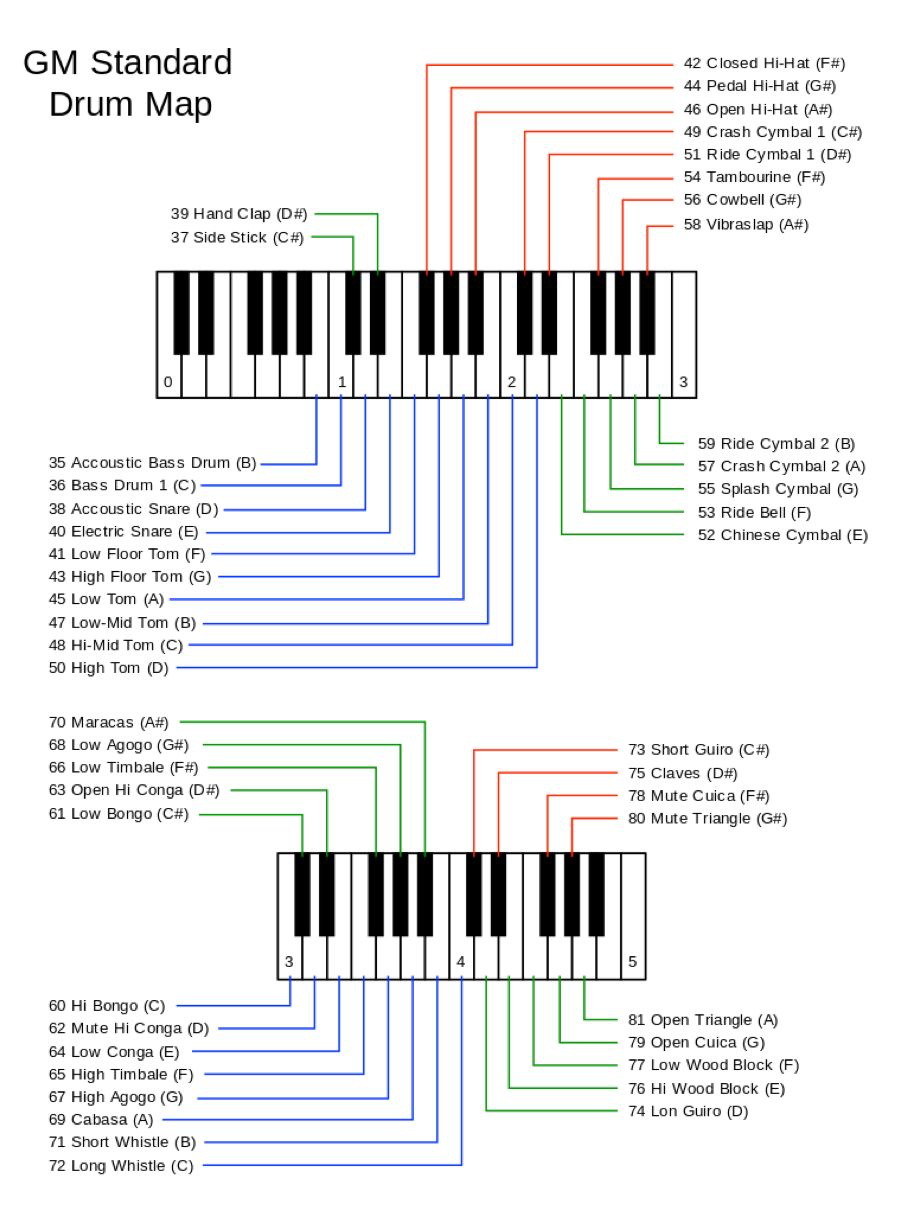
I don't think you can change them.
(Note: MIDI octave naming differs from app to app an hardware. What is called C1 in one app may be called C2 or another octave in another. There's no MIDI standard for octave naming.)
@ecamburn
Here are the notes per pad for the Drum rack.
They're different for the Pure Acid Drums rack.
See below for some explanation. In most cases the difference is one octave up or down if sounds don’t seem to match the mapping you expect:
C3 is not middle C in the standard musical notation system; rather, middle C is C4. However, some digital music software, keyboards, and manufacturers, such as Yamaha, use a C3 convention for middle C due to practical reasons related to smaller keyboards, which can sometimes cause confusion
Thanks @wim. I was being lazy and hoping I could change input notes on the GR2 side. I changed sending notes on the device and all works well.
I’m having trouble getting midi generators to work in the part layers tab… for instance BLEASS Arpeggiator or Arpbud… I have it as a layer before the synth and it will play a note or notes, but will not change the rhythm or notes according to the scale. Am I doing it wrong. Is it possible?
I sent a mail to JimAudio with a couple of suggestion:
Banks named: ‘Ideas’, ‘In progress’, ‘Finished’, and so on.
GR2 is an incredible app, i really feel at home. Powerful, intuitive and the UI is a pleasure for the eyes. At Least to me
I'm running into some midi recording issues I'm hoping the hive mind might have insight into.
I'm recording MIDI from an Alesis Strike Multipad into a drum rack in GR2 via a powered USB hub. The problem is that some played notes are not recorded. The pattern played is triggering the following 16th notes in a 4/4 bar: 1, 4, 5, 9, 12, 13. What's getting recorded is: 1, 4, 9, 13. I've tried every combination of record quantize settings (including off), grid size, and quantize settings. I'm playing with enough velocity that everything should get recorded. I've recorded similar patterns in Ableton from the multipad and it's worked fine.
@ecamburn - Just to clarify, are all the notes played the same note?
Also, how long are the notes that do get recorded?
You mean the same note number? If so, yes? It's 36. I did some more testing and GR2 for some reason isn't "hearing" all of the notes. When I play not all notes are triggered. I tested with multiple devices inside GR2 (drum racks and London) and get the same behavior. To make sure it wasn't the midi device or the hub I recorded from the multipad into Cubasis. It records fine. As a final test I swapped out the Alesis multipad with a keyboard controller, in the same GR2 project that recorded the Alesis problematically. MIDI from the keyboard was recorded fine. For some reason, GR2 seems to not like the MIDI from the Alesis Multipad.
The notes recorded from the multipad in GR2 are mostly 16th notes, but some are longer.