Loopy Pro: Create music, your way.
What is Loopy Pro? — Loopy Pro is a powerful, flexible, and intuitive live looper, sampler, clip launcher and DAW for iPhone and iPad. At its core, it allows you to record and layer sounds in real-time to create complex musical arrangements. But it doesn’t stop there—Loopy Pro offers advanced tools to customize your workflow, build dynamic performance setups, and create a seamless connection between instruments, effects, and external gear.
Use it for live looping, sequencing, arranging, mixing, and much more. Whether you're a live performer, a producer, or just experimenting with sound, Loopy Pro helps you take control of your creative process.
Download on the App StoreLoopy Pro is your all-in-one musical toolkit. Try it for free today.
Comments
Ben's been killing it with his recent uploads. very good stuff. I've been a patterning fan since iPhone.
I'm not the only one inspired by P3, check this out....
Hi. I just bought Patterning 3 and I have problem in Garageband.
By default when I start play track in Garageband, both Patterning 3 (green line) and Hammerhead (red line) play drums.
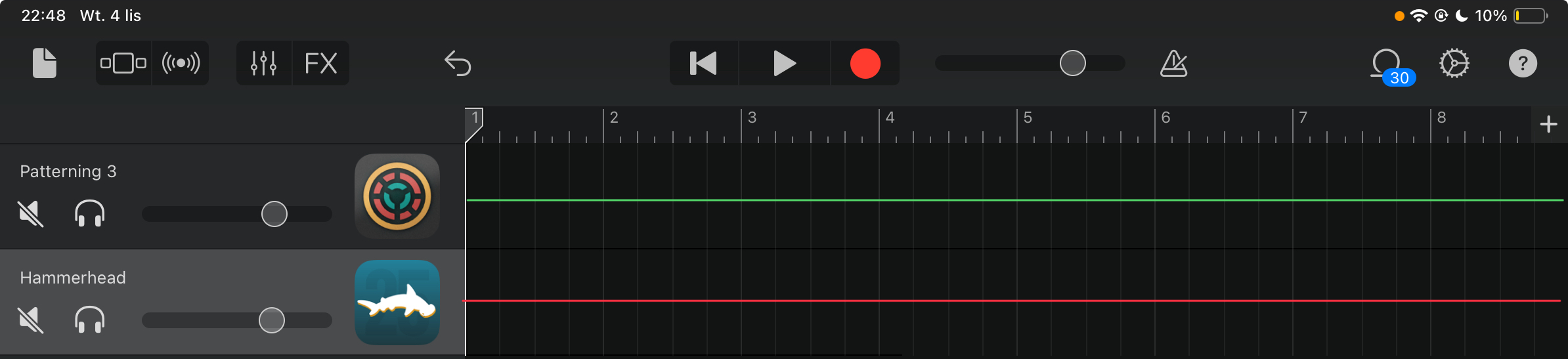
But, when in Hammerhead I TURN OFF the red light in the "play" button, then Hammerhead play recorded part (blue line) only. I would like to achieve the same result to Patterning 3 play recorded part (yellow line) only.


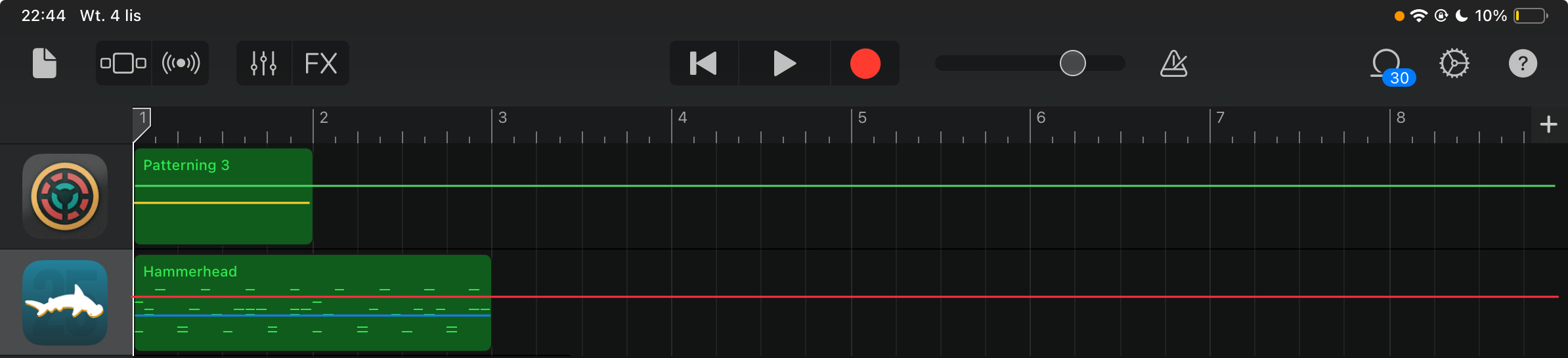
Q1: How do I record notes using Pattern 3 in GarageBand? (when I start recording, it is records only empty part, and only as short as shown in the screenshots).
Q2: Can I switch something in Patterning 3 (like TURN OFF red light in Hammerhead) to Garageband play recorded part (yellow line) only?
Thanks in advance for advice.
When exporting individual MIDI files from Patterning 3, only three out of the eight tracks/sounds are exported. Multiple attempts, reloaded the app multiple times. iOS 18.7.2, iPad Air 5. Anyone else seeing this? @benkamen
I just did a quick test. I'm seeing all tracks exported.
@musikeer - how are you determining that not all tracks are being exported? Are you playing something back from the midi file, or are you looking at the actual content of the file(s).
I’m looking at the results in Patterning’s results list within the standalone, also within the folder in the Patterning folder in the Files app. They’re not there. Using two different kits. Which kit did you successfully export all MIDI tracks from? I’ve used Patterning 2 extensively, new to 3, but it’s not behaving as I’d expect. Thanks for checking in to it!
I’ve (unsuccessfully) exported from the PureCussion Djembe and 70’s Sausalito kits.
Is MIDI enabled on all of the tracks?
And curiouser (!), at times, and just now it’s exported only 7 of the 8 sounds. And it seems using different kits, different results. All 8 with the Nature Beats kit, 3 with Purecussion Congas. Repeatable.
Check your settings.
It seems definitely to export different amounts of tracks depending on the kit. A bug in the kit creation, P3 not exporting correctly from kits made in earlier versions of Patterning?
I see what’s happening: the MIDI export is dependent on how the samples are named in their actual audio samples. So if there are duplicate named kit layers, only one of them will export. Which is a problem going forward, using previously acquired kits and having to manually correct all the layer/sample names. @benkamen
Edited
Sorry, didn’t see the replies, I’ll check now, thanks.
Makes no difference if the setting is MIDI, Audio, or Both. Same results. Try it yourselves with the kits I previously mentioned, the PureCussion Conga kit etc. The layer name is obtained from the first letters of the sample audio file it seems.
@benkamen MIDI was NOT enabled on all the tracks, and success now when it is. I see that the track labels now read the MIDI note, not the sample name. Thank you as well @timfromtheborder and @offbrands. Truly appreciate your invaluable help, and have used the app since Patterning 1. MIDI export is the main reason I updated from 2 to 3.
But still a bit of a problem not knowing what the exported MIDI files represent, and what the layers are named within the wheel and pads when only named by the MIDI note, any way around that?
If “Both” could retain the sample name it would be perfect, or an option to display either the note or sample name?
You can double tap a track on the left to name it. That’s a new-ish feature, though, so older kits will not have named tracks.
Also!
You can LOCK the MIDI settings for a drum kit (in the drum kit drop down menu) so that the midi settings are retained even if you change the kit.
@benkamen Perfect! You are a gentleman and a scholar… this will be great. You’ve solved everything! Very elegant, thanks so much for your help.
Is it still the case that when trying to download this onto desktop, the App Store says that it’s 20 quid ? As opposed to other apps I’ve bought on iPad, which are immediately downloadable with a cloud icon. Seem to recall folks saying that it feels like they’re gonna get charged…
The video on this page shows what happens on the Mac App Store when you try to buy it again.
https://www.olympianoiseco.com/blog/issues-on-the-mac-app-store/
Hmmm, odd... recently wiped my iPad and reinstalled and the pitch is now different in the AUV3 than in the standalone.
Sample Rate.
Yah... cant seem to fix it though
What's the sample rate in P3 standalone? What host are you using for the plugin? What's the host sample rate?
Sounds like a strange edge case - the more info you can share the better. I’ve def tested sample rate changes etc, but there might be a specific situation that is breaking it. Feel free to DM me.
Cool cool, thanks will do! Just swapping between a variety of devices (headphone adapter, bluetooth, Roland Duo Capture) and finding that I can get the pitch to become inconsistent. In some case I even get massive level outputs now to where I need to set the AUM or BM3 levels to -20db for it not to overload. I will try some other apps too just to see if this may be OS related as like I say it did seem to start when I wiped and reloaded.
@AudioGus I am tickled that you still use BM3. Props!