Loopy Pro: Create music, your way.

What is Loopy Pro?Loopy Pro is a powerful, flexible, and intuitive live looper, sampler, clip launcher and DAW for iPhone and iPad. At its core, it allows you to record and layer sounds in real-time to create complex musical arrangements. But it doesn’t stop there—Loopy Pro offers advanced tools to customize your workflow, build dynamic performance setups, and create a seamless connection between instruments, effects, and external gear.

Use it for live looping, sequencing, arranging, mixing, and much more. Whether you're a live performer, a producer, or just experimenting with sound, Loopy Pro helps you take control of your creative process.

Download on the App Store

Loopy Pro is your all-in-one musical toolkit. Try it for free today.

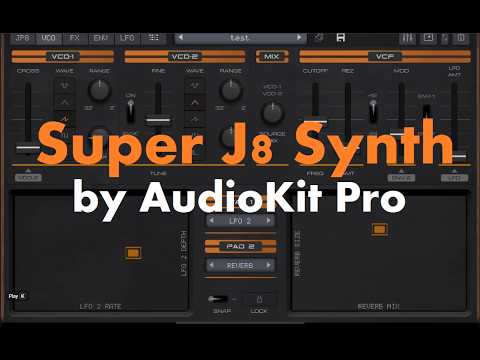
NEW APP: Super J8 - Inspired by Jupiter-8

1679111214

Comments

  • @baliw said:
    @AnalogMatthew , please consider adding a tab selection bar for the lower half, for when using an iPad.

    I am curious with your request, I find that when using the Modulation slider the Dock suddenly appears!

  • @rapidfire said:

    @baliw said:
    @AnalogMatthew , please consider adding a tab selection bar for the lower half, for when using an iPad.

    I am curious with your request, I find that when using the Modulation slider the Dock suddenly appears!

    Could u be a bit more specific here maybe hehe? Do you mean, in standalone, when u use the mod slider (beside pitch bend), you see a tab menu for the lower half of the screen, similar to the one at the top? I don't get that so I'm wondering whether I misunderstood

  • @Loups said:

    @rapidfire said:
    Here is Dr Mix off YouTube top 10 Synths of all time, the two starred items are @AnalogMatthew next synths on his list for us, notice Jupiter 8 is #2

    Gah that's got me hankering for a iM1-style 'emulation' port of a D-50...

    Sadly, this is very unlikely to happen outside of Roland's control. They have really strictly priotected the copyrights of the sound library and patches.

  • @Gavinski said:

    @rapidfire said:

    @baliw said:
    @AnalogMatthew , please consider adding a tab selection bar for the lower half, for when using an iPad.

    I am curious with your request, I find that when using the Modulation slider the Dock suddenly appears!

    Could u be a bit more specific here maybe hehe? Do you mean, in standalone, when u use the mod slider (beside pitch bend), you see a tab menu for the lower half of the screen, similar to the one at the top? I don't get that so I'm wondering whether I misunderstood

    Hi @Gavinski, the Mod slider (or keyboard) isn’t available in AUv3 mode, I was referring to Standalone mode, sorry for not being clear

  • Am I missing something, or is there no means to apply envelope to DCO pitch?

  • There's not many apps that knock ForScore off the top of the music app chart, so it was pleasing to see this one manage it> @garden said:

    @Loups said:

    @rapidfire said:
    Here is Dr Mix off YouTube top 10 Synths of all time, the two starred items are @AnalogMatthew next synths on his list for us, notice Jupiter 8 is #2

    Gah that's got me hankering for a iM1-style 'emulation' port of a D-50...

    Sadly, this is very unlikely to happen outside of Roland's control. They have really strictly priotected the copyrights of the sound library and patches.

    Yes it would have to be a Roland product - very unlikely to happen i know, but i can dream. Just have a thing for late 80s/ early 90s flagship digital synths.

  • @rapidfire said:

    @Gavinski said:

    @rapidfire said:

    @baliw said:
    @AnalogMatthew , please consider adding a tab selection bar for the lower half, for when using an iPad.

    I am curious with your request, I find that when using the Modulation slider the Dock suddenly appears!

    Could u be a bit more specific here maybe hehe? Do you mean, in standalone, when u use the mod slider (beside pitch bend), you see a tab menu for the lower half of the screen, similar to the one at the top? I don't get that so I'm wondering whether I misunderstood

    Hi @Gavinski, the Mod slider (or keyboard) isn’t available in AUv3 mode, I was referring to Standalone mode, sorry for not being clear

    Thnx, Mike, I know but what do you mean 'the dock appears'?

  • @rapidfire said:
    I put feedback for the J8 on the App Store three days ago (Thursday) but there is no sign of it! It usually only takes 24 hours to appear.

    My reviews never show up. The reason why may be simple but I followed several different schemes to correct it with no success.

  • @anickt said:

    @rapidfire said:
    I put feedback for the J8 on the App Store three days ago (Thursday) but there is no sign of it! It usually only takes 24 hours to appear.

    My reviews never show up. The reason why may be simple but I followed several different schemes to correct it with no success.

    Store is probably just flooded and struggling to keep up with all the positivity submitted

  • @baliw said:
    @AnalogMatthew , please consider adding a tab selection bar for the lower half, for when using an iPad.

    I confess, I am confused by how this works.

  • @Squishy said:

    @anickt said:

    @rapidfire said:
    I put feedback for the J8 on the App Store three days ago (Thursday) but there is no sign of it! It usually only takes 24 hours to appear.

    My reviews never show up. The reason why may be simple but I followed several different schemes to correct it with no success.

    Store is probably just flooded and struggling to keep up with all the positivity submitted

    Ha-Ha, you are probably right 👍

  • edited February 14

    @garden said:
    Am I missing something, or is there no means to apply envelope to DCO pitch?

    If you tap on the JP8 tab on top left, slide the PITCH slider up on VCO MOD, tap the ENV tab and adjust the ATTACK on ENV 1,now play a key 👍

  • @rapidfire said:

    @Squishy said:

    @anickt said:

    @rapidfire said:
    I put feedback for the J8 on the App Store three days ago (Thursday) but there is no sign of it! It usually only takes 24 hours to appear.

    My reviews never show up. The reason why may be simple but I followed several different schemes to correct it with no success.

    Store is probably just flooded and struggling to keep up with all the positivity submitted

    Ha-Ha, you are probably right 👍

    To be clear, my reviews NEVER show up. In my Ratings and Reviews the last one in the list is from 2021. Maybe I’m dead? 😂 👻

  • @rapidfire said:

    @garden said:
    Am I missing something, or is there no means to apply envelope to DCO pitch?

    If you tap on the JP8 tab on top left, slide the PITCH slider up on VCO MOD, tap the ENV tab and adjust the ATTACK on ENV 1,now play a key 👍

    And as usual, I'm a doofus. I've hit the JP8 tab multiple times and missed the VCO MOD section. Thanks for the poke.

  • Here's my video for it

    I dig this one a lot, the sounds can fit lots of styles

  • @garden said:

    @rapidfire said:

    @garden said:
    Am I missing something, or is there no means to apply envelope to DCO pitch?

    If you tap on the JP8 tab on top left, slide the PITCH slider up on VCO MOD, tap the ENV tab and adjust the ATTACK on ENV 1,now play a key 👍

    And as usual, I'm a doofus. I've hit the JP8 tab multiple times and missed the VCO MOD section. Thanks for the poke.

    We all help each other one way or another 🍻

  • @anickt said:

    @rapidfire said:

    @Squishy said:

    @anickt said:

    @rapidfire said:
    I put feedback for the J8 on the App Store three days ago (Thursday) but there is no sign of it! It usually only takes 24 hours to appear.

    My reviews never show up. The reason why may be simple but I followed several different schemes to correct it with no success.

    Store is probably just flooded and struggling to keep up with all the positivity submitted

    Ha-Ha, you are probably right 👍

    To be clear, my reviews NEVER show up. In my Ratings and Reviews the last one in the list is from 2021. Maybe I’m dead? 😂 👻

    🤣😂

  • @eylvy said:
    Here's my video for it

    I dig this one a lot, the sounds can fit lots of styles

    That actually sounds good, it’s a pity there is such a lag when changing presets. I can’t see any program change in settings or MIDI, but even then that would cause glitches when changing presets.

  • Hi @AnalogMatthew,
    Just found an issue with the ENV-2 Release, when you drop the slider down to “0” and take your finger off the slider you can’t lift it up again, but if you hold your finger on you can move it up and down., Occasionally it will allow you to touch the middle of the release slider path and the slider then jumps to that position. This does not happen with the other sliders.
    Mike

  • @rapidfire said:
    Hi @AnalogMatthew,
    Just found an issue with the ENV-2 Release, when you drop the slider down to “0” and take your finger off the slider you can’t lift it up again, but if you hold your finger on you can move it up and down., Occasionally it will allow you to touch the middle of the release slider path and the slider then jumps to that position. This does not happen with the other sliders.
    Mike

    I believe I see this also, stand-alone on iPad Air 11" M2. If you touch a bit below the slider and swipe upward, it does not move the slider. Also sometimes, even when the touch is accurate, the slider does not move. Touching and waiting a bit seems more reliable. For me, these symptoms apply to all the Env sliders.

  • So this app used machine learning to learn the Jupiter 8's oscillators? Is that an accurate oversimplification?

  • @uncledave said:

    @rapidfire said:
    Hi @AnalogMatthew,
    Just found an issue with the ENV-2 Release, when you drop the slider down to “0” and take your finger off the slider you can’t lift it up again, but if you hold your finger on you can move it up and down., Occasionally it will allow you to touch the middle of the release slider path and the slider then jumps to that position. This does not happen with the other sliders.
    Mike

    I believe I see this also, stand-alone on iPad Air 11" M2. If you touch a bit below the slider and swipe upward, it does not move the slider. Also sometimes, even when the touch is accurate, the slider does not move. Touching and waiting a bit seems more reliable. For me, these symptoms apply to all the Env sliders.

    All sliders working as expected. iPad A16 iPadOS 26.2

  • @anickt said:

    @uncledave said:

    @rapidfire said:
    Hi @AnalogMatthew,
    Just found an issue with the ENV-2 Release, when you drop the slider down to “0” and take your finger off the slider you can’t lift it up again, but if you hold your finger on you can move it up and down., Occasionally it will allow you to touch the middle of the release slider path and the slider then jumps to that position. This does not happen with the other sliders.
    Mike

    I believe I see this also, stand-alone on iPad Air 11" M2. If you touch a bit below the slider and swipe upward, it does not move the slider. Also sometimes, even when the touch is accurate, the slider does not move. Touching and waiting a bit seems more reliable. For me, these symptoms apply to all the Env sliders.

    All sliders working as expected. iPad A16 iPadOS 26.2

    I’m using the 13” iPad M2 and the Release sticks at “0” but on my iPad Air 4 there is no problem. I have updated the Air 4 to the latest OS26.3 but the 13” is still on OS26.2.1, perhaps that’s the issue here? I will update it and find out.

  • @rapidfire said:

    @anickt said:

    @uncledave said:

    @rapidfire said:
    Hi @AnalogMatthew,
    Just found an issue with the ENV-2 Release, when you drop the slider down to “0” and take your finger off the slider you can’t lift it up again, but if you hold your finger on you can move it up and down., Occasionally it will allow you to touch the middle of the release slider path and the slider then jumps to that position. This does not happen with the other sliders.
    Mike

    I believe I see this also, stand-alone on iPad Air 11" M2. If you touch a bit below the slider and swipe upward, it does not move the slider. Also sometimes, even when the touch is accurate, the slider does not move. Touching and waiting a bit seems more reliable. For me, these symptoms apply to all the Env sliders.

    All sliders working as expected. iPad A16 iPadOS 26.2

    I’m using the 13” iPad M2 and the Release sticks at “0” but on my iPad Air 4 there is no problem. I have updated the Air 4 to the latest OS26.3 but the 13” is still on OS26.2.1, perhaps that’s the issue here? I will update it and find out.

    Restart the M2?

  • @anickt said:

    @rapidfire said:

    @anickt said:

    @uncledave said:

    @rapidfire said:
    Hi @AnalogMatthew,
    Just found an issue with the ENV-2 Release, when you drop the slider down to “0” and take your finger off the slider you can’t lift it up again, but if you hold your finger on you can move it up and down., Occasionally it will allow you to touch the middle of the release slider path and the slider then jumps to that position. This does not happen with the other sliders.
    Mike

    I believe I see this also, stand-alone on iPad Air 11" M2. If you touch a bit below the slider and swipe upward, it does not move the slider. Also sometimes, even when the touch is accurate, the slider does not move. Touching and waiting a bit seems more reliable. For me, these symptoms apply to all the Env sliders.

    All sliders working as expected. iPad A16 iPadOS 26.2

    I’m using the 13” iPad M2 and the Release sticks at “0” but on my iPad Air 4 there is no problem. I have updated the Air 4 to the latest OS26.3 but the 13” is still on OS26.2.1, perhaps that’s the issue here? I will update it and find out.

    Restart the M2?

    Thank you @anickt, something so simple as a restart fixed it👍

  • @rapidfire said:

    @anickt said:

    @rapidfire said:

    @anickt said:

    @uncledave said:

    @rapidfire said:
    Hi @AnalogMatthew,
    Just found an issue with the ENV-2 Release, when you drop the slider down to “0” and take your finger off the slider you can’t lift it up again, but if you hold your finger on you can move it up and down., Occasionally it will allow you to touch the middle of the release slider path and the slider then jumps to that position. This does not happen with the other sliders.
    Mike

    I believe I see this also, stand-alone on iPad Air 11" M2. If you touch a bit below the slider and swipe upward, it does not move the slider. Also sometimes, even when the touch is accurate, the slider does not move. Touching and waiting a bit seems more reliable. For me, these symptoms apply to all the Env sliders.

    All sliders working as expected. iPad A16 iPadOS 26.2

    I’m using the 13” iPad M2 and the Release sticks at “0” but on my iPad Air 4 there is no problem. I have updated the Air 4 to the latest OS26.3 but the 13” is still on OS26.2.1, perhaps that’s the issue here? I will update it and find out.

    Restart the M2?

    Thank you @anickt, something so simple as a restart fixed it👍

    😎👍🏼

  • @anickt said:

    @Gavinski said:
    I think btw that when devs collect presets from sound designers for a synth app, the dev should probably make sure before release that the levels are set in a sensible way and fairly uniform in volume. Strangely this often seems not to happen!

    Maybe the sound designers could take on that task in the first place and give the dev a break so they can enjoy the fruits of their labor in the Maldives? 😎✌🏼

    I don’t believe theres any standard for volume for patches, but I imagine it might be possible to automate such a thing.

  • Any presets that I find a bit too loud, I reduce the levels and save it, it overwrites the original, so all is good 👍

  • I think I'm the "odd one out" that likes to mess around and experiment with a "clean" default preset and elicit my own sonic textures and sounds. 😅 And @AnalogMatthew 's J8 synth is a goldmine of endless fun! I can't wait for the next ones he's developing, especially that CS-80. Can you imagine the sounds I will get out of that!? 🤯

  • Amazing app! I wish it could be run on Mac as well, like King of FM. @AnalogMatthew is it possible?

Sign In or Register to comment.