Loopy Pro: Create music, your way.

What is Loopy Pro?Loopy Pro is a powerful, flexible, and intuitive live looper, sampler, clip launcher and DAW for iPhone and iPad. At its core, it allows you to record and layer sounds in real-time to create complex musical arrangements. But it doesn’t stop there—Loopy Pro offers advanced tools to customize your workflow, build dynamic performance setups, and create a seamless connection between instruments, effects, and external gear.

Use it for live looping, sequencing, arranging, mixing, and much more. Whether you're a live performer, a producer, or just experimenting with sound, Loopy Pro helps you take control of your creative process.

Download on the App Store

Loopy Pro is your all-in-one musical toolkit. Try it for free today.

Microwave by Waldorf - out now! (iPad)

145679

Comments

  • edited May 2025

    @Samu said:

    @PapaBPoppin said:
    Tested in loopy Pro (current beta)

    Same issue - however, trying to open drop-down on First Instance actually opens drop-down on 2nd instance (saw it happen in 2nd window) 😅

    Edit: erm, even when tapping on space on 'frozen' 1st instance, can see/select on the 2nd window in the background 🤣

    Edit 2: added a 3rd instance... because. Ends up newest instance is the only 'working' instance and all previous just effect the newest

    Where's a good place to send reports? (Where on site or app?)

    Definitely 'messed up' :D

    Here's the contact info fo Waldorf...
    https://waldorfmusic.com/support-request/
    (Send a message to the support e-mail address).

    Dope many thanks!

    Edit: submertted

  • @PapaBPoppin said:

    @Samu said:

    @PapaBPoppin said:
    Tested in loopy Pro (current beta)

    Same issue - however, trying to open drop-down on First Instance actually opens drop-down on 2nd instance (saw it happen in 2nd window) 😅

    Edit: erm, even when tapping on space on 'frozen' 1st instance, can see/select on the 2nd window in the background 🤣

    Edit 2: added a 3rd instance... because. Ends up newest instance is the only 'working' instance and all previous just effect the newest

    Where's a good place to send reports? (Where on site or app?)

    Definitely 'messed up' :D

    Here's the contact info fo Waldorf...
    https://waldorfmusic.com/support-request/
    (Send a message to the support e-mail address).

    Dope many thanks!

    Edit: submertted

    I told them already too, so hopefully they’ll be on it!

  • @Samu said:

    @Edward_Alexander said:

    @FPC said:

    @gregsmith said:

    @FPC said:
    @gregsmith

    Nope, tried again but Microwave's drop down menus behaved impeccably for me 🤷‍♂️

    Figured it out! If you have add another auv3 instance of microwave, the dropdowns stop working in the first one. Ridiculous.

    I’ll send them a bug report fwiw.

    Yep, can confirm it's definitely broken. Good spot. Weird one.

    Confirmed here as well in Drambo.

    Loaded one instance on the first track, drop down menus work fine.

    Loaded a second instance on a second track; drop down menus in the first instance immediately stop working.

    Make sure to let Waldorf know about it.
    I’ve sent feedback about this issue about a week ago and they told me they’d take a look at it…

    Done.

  • Waldorf put out a V2 - curious how this will come to ipad os (upgrade price with bundle or something) https://waldorfmusic.com/produkt/microwave-1-version-2/

  • edited June 28

    @Paco said:
    Waldorf put out a V2 - curious how this will come to ipad os (upgrade price with bundle or something) https://waldorfmusic.com/produkt/microwave-1-version-2/

    Saw that, seems a bit of a slim offering for a fairly pricey (in desktop, at full price) paid upgrade. Not sure I'd bother upgrading to that on iOS unless it was a very cheap upgrade. Judging by the comments I've seen, my sentiment is widely shared.

  • edited June 28

    I upgraded the VST version yesterday and I think the new features justify the reasonable outlay. There's now a polyphonic arpeggiator which really extends the multis, a well-though out delay effect, 32 voice polyphony, and a killer Mutator/randomiser that produces very usable results each time.

    They also implemented a better preset browser which is a free upgrade for Version 1.3 users.

    So I guess they'll at least provide at least the update with preset browser for free, and I'm hoping that they'll port over the new features for those that want them. Personally it's a no-brainer for me, my favourite plugin by far on any platform.

  • Free update adds some cool stuff from Version 2. Love the Mutator and rather fond of the green skin too.

  • Nice! The mutator is pretty cool 😎

  • What is the difference between Microwave iOS app, Nave iOS app, and a Protein actual synth?

  • Here’s the official update announcement from Waldorf. Love it.

    Microwave 1 iPad v1.3.0
    Now Available: Free Update & Promo
    Workflow & Usability Improvements
    The new Microwave 1 v1.3.0 free update is now available for all iPad users, featuring:

    ❯ Redesigned preset browser with favourites, search and direct instrument part loading.
    ❯ Multi-level undo/redo for parameter editing.
    ❯ Simultaneous editing of multiple instrument parts.
    ❯ New presets from mixer, engineer, and producer Chuck Zwicky.
    ❯ Mean Green Machine look + Mutator Patch Randomizer.

  • edited July 11

    Does anyone else find that the new version is a battery drainer? I left it idle on my M1 ipad pro for about 30 minutes and it generated some serious heat.

  • So where is this ‘ Mutator Patch Randomizer’ hidden?

  • edited July 12

    @Slush said:
    So where is this ‘ Mutator Patch Randomizer’ hidden?

    Push the red buttons to mutate and reset for default/init parameters.

  • Yeeeeey! Finally.... 🤩

  • @Samu said:

    @Slush said:
    So where is this ‘ Mutator Patch Randomizer’ hidden?

    Push the red buttons to mutate and reset for default/init parameters.

    Thanks Samu, I overlooked!

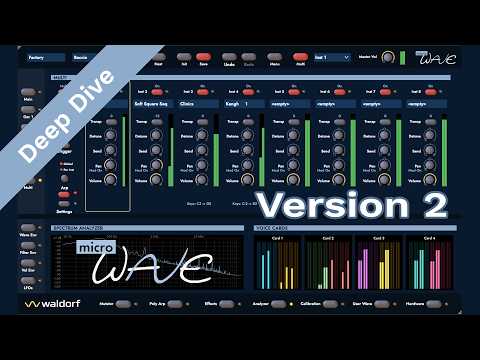
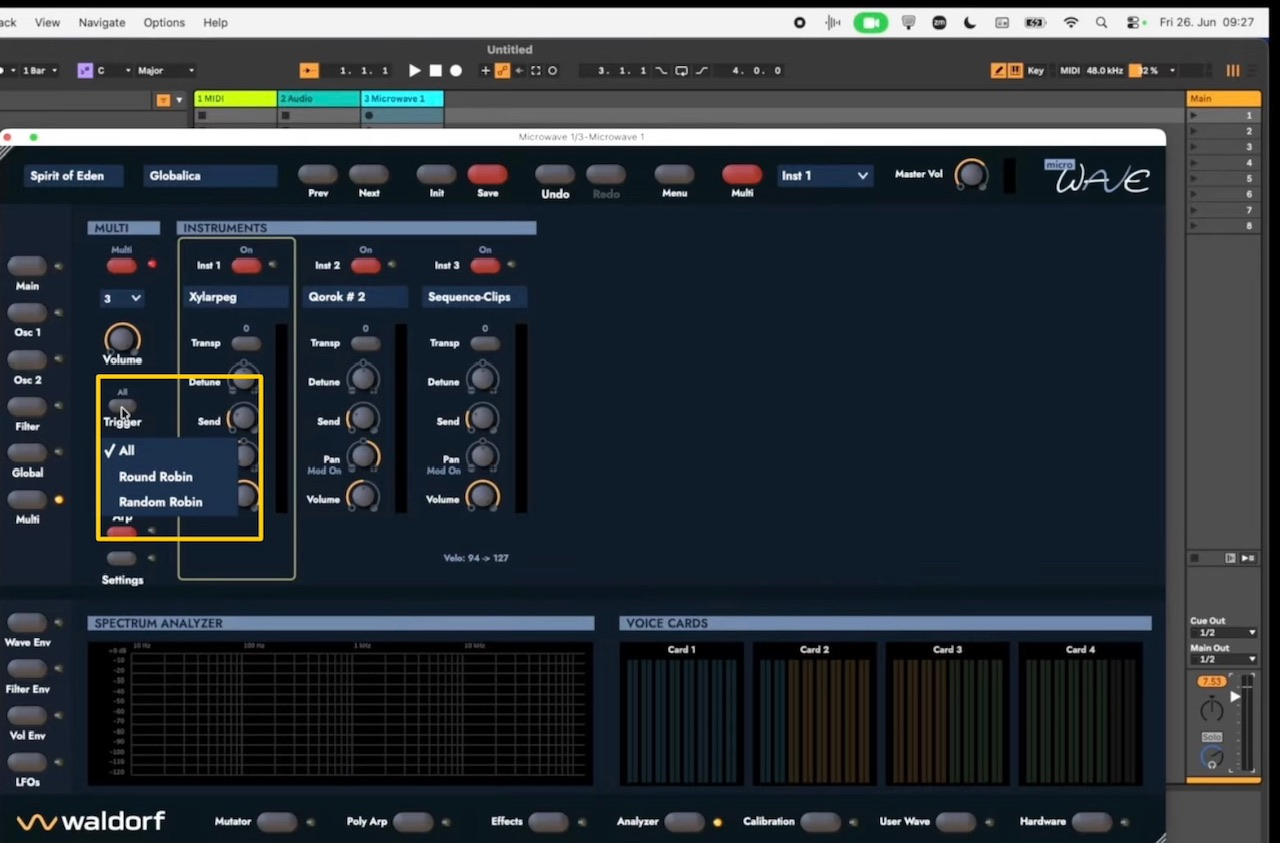
  • I have just been watching the latest YouTube demo of Microwave 1 version 2 by Rolf Wöhrmann. I opened my Microwave 1 version 1.3.0 on my iPad Air 6 and attempted to reproduce the functions of the desktop version as I watched the demo, the one function that I cant find is the Trigger/Round Robin/Random Robin tab, perhaps this function is not available on the iPad version, but just in case it is there staring me in the face….. does anyone know if it exists?
    Mike🍻

  • Question:
    how weird/leftfield/experimental this synth can do?
    any audio/video demos !? thnx

  • @rapidfire said:
    I have just been watching the latest YouTube demo of Microwave 1 version 2 by Rolf Wöhrmann. I opened my Microwave 1 version 1.3.0 on my iPad Air 6 and attempted to reproduce the functions of the desktop version as I watched the demo, the one function that I cant find is the Trigger/Round Robin/Random Robin tab, perhaps this function is not available on the iPad version, but just in case it is there staring me in the face….. does anyone know if it exists?
    Mike🍻

    I haven't seen that video....Do you mean this Trigger setting?

  • @rapidfire said:
    I have just been watching the latest YouTube demo of Microwave 1 version 2 by Rolf Wöhrmann. I opened my Microwave 1 version 1.3.0 on my iPad Air 6 and attempted to reproduce the functions of the desktop version as I watched the demo, the one function that I cant find is the Trigger/Round Robin/Random Robin tab, perhaps this function is not available on the iPad version, but just in case it is there staring me in the face….. does anyone know if it exists?
    Mike🍻

    That v2 feature (which I think is part of the polyphonic arpeggiator) is not in the iPad 1.3 version AFAIK.

  • @waka_x said:
    Question:
    how weird/leftfield/experimental this synth can do?
    any audio/video demos !? thnx

    Hi @waka_x,
    Here is a link to the latest demo video 👍

  • @drewinnit said:

    @rapidfire said:
    I have just been watching the latest YouTube demo of Microwave 1 version 2 by Rolf Wöhrmann. I opened my Microwave 1 version 1.3.0 on my iPad Air 6 and attempted to reproduce the functions of the desktop version as I watched the demo, the one function that I cant find is the Trigger/Round Robin/Random Robin tab, perhaps this function is not available on the iPad version, but just in case it is there staring me in the face….. does anyone know if it exists?
    Mike🍻

    I haven't seen that video....Do you mean this Trigger setting?

    Hi @drewinnit,
    Thanks for your reply,
    I haven’t seen that on my Microwave 1, I will go exploring after sending this reply. I have attached a screenshot of the Trigger tab on the desktop Microwave.

  • @drewinnit said:

    @rapidfire said:
    I have just been watching the latest YouTube demo of Microwave 1 version 2 by Rolf Wöhrmann. I opened my Microwave 1 version 1.3.0 on my iPad Air 6 and attempted to reproduce the functions of the desktop version as I watched the demo, the one function that I cant find is the Trigger/Round Robin/Random Robin tab, perhaps this function is not available on the iPad version, but just in case it is there staring me in the face….. does anyone know if it exists?
    Mike🍻

    I haven't seen that video....Do you mean this Trigger setting?

    Just found the Trigger function, unfortunately it doesn’t have Round/Random Robin like the Desktop version🫤 I was hoping it was added to the iPad version, but thanks for pointing me in the right direction 🍻

  • edited July 14

    I have 19 preset packs if anyone is interested for free👍
    https://www.dropbox.com/scl/fi/v49lr3hr2jm80dfa5z317/Microwave-1.zip?rlkey=1zetb2wiwfrplguaj8mbk1g9n&st=7amdfmzt&dl=0

    To install them, unzip the file in the Download Folder, open the unzipped folder and copy all folders inside, then select - On My iPad > Microwave 1 > Presets > paste all folders here, they will now be present in the Microwave Preset Browser.
    Enjoy🍻

  • @u0421793 said:
    What is the difference between Microwave iOS app, Nave iOS app, and a Protein actual synth?

    Hi @u0421793,
    I just watched a demo of the Protein synth on YouTube, to my ears it sounds very much like the Microwave 1 iOS, but that’s because it is based on the Microwave synth, but instead of having a drop down preset menu like Microwave, it has a rotary select control that activates the chosen preset when pressed down.

    Nave on the other hand is a beautiful sounding synth, the big problem is it being IAA and only one instance can be used in a project (Cubasis 3), I tend not to use it for that reason.
    The presets are more of a musical nature compared to both Protein and Microwave which have a more sonic structure and very useful for evolving weirdness, I’m saying this because I have never heard anything similar to what Nave can do on either of the other two synths.

    I guess only by watching all three synth demos would help you decide for yourself.
    Mike🍻

  • thank you.

  • @rapidfire said:

    @u0421793 said:
    What is the difference between Microwave iOS app, Nave iOS app, and a Protein actual synth?

    Hi @u0421793,
    I just watched a demo of the Protein synth on YouTube, to my ears it sounds very much like the Microwave 1 iOS, but that’s because it is based on the Microwave synth, but instead of having a drop down preset menu like Microwave, it has a rotary select control that activates the chosen preset when pressed down.

    Nave on the other hand is a beautiful sounding synth, the big problem is it being IAA and only one instance can be used in a project (Cubasis 3), I tend not to use it for that reason.
    The presets are more of a musical nature compared to both Protein and Microwave which have a more sonic structure and very useful for evolving weirdness, I’m saying this because I have never heard anything similar to what Nave can do on either of the other two synths.

    I guess only by watching all three synth demos would help you decide for yourself.
    Mike🍻

    The only one I actually have is Nave, and I’ve never understood the whole IAA vs AU thing, the synths themselves are the only bit I use, and only ever one at a time (how else do you twiddle the knobs on more than one synth?). I’ll stick to Nave then. I was actually prodding it a bit earlier today and being impressed yet again.

  • @u0421793 said:

    @rapidfire said:

    @u0421793 said:
    What is the difference between Microwave iOS app, Nave iOS app, and a Protein actual synth?

    Hi @u0421793,
    I just watched a demo of the Protein synth on YouTube, to my ears it sounds very much like the Microwave 1 iOS, but that’s because it is based on the Microwave synth, but instead of having a drop down preset menu like Microwave, it has a rotary select control that activates the chosen preset when pressed down.

    Nave on the other hand is a beautiful sounding synth, the big problem is it being IAA and only one instance can be used in a project (Cubasis 3), I tend not to use it for that reason.
    The presets are more of a musical nature compared to both Protein and Microwave which have a more sonic structure and very useful for evolving weirdness, I’m saying this because I have never heard anything similar to what Nave can do on either of the other two synths.

    I guess only by watching all three synth demos would help you decide for yourself.
    Mike🍻

    The only one I actually have is Nave, and I’ve never understood the whole IAA vs AU thing, the synths themselves are the only bit I use, and only ever one at a time (how else do you twiddle the knobs on more than one synth?). I’ll stick to Nave then. I was actually prodding it a bit earlier today and being impressed yet again.

    I just wish they would make Nave AUv3 so that I can use more than one instance in my projects, but the developer who created Nave left Waldorf and no one else knew how to modify it.
    IAA was the old way of connecting the app to a DAW but Apple gradually faded out IAA because the new AUv3 connectivity took over and it is more reliable allowing many instances of the same synth to be used.
    Regarding twiddling the knobs, I use MIDI CC to control anything that needs to be twiddled especially when using many different synths within a project, I just MIDI Learn what parameters need to be controlled, it’s like having a third hand when it comes to playing….. and there is no worry of forgetting to adjust a control or controls, just let MIDI CC take over 👍
    I am going to have a go at recreating similar Nave preset sounds on the Microwave 1 because it is such a great sounding synth.

  • @rapidfire said:

    @u0421793 said:

    @rapidfire said:

    @u0421793 said:
    What is the difference between Microwave iOS app, Nave iOS app, and a Protein actual synth?

    Hi @u0421793,
    I just watched a demo of the Protein synth on YouTube, to my ears it sounds very much like the Microwave 1 iOS, but that’s because it is based on the Microwave synth, but instead of having a drop down preset menu like Microwave, it has a rotary select control that activates the chosen preset when pressed down.

    Nave on the other hand is a beautiful sounding synth, the big problem is it being IAA and only one instance can be used in a project (Cubasis 3), I tend not to use it for that reason.
    The presets are more of a musical nature compared to both Protein and Microwave which have a more sonic structure and very useful for evolving weirdness, I’m saying this because I have never heard anything similar to what Nave can do on either of the other two synths.

    I guess only by watching all three synth demos would help you decide for yourself.
    Mike🍻

    The only one I actually have is Nave, and I’ve never understood the whole IAA vs AU thing, the synths themselves are the only bit I use, and only ever one at a time (how else do you twiddle the knobs on more than one synth?). I’ll stick to Nave then. I was actually prodding it a bit earlier today and being impressed yet again.

    I just wish they would make Nave AUv3 so that I can use more than one instance in my projects, but the developer who created Nave left Waldorf and no one else knew how to modify it.
    IAA was the old way of connecting the app to a DAW but Apple gradually faded out IAA because the new AUv3 connectivity took over and it is more reliable allowing many instances of the same synth to be used.
    Regarding twiddling the knobs, I use MIDI CC to control anything that needs to be twiddled especially when using many different synths within a project, I just MIDI Learn what parameters need to be controlled, it’s like having a third hand when it comes to playing….. and there is no worry of forgetting to adjust a control or controls, just let MIDI CC take over 👍
    I am going to have a go at recreating similar Nave preset sounds on the Microwave 1 because it is such a great sounding synth.

    The thing is, the Protein is neither AU nor IAA, it’s a box by itself. What about just putting Nave on a spare iPad (and it ran on what are now old iPads back in ‘the day’) - that’s the same thing, just use a spare iPad to make your own ‘hardware’ synth, just like a hardware synth with a touch screen. In fact get lots of old iPads and put all the apps of a song on there, all going into a mixer (a real one), then there’s only one app running at a time (which is easier on each iPad) and you’ve got hands on with all of them (except they’re not real knobs, which I’m increasingly wanting, I’ve decided some years ago that I really don’t like ‘screen’ knobs, but that’s a separate conversation).

  • @rapidfire said:
    I just wish they would make Nave AUv3 so that I can use more than one instance in my projects, but the developer who created Nave left Waldorf and no one else knew how to modify it.

    Rolf Wöhrmann (current Waldorf CEO) developed it.

  • @R_2 said:

    @rapidfire said:
    I just wish they would make Nave AUv3 so that I can use more than one instance in my projects, but the developer who created Nave left Waldorf and no one else knew how to modify it.

    Rolf Wöhrmann (current Waldorf CEO) developed it.

    Hi @R_2,

    Stefan Stenzel – Chief engineer and technical lead. He was responsible for the synthesis engine and was the principal architect behind Nave’s wavetable technology.
    

    Nave was released for iPad in 2013 as Waldorf’s first dedicated iOS synthesizer. It was notable for bringing Waldorf’s wavetable synthesis heritage to a touchscreen interface, including features such as:

    • advanced wavetable oscillators,
    • speech synthesis for creating wavetables,
    • 3D wavetable editing,
    • audio-to-wavetable conversion,
    • an interface designed specifically for touch interaction.

    Although Waldorf Music published the app, the original product credits consistently identify Stefan Stenzel, Rolf Wöhrmann, and Axel Hartmann as the creators of the initial Nave app.

Sign In or Register to comment.