Loopy Pro: Create music, your way.

What is Loopy Pro?Loopy Pro is a powerful, flexible, and intuitive live looper, sampler, clip launcher and DAW for iPhone and iPad. At its core, it allows you to record and layer sounds in real-time to create complex musical arrangements. But it doesn’t stop there—Loopy Pro offers advanced tools to customize your workflow, build dynamic performance setups, and create a seamless connection between instruments, effects, and external gear.

Use it for live looping, sequencing, arranging, mixing, and much more. Whether you're a live performer, a producer, or just experimenting with sound, Loopy Pro helps you take control of your creative process.

Download on the App Store

Loopy Pro is your all-in-one musical toolkit. Try it for free today.

Drambo - “visual extension” : Released

123457»

Comments

  • In other words, you’re seeing reflections from the other side, which gives the illusion of more shapes

  • edited July 20
    • double posted
  • @pedro said:

    @Gravitas said:
    Here's a screenshot using the Scene module thanks to @pedro

    Very nice, is that from the terrain shader?

    Yup, that is.

    I ported this one too, that might interest you (it has a CC license though)

    Looking good from the screenshot.
    I'll check this out.
    Thanks.

  • @pedro

    That is awesome.

  • @Edward_Alexander said:
    No @pedro that is your file, unchanged. You’re just seeing though it to the other side. Look at the project file.😌

    Ah, ok, sorry 😬
    I’m just puzzled cause I can’t find a single pentagon, but I trust your word (and it’s gemini’s credit for the SDF)

  • edited July 20

    @Gravitas said:
    @pedro

    That is awesome.

    Yep 😄 when you mentioned the screen shot looked good, I thought “you ain’t seen nothing”
    Didn’t want to give any spoilers
    How many fps running 1:1 16:9 full screen do you get? I get 7-49 depending on the locations (iphone 17)

  • @pedro said:

    @Gravitas said:
    @pedro

    That is awesome.

    Yep 😄 when you mentioned the screen shot looked good, I thought “you ain’t seen nothing”
    Didn’t want to give any spoilers
    How many fps running 1:1 16:9 full screen do you get? I get 7-49 depending on the locations (iphone 17)

    I get 5-12FPS on average on my Macbook Air M1

  • @Gravitas said:

    @pedro said:

    @Gravitas said:
    @pedro

    That is awesome.

    Yep 😄 when you mentioned the screen shot looked good, I thought “you ain’t seen nothing”
    Didn’t want to give any spoilers
    How many fps running 1:1 16:9 full screen do you get? I get 7-49 depending on the locations (iphone 17)

    I get 5-12FPS on average on my Macbook Air M1

    It seems to go faster on the M5 MacBook Air switching from code to shader kit?!
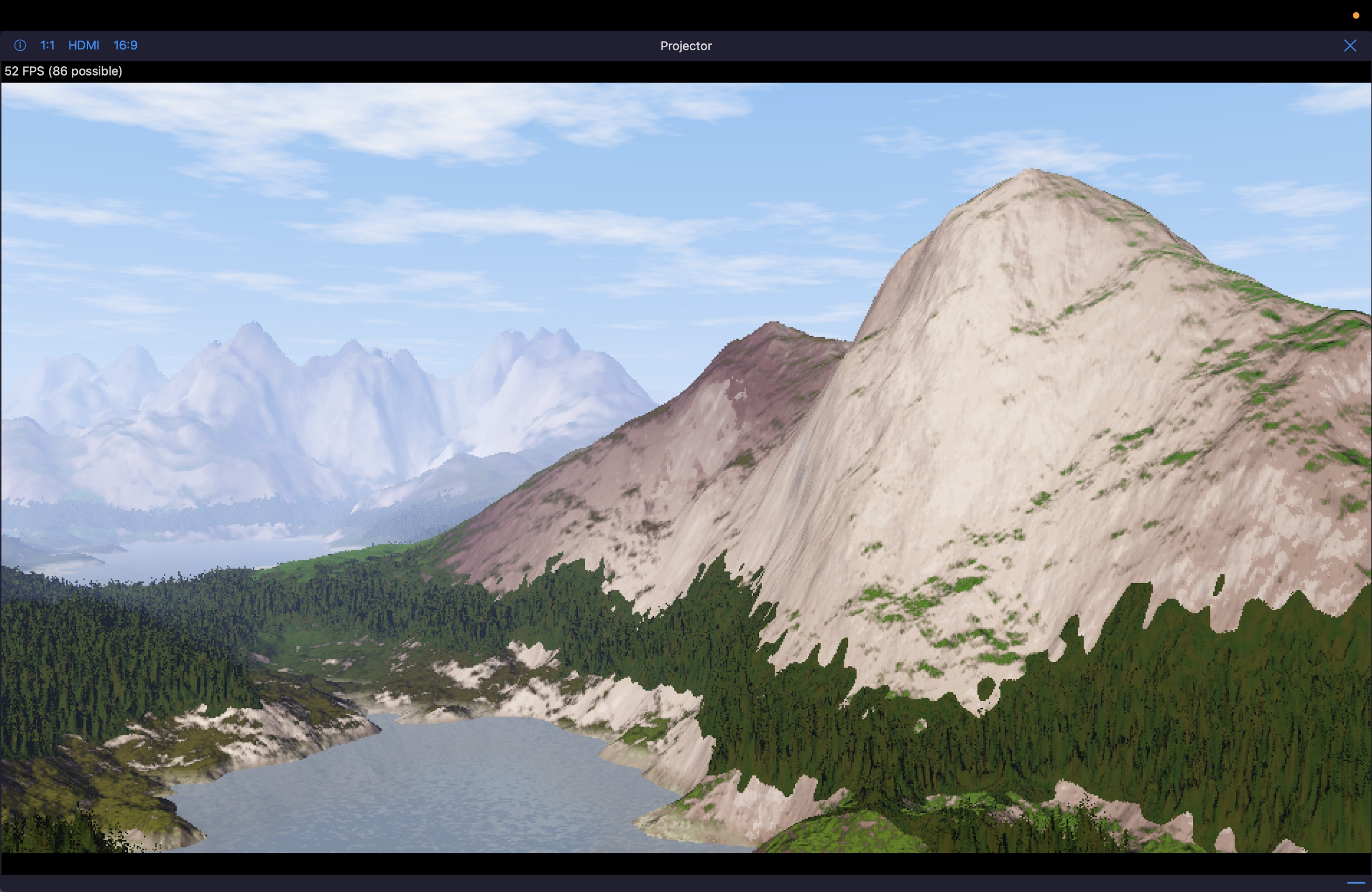
  • edited July 20

    @Samu said:

    @Gravitas said:

    @pedro said:

    @Gravitas said:
    @pedro

    That is awesome.

    Yep 😄 when you mentioned the screen shot looked good, I thought “you ain’t seen nothing”
    Didn’t want to give any spoilers
    How many fps running 1:1 16:9 full screen do you get? I get 7-49 depending on the locations (iphone 17)

    I get 5-12FPS on average on my Macbook Air M1

    It seems to go faster on the M5 MacBook Air switching from code to shader kit?!

    That looks like a bug, in that switching to shader kit should erase the code. It’s probably running the original code, if you try to insert anything in the rack image will freeze
    And I don’t notice any noticeable difference, anyway
    The shader runs at different speeds, for instance snow seems to be the most taxing

  • On my 13" M5 iPad Pro 2TB (16GB RAM), my frame rate is a little better than @Gravitas' but worse than @Samu's with that one.

  • I've always loved this terrain shader.

    This was one of my first "ports" I did of a shadertoy gls shader to metal (MSL) conversion for Drambo. This was when I first learned how to use LLMs, and spent many hours going back and forth with error messages, and then things that just didn't look right. Until that one compile, where this beauty emerged.

    Slightly altered (and IMO, much better) than the original; and I'm sure the original has some sort of copyright/license.

    But it was so satisfying to get it working in Drambo!

    (Play with the "TurbBias" knob to make the terrain grow! Also has full camera control pitch/yaw, elevation, focal point, and more)

  • Can someone please tell me where to find the "reference.md" file referred to in Section 22 of the "Scene Module" page of the Drambo Visual docs (https://www.beepstreet.com/drambo-visual/scene-module.html)? Or maybe just a hint on where to search? Is this a Metal Shading Language doc? A Drambo doc? A Processing language doc?

  • edited July 21

    @BeatsMe good question.

    I think that might be referring to the “module reference” doc file which is accessible through the quick help (?) in Drambo

    I think he’s still working on this part of the help/reference system, and hasn’t added the visual modules just yet.

    Edit: looking at the scene module page again, I don’t think it is talking about the module reference after all.

  • @Edward_Alexander said:
    @BeatsMe good question.

    I think that might be referring to the “module reference” doc file which is accessible through the quick help (?) in Drambo

    I think he’s still working on this part of the help/reference system, and hasn’t added the visual modules just yet.

    Edit: looking at the scene module page again, I don’t think it is talking about the module reference after all.

    A quick look using Google returned this

    "The reference.md file in the BeepStreet Drambo Visual/Scene Module documentation serves as a technical lookup dictionary for custom GLSL shader coding. It lists built-in variable names, math constants, and functions necessary for creating visual nodes and ensuring code compiles correctly."

  • @Gravitas said:

    @Edward_Alexander said:
    @BeatsMe good question.

    I think that might be referring to the “module reference” doc file which is accessible through the quick help (?) in Drambo

    I think he’s still working on this part of the help/reference system, and hasn’t added the visual modules just yet.

    Edit: looking at the scene module page again, I don’t think it is talking about the module reference after all.

    A quick look using Google returned this

    "The reference.md file in the BeepStreet Drambo Visual/Scene Module documentation serves as a technical lookup dictionary for custom GLSL shader coding. It lists built-in variable names, math constants, and functions necessary for creating visual nodes and ensuring code compiles correctly."

    Google is hallucinating. Drambo uses Metal Shader Language (MSL), not GLSL.

  • @Edward_Alexander said:

    @Gravitas said:

    @Edward_Alexander said:
    @BeatsMe good question.

    I think that might be referring to the “module reference” doc file which is accessible through the quick help (?) in Drambo

    I think he’s still working on this part of the help/reference system, and hasn’t added the visual modules just yet.

    Edit: looking at the scene module page again, I don’t think it is talking about the module reference after all.

    A quick look using Google returned this

    "The reference.md file in the BeepStreet Drambo Visual/Scene Module documentation serves as a technical lookup dictionary for custom GLSL shader coding. It lists built-in variable names, math constants, and functions necessary for creating visual nodes and ensuring code compiles correctly."

    Google is hallucinating. Drambo uses Metal Shader Language (MSL), not GLSL.

    It doesn't matter about the language used in this case,
    what matters is that reference.md is a look up dictionary for dRambo's Scene module.
    From what I've gathered users cannot access it directly
    however I'm sure @giku_beepstreet will be able to clarify this at some point.

Sign In or Register to comment.