Loopy Pro: Create music, your way.
What is Loopy Pro? — Loopy Pro is a powerful, flexible, and intuitive live looper, sampler, clip launcher and DAW for iPhone and iPad. At its core, it allows you to record and layer sounds in real-time to create complex musical arrangements. But it doesn’t stop there—Loopy Pro offers advanced tools to customize your workflow, build dynamic performance setups, and create a seamless connection between instruments, effects, and external gear.
Use it for live looping, sequencing, arranging, mixing, and much more. Whether you're a live performer, a producer, or just experimenting with sound, Loopy Pro helps you take control of your creative process.
Download on the App StoreLoopy Pro is your all-in-one musical toolkit. Try it for free today.
Comments
I don't mind a wonky groove and I'm constantly looking for weird ones...
But I recently recorded 2 bass riffs from scratch, one 6 the other 10 seconds long, 3 versions for each riff, no metronome.
Maximum deviation: 3 10th of a second, 2 of the longer one were spot on to the 2nd decimal, but that's just luck I guess
(it wasn't intended at all, I just noticed it while cutting the samples from Audioshare)
cheers, Tom
I know what you mean. My other drummer doesn't like things too quantised. What did you use as reference for no metronome recording? I never use the metronome but I always have some rhythmical stuff going on either in Samplr (arp) or loopy.
I never got Samplr either, until very recently. Carefully watching skilled people jamming live with it helped a lot. Like @supadom and that other chap who posted quite a few excellent vids recently. (Help me out someone...).
that's a very generous review but speaking as someone who got into iOS music solely because of and for the sole purpose of using Samplr I think it would be even better if it could. do these things that mpcs can do.
panning
edit samples
route tracks out of whatever outputs you want
automate tempos
automate time signatures
merge tracks
automation of mutes and solos
time stretching
individual slice features
I could go on and on but suffice to say "beats any mpc hands down" is a bit farfetched at best.
and the motion sequencing in samplr is not even comparable to an mpcs midi sequencing, in any shape or form.
but I do love Samplr as much as you do
well, I should have added that this referred to what I would use an MPC for.
(considered one more than once, but SamplR finished that process)
of course I wouldn't refuse single outs, but when SamplR was released there was noch such thing available - not even Audiobus can do that. Minimix is the first one I noticed to support that feature.
The AD480 reverb also can adress external interface channels - in theory.
If you activate the feature when it's loaded in Audiobus the iPad will crash as deep as it gets - don't try with monitors connected, it's freaking loud...
my 2 favorite quotes:
less, but better (Dieter Rams, a German designer)
devide and rule (good ole Caesar)
I don't need all in one box, but get along with simple tools that do their job best.
As mentioned in another thread I use a $800 DAW, but I'm not shy to preprocess the files with a freeware editor (as the DAW is non destructive and I want the files modified)
@supadom I just used my own inner clock, no external reference...
I can't tell the bpm, but the thing is rather stable - I frequently play 15-30 minutes and can cut sections from arbitrary regions, or even different takes, timing doesn't drift too much.
The disadvantage is that the 'momentary timing' has a big influence on my own perceiption - I may regard the track completely different some days later, often surprising myself.
cheers, Tom
Since Samplr is the greatest app I have ever played with, I currently can't stand the title of this thread.
When I first got into music 20 years ago, an accordian repairman/cheezy lounge singer/mentor lived next to me. He heard me listening to my techno records next door. I was down to one turntable after moving, so my DJ career was done. He came over and listened. Then he said, "I have a machine that sounds like your brain." Went over to his room and came back with a Roland TR-808. Still in the box, plastic cutout protector on it. He let me play with it for the night. I stayed up all night. When he came back, I showed him what I did, and he sold it to me. For $160. Just because I was so in love. It inspired everything I did.
Samplr is now the machine that sounds like my brain. It's just so intuitive. If it breaks, I'll be heartbroken. It is worth more than the price of the iPad to me.
Sorry, you lost me there. You mean you don't need the metronome when you record samples to import into samplr or when you record using motion recorder within samplr?
Intrigued by the mysticism here! Can I hear some of your Samplr results? I am baffled by it. Can never figure out how to record my gestures; sometimes the repeating circles appear, sometimes not. I would love to make this work. (Also, no audioshare in? Harrumph.)
Gimme a day and I'll shoot a video.
Recording gestures is easy. Right in the middle above the waveform is where you can record three different instances of gestures. It will count you down into the recording of them, and you may make them as long or short as you wish. I usually get a rhythm going in the Arp first, so I know I have a backbone to the song.
Nicely done.
I enjoyed that story and would like to hear more about that fella; he sounds like quite a character.
A-fuckin-men to that!
I really look forward to link in this app!!!
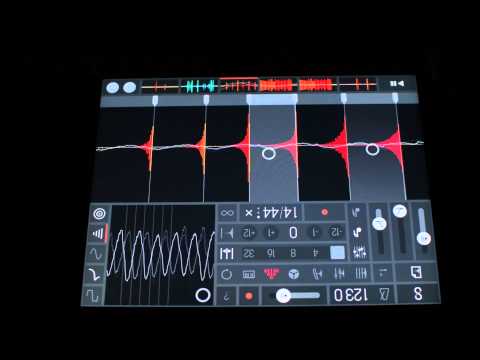
How about this one!
I love Samplr, yet i ditched it a while ago because i wanted to get to grips with Gadget. This thread made me re-install it but now i encounter a problem with audiocopy. Samplr crashes every time i try to paste audio into it. I am on an Ipad 4 IOS 9.3.2. Anyone else have this? Or is this a audiocopy problem. It seems to wrork fine with other apps...
I'm not 100% shure, but I remember similiar issues with paste.
Iirc 'send to' SamplR from Audioshare works much better.
cheers, Tom
Thanks Tom, i will do it that way.
There is a workaround for paste. Tap the gear in the upper right corner instead of the paste button in the middle of the screen. It requires two more taps but it does work.
Thanks for the tip, Luke!
It does work but crashes when returning to the sample browser. Doesn't that happen to you?
It does crash if I retrace my steps through the taps to paste. It doesn't crash, though, if I just tap on the screen outside of the paste modal window.
rediscovered a folder with SamplR snippets and had some guitar sounds laying around
sampled synth source was probably iVCS3...
Lots of apps offer multiple outs by way of exposing multiple ports to AB and IAA. Think that's generally what people are wanting around here vs the ability to address multiple hardware ports. Samplr is ripe for it. Then @kobamoto and @JohnnyGoodyear could at least pan via AUM.
Amazing story @FlightManual! I already had a lot of respect for accordion repairmen (those things are crazy crazy complicated/delicate) but now I kinda want to be one.
I wrote 'hardware outs' because of 'arbitrary outputs' in the referring post, but actually don't make a lot of difference between the two.
On the other hand if I imagine only 3 outputs on dedicated AB lines running through 3 different fx apps on the same tablet... screen swapping would drive me nuts.
I'd appreciate the iConnect method with more than 2 divices...
cheers, Tom
that would be great, but I primarily need panning with in the app as I use it for production more so than performance
launchpad app, blocs wave, even the circuit doesn't have it. This is why the aliens attacked us in the movie independence day.
Absolutely true.
@kobamoto and @JohnnyGoodyear Out of curiosity, if Marco were to show up here and ask you to decide between:
which would you chose?