Loopy Pro: Create music, your way.
What is Loopy Pro? — Loopy Pro is a powerful, flexible, and intuitive live looper, sampler, clip launcher and DAW for iPhone and iPad. At its core, it allows you to record and layer sounds in real-time to create complex musical arrangements. But it doesn’t stop there—Loopy Pro offers advanced tools to customize your workflow, build dynamic performance setups, and create a seamless connection between instruments, effects, and external gear.
Use it for live looping, sequencing, arranging, mixing, and much more. Whether you're a live performer, a producer, or just experimenting with sound, Loopy Pro helps you take control of your creative process.
Download on the App StoreLoopy Pro is your all-in-one musical toolkit. Try it for free today.
Comments
I don't think so it's more a lazy reuse of poor original framework. He claim to have spent 8 years on FMR but on the file and history/undo it's pretty much just a repetition of the old system.
I get it, it's a lot of work to start over but at the same time, the iOS file system has gotten so much better (to my understanding, I've only used iOS since 2019).
I did the same thing as you but then started to be a lot more careful and copying to a new file instead of saving over but now I gotten more confident and do use the overwrite.
Thanks for your reply @0tolerance4silence . Yes, I want to run Fmr in AUM. So you’re saying that I link AUM with Ableton? (As opposed to linking FMR with Ableton)
Also, I still haven’t managed to figure out how to pause playback and then start instantaneously from where I left off in FMR. Anyone able to help with that? Cheers!
Ok, but you’re conflating the 2 issues (my fault for not being clearer) ; the link question is one thing, and I think I understand that now.
Stopping and starting FMR is something I want to do (using FMR in AUM) completely separate from the link thing….
Bumpity bump
Sorry folks, don’t mean to come across as a petulant child,…but I’m just gonna keep bumping this until I manage to figure it out.
If no one knows the answer, then does anyone know the best way to contact the dev?
Cheers!
All contact info is on the website and there's a special address for every app. Yes it's childish and annoying to keep bumping, if someone has an answer they will get to you, you should know that by now.
Only because I just gave you some shit😉 I'll also give you what you need: [email protected]
Is there a way to bring projects from vanilla Fugue into Rubato?
Can't seem to save my own preset. I have a preset that I made a few weeks ago (so i must've saved somehow!), but now I'm trying to duplicate it, make a few changes and then rename it, so that I have a slightly modified version of the preset. I click on the 3 dots in top right corner, select "duplicate", then "rename", but then it just seems to revert back to the original - it doesn't save with the changes I made. Stumped.
When I look it up on the intraweb, it says:
....but I can't see the "more menu" option (?)
@Alexandernaut
//img
The more menu should be the one in the upper right of the menu you have open. Save as is never used in Fugue, instead Write as +1 or Write as are. If you don't see three dots in the upper right of the menu you show, I dunno.
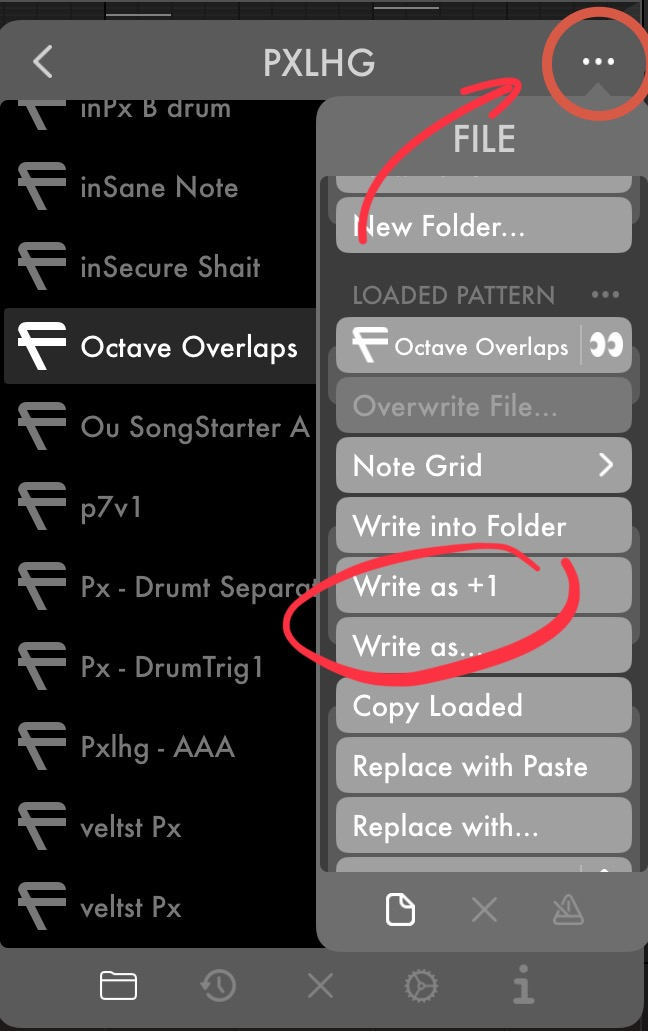
Aha! Thanks @Pxlhg . Got it
Black Friday sale peeps! I’m in. Looking forward to learning this one over the holidays.
How’s everyone liking it?
@gusgranite it’s great. Really deep. But it’s missing som QOL updates, like copying and pasting, or saving things like automation presets, or just anything to help speed up creating new patches from zero. Also it needs to accept midi in for things like playheads, (relative) pitch, automation, etc.
It already has very deep automation controls, but it’s only in-house and doesn’t play well with others.
Good to know @Darkstring . Thank you. I wonder if the host can compensate of any of these things which it’s used as an AUv3 plugin?
How complete is the manual and in-app help? Has much info been added since release, do you know? Because I remember the manual was incomplete.
@Gavinski I haven’t checked the manual in a while. The in-app help is the same from what I can see, which is basically descriptions in some submenus mostly to do with modulation.
@gusgranite Perhaps. I don’t know. I think the best use cases right now are either stand alone midi driver for potentially very complex stuff, or midi generator for ideas you can chop and slice as needed in bigger projects.
It’s fairly useless as a classic midi effect/processor.
Hmm not the singing praises I was expecting. Will need to dig in and see what I can muster.
https://x.com/verbalee/status/1995681104175501484?s=46
Some piano I was able to squeeze out of FugueMachineRubato. Love the stuff this app can do.
I’ll be one to sing some praise - I love this app. Being able to specify regions for each playhead is cool - you can set a couple of playheads doing their thing in tandem but have another playhead off to the side doing its own thing. You can do so much with easing and accelerating notes. Having notes tied to drum triggers is a bit clunky but adds some more utility. My favorite feature is probably having midi notes that move over time. With the above setup of two playheads in a segment and another in its own section you can have a note pop in and out of each part.
If you’ve never used this app some of that may make no sense and it’s kind of tricky to explain some of the deeper features.
This is my favorite sequencer as a whole I’m realizing. All the caveats are true listed above, it’s a bit rough around the edges, but it’s been very consistent for me and is a very powerful musical tool.
There’s definitely nothing else like it.
This video really helped understand how to approach Rubato. I watched it on a lunch break at work without the software on me and I think in this case watching before following along is a good idea. Between this video, the manual, and trial and error I’ve pulled out a lot I like.
You could really write an entire piece using Rubato. Between repeating segments and playhead specific regions you could structure a full song. That’s a challenge I’ve been wanting to tackle.
One thing I will say, this thing is a bit of a Legend of Zelda dungeon - stepping away for extended periods can leave you puzzled when you come back to it a few weeks later.
Just noticed it was on sale for $29, so I finally picked it up.
Is the “Show Playhead Notes” option from the original not available here? Not finding it in Rubato’s settings menu…
Also, it will follow clock via Ableton Link, but it won’t respond to Start/Stop?
Is that right, or am I missing a setting?
Can’t remember how but mine definitely responds to start/stop. Not sure about the Show Playhead Notes though.
You talking about “show note labels”?
If so, then no.
Rubato works a lot differently than the OG Fugue Machine (as I’m sure you’ve discovered by now). The “notes” on the grid rely exclusively on the settings in the playhead’s settings below. There can be multiple notes on a single grid line, and each be different notes. Or in other words, you can use just one note on the grid to cycle through an entire scale of notes.
OG FM’s grid was more like a piano roll, where the notes placed could be defined, and they’d remain what you set them to.
In Rubato, the grid is just a place to stick “notes” for the playheads to trigger. All the note values, including pitch, speed, and much much more, are in the playhead settings.
Hope that makes sense!
Yes, “show note labels” is what I meant. And I am already starting to see why it wouldn’t be pertinent in Rubato.
Thanks for the clarification, though.
Lots to dive into and learn in this one. But having fun with it already.
It will follow Start/Stop if I open it inside of AUM, which is probably what I’ll be doing 99% of the time anyway…
There are literally so many jokes that you can’t catch them all in one watching. There often multiple layers to the jokes, and some are said in passing, or while laughing at the previous joke. It’s a phenomenal show, great cast, brilliant writing. Just top notch stuff
Rubato is phenomenal and I’ve only scratched the surface.
What's the reason for having 5 offsets per playhead? I can't understand why 1 is not enough. Cannot believe this app still doesn't have a proper manual more than half a year on!