Loopy Pro: Create music, your way.
What is Loopy Pro? — Loopy Pro is a powerful, flexible, and intuitive live looper, sampler, clip launcher and DAW for iPhone and iPad. At its core, it allows you to record and layer sounds in real-time to create complex musical arrangements. But it doesn’t stop there—Loopy Pro offers advanced tools to customize your workflow, build dynamic performance setups, and create a seamless connection between instruments, effects, and external gear.
Use it for live looping, sequencing, arranging, mixing, and much more. Whether you're a live performer, a producer, or just experimenting with sound, Loopy Pro helps you take control of your creative process.
Download on the App StoreLoopy Pro is your all-in-one musical toolkit. Try it for free today.
Outgrowth by Aqeel Aadam Sound (Released)

https://apps.apple.com/us/app/outgrowth-sample-instrument/id6755965753
A new sample instrument by Aqeel Aadam Sound and BlankFor.ms
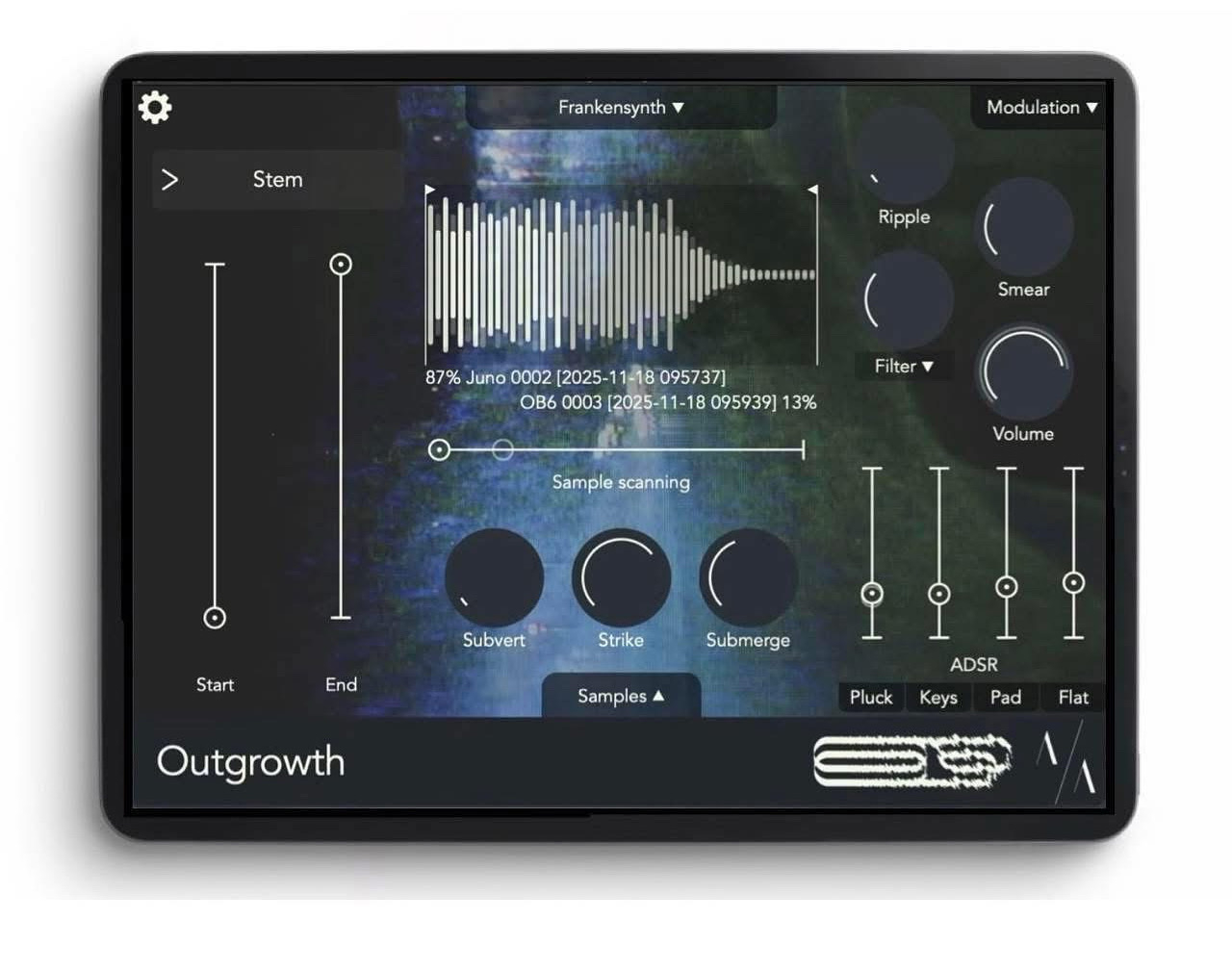
Outgrowth is a sample-based instrument built collaboratively by Aqeel Aadam Sound and BlankFor.ms. Designed with creativity, flexibility, and performance in mind, Outgrowth provides unique, multifaceted ways to reimagine audio with your mouse or keyboard.
MPE compatible.
Includes 50+ presets and 100+ samples built by BlankFor.ms.
Outgrowth features five unique engines for processing samples:
- Stem: A basic one-shot style player that repitches the sample
- Retain: A granular stretching engine that sustains the sample indefinitely
- Reflect: A looping algorithm that loops the sample at a consistent rate across all pitches
- Radiate: An additive resynthesizer that maps each harmonic of the sample to a sine wave oscillator
- Delve: A wavetable synthesizer in which the sample becomes the basis for a completely unique wavetable
Outgrowth also features five standout audio effects for shaping your sounds further:
- Subvert: A unique shaper that flattens or inverts the sample's volume
- Submerge: A singular effect for adding dimensional realism to sample repitching
- Strike: A dynamic control for adding an acoustic-like response to sample playback and performance
- Ripple: A one-knob tape emulation handcrafted by BlankFor.ms that can be subtle, deconstructive, and anywhere in between
- Smear: A pre-ADSR reverb for congealing notes and blurring boundaries between pitch and texture
And further still, Outgrowth offers a robust modulation matrix for generative or performative control over all parameters. Control every single parameter within Outgrowth via LFOs, unique random sources, velocity, note pitch, aftertouch, MPE control, and more.
Finally, Outgrowth offers a robust preset system, including more than 50 bespoke presets and over 100 samples by BlankFor.ms. Explore ethereal ambient pads, haunted lofi keys, shimmering tape-infused plucks, gnarled percussive textures, and more.
Comments
I want this critter so badly. I really dig Aqeel's UI's and Waymaker has been just an absurdly deep sequencer. The Ui reminds me of the movie skinamarink.
The first time I saw this I thought "great, another granular synth!" (unsarcastically, I like them). Then I saw the video manual and began to understand how deep this thing is, all wrapped in such an understandable UI. Just in time for Christmas break
Instabuy from this developer, and it’s way bigger than his previous apps. The modulation possibilities are nuts. Can’t wait to have a good sit down with it👏
Spacecraft 1&2 has always been my go to granular sampler it’s nice to have other new options now to explore sound design.
Been trying out on desktop which has a fully functional demo. It's pretty cool albeit not revolutionary. Price was a bit more than I thought it would be on IOS but not chocking.
I still haven’t really wrapped my head around their other apps yet but they’re fun to play with. I’ll probably pick those up at some point.
Pardon if this has been covered, but this is not an Auv3 instrument, correct?
Yes it's Auv3
Wonder if it will be added to the bundle price at some point ?
Ok neat. Thanks for the confirmation!
Great job! I will definitely purchase once there is the ability to add as an Insert FX. This would make quality of life easier to sample directly into the app vs the process of recording, importing a file. If not possible, understandable.
Woah. There’s a LOT of stunning stuff and future potential in this one device.
This is definitely our #1 request, though it will be fairly complex to implement from both a technical and UX perspective, so I don't want to make any promises about when it would be available. It will require a whole flow for recording (probably an automatic option as well), monitoring, naming a sample, exporting it somewhere so you can use it again, etc. But we definitely hear you and are intending to sort it out!
@aqeelaadam The app isn't responding correctly when using an Apple Pencil Pro, the controls in the main window work as expected but when I try to select an engine the selection lights up but nothing happens. The same goes for trying to load a preset...
Would you mind emailing at [email protected] and we'll troubleshoot? I'll need some help figuring out the issue because I don't have an Apple Pencil
@aqeelaadam Yer would be good to have direct recording into the effects slot. Understand it’s a big undertaking. It’s trying to to make it seamless and not destroy the apps UI.
Spacecraft has the record in option but it does make the UI a bit clunky after you tried it as you mentioned adding saving exporting etc. It’s how to add it elegantly without destroying the core of the app.
Playing Outgrowth with added modulation using Piano Motiffs in AUM is great fun.
Will do!
Just read through the manual (https://files.aqeelaadamsound.com/AqeelAadamSound_Outgrowth_Manual.pdf). Sounds like it has some really great features @aqeelaadam, congratulations on the release.
How long is the intro pricing on for? Would like to see some reviews before making a decision.
Yeah exactly. From our perspective, also, we didn't want to necessarily rebuild the functionality that most DAWs offer. Most DAWs offer some sort of clip recording feature built-in. And even for more advanced operations like, for example, if you want to really accurately trim a sample based on transients, you might as well just use something like Ableton's built in editor.
But, of course, that's at odds with the reality of iOS, where many "DAWs" (like AUM) seem to really just be hosts for plug-ins with limited ability to actually edit audio. So, it's a bit of a rock and a hard place, but simpler hosts like AUM are kind of the exception. We'll be working to better fit in that ecosystem though!
The pricing should run through the 29th (don't quote me on that since I never know with Apple if that means it ends on or after that date ). There's a few videos from YouTubers up now and more coming soon
Great, thanks @aqeelaadam.
I think the excellent video manual video is worth more than any reviews could be. If that doesn’t clarify if it’s for you or not, I’d be really surprised.
Wow. This is an outstandingly great app. I know it's also a desktop app, but it feels like a new iOS classic, right up there with Samplr to me.
I only have 2 of this dev’s apps. > @wim said:
I only have Ridgewalk and weeping wall from this dev. I like their interface design, but they both seem more targeted for musicians, than for my typical use.
I’ve recently unlocked Soundbox for creating playable instruments from my samples. Mostly for playing custom sound samples and recordings into Logic to go along with short, abstract video pieces. For this use, I’m loving it. Similar in a way to SynthScaper (also brilliant for this use) but way more intuitive. Soundbox is also targeted at musicians, but I don’t find it as cumbersome for my use… with far less dense parameters up front that are of more use to musicians than for my stated use.
This one sounds like it too is primarily targeted at musicians… from skimming the video manual link you posted.
If you are familiar with SoundBox’s instrument creation and interface… how does Outgrowth compare in your opinion?
Sorry, I'm not familiar with SoundBox.
It's interesting to me that you reacted this way to those apps since I had to suspend just about all my ideas of musicianship to begin to appreciate Ridgewalk and Weeping Wall. I kept trying to approach them from a musician's perspective when what I really find them useful for is simply to add ambience. I had to suspend my player's mentality and look at them more like coloring tools. Waymaker on the other hand is totally musician focused to me.
I'd say this one is definitely more musician focused in that it's geared toward making keyboard playable instruments out of samples. Not that it couldn't be used for other purposes - not by a long shot. However, I'm guessing if your impression of Ridgewalk and Weeping Wall is what it is, then it'll be much moreso with this one.
Hmmm…. I think I misspoke about the other two. I DO like them a lot. And they are definitely up my alley for sound scape stuff. I think I lost a little interest with Waymaker and didn’t buy that one, but I don’t regret buying the first two at all.
I’ll keep an eye on this one regardless…. Mostly because I like this dev’s GUI aesthetic, and the other two apps are fun… even if I don’t use them as much for my stated use.
I’m only asking you because you tend to have a good way of describing what you like about an app, and I know you at least dabble in the Mozaic stuff as well… so, I value your opinion when condensing and describing an app’s use and it’s strengths, etc.
Yes this would make it an absolute must buy for me. Similar to Ridgewalk which offers a range of ways to fill the buffer. If it worked with live audio especially it would be an absolute no brainer.
@aqeelaadam
In the desktop demo, there seems to be an issue with downloading Factory samples.
I'm in Ableton Live 10 on Windows 10.
Hope I can get this to work before the week's trial runs out
Thanks for the kind words.
This one is hard to sum up because ... it's huge ... and I can tell I'm going to be using it in a lot of different ways. I mean, I picked it up and loaded a random sample that I honestly don't remember at all what it sounds like. In seconds I had a unique and interesting atmospheric texture. Over the next 30 minutes I goofed with three of the engines and had playable instruments of really different types. By the time I hit Radiate, I couldn't help but react here. I haven't even touched the modulation section yet.
One standout thing to me is how thoroughly they've thought through the details of what people might want from the app. It's truly impressive. Usually in just a couple of minutes I can start to think of things I would have added or done differently. This is the opposite. In that video they describe so many things that I wouldn't have even thought of that they've already added. I love apps like that.
But, it's not the kind of thing that would be useful for everyone.
(btw, at first I though Ridgewalk and Waymaker were OK for the bundle price, but I didn't figure I'd get much use out of them, being too different from anything I'm used to. Now they creep more and into all kinds of projects.)