Loopy Pro: Create music, your way.

What is Loopy Pro?Loopy Pro is a powerful, flexible, and intuitive live looper, sampler, clip launcher and DAW for iPhone and iPad. At its core, it allows you to record and layer sounds in real-time to create complex musical arrangements. But it doesn’t stop there—Loopy Pro offers advanced tools to customize your workflow, build dynamic performance setups, and create a seamless connection between instruments, effects, and external gear.

Use it for live looping, sequencing, arranging, mixing, and much more. Whether you're a live performer, a producer, or just experimenting with sound, Loopy Pro helps you take control of your creative process.

Download on the App Store

Loopy Pro is your all-in-one musical toolkit. Try it for free today.

Geoshred /Swam Collaborate - Just Wow! - IAP

1131416181922

Comments

  • @Masanga said:

    @moForte said:

    @DSCB57 said:

    @Treaszure said:
    @moForte Since the Jamstik Studio MIDI guitar is an MPE device will it work flawlessly and will it be recognized as an MPE device or is it only certain MPE devices like Roli/Linnstrument that is compatible?

    I would ask the same about the Artiphon Instrument 1, also being an MPE controller - is it compatible?

    We have an Artiphone Instrument 1 MIDI configuration built into GeoShred. I don't recall if it was fully MPE. I'll pull It out next week and look.

    The I1 has been fully MPE-compliant since early 2017, though it may not have been yet when the GeoShred configuration was added. But the GeoSWAM instruments also seem to work fine with it using the other MPE configurations built in, including the Seaboard one. I haven't tested all parameters systematically, though.

    Thank you. I assume that these were implemented via firmware updates on the I1, so a 2016 model with the latest firmware should be good to go?

  • @moForte When I use GeoShred as an AUv3 in GarageBand, I can’t use my seaboard as a Device. I get an error message stating I have to use an MPE device when attempting to open geocello. This only appears to be happening in GarageBand for me.

  • @DSCB57 said:

    @Masanga said:

    @moForte said:

    @DSCB57 said:

    @Treaszure said:
    @moForte Since the Jamstik Studio MIDI guitar is an MPE device will it work flawlessly and will it be recognized as an MPE device or is it only certain MPE devices like Roli/Linnstrument that is compatible?

    I would ask the same about the Artiphon Instrument 1, also being an MPE controller - is it compatible?

    We have an Artiphone Instrument 1 MIDI configuration built into GeoShred. I don't recall if it was fully MPE. I'll pull It out next week and look.

    The I1 has been fully MPE-compliant since early 2017, though it may not have been yet when the GeoShred configuration was added. But the GeoSWAM instruments also seem to work fine with it using the other MPE configurations built in, including the Seaboard one. I haven't tested all parameters systematically, though.

    Thank you. I assume that these were implemented via firmware updates on the I1, so a 2016 model with the latest firmware should be good to go?

    Yes, the 2016 hardware remains (I think) the current revision, so you'll be good to go. Lay in some coconut oil or similar if you're likely to want to explore the slide mode (really beautiful on the string instruments here); the rubber surface is optimised for tapping and is a bit frictiony for sliding. Depending how much use your secondhand unit has seen, there may be some wear on the string ridges; this doesn't affect actual responsiveness and makes no difference whatever to either feel or response in tap playing, but can make unlubricated friction uneven over string length in slide modes. (My Eb on the second string has been particularly distressed by four years of daily use where the fingers seem to gravitate instinctively to C minor. But a dab of oil and I'm Fake Pablo Casals.)

  • @sujoybose77 said:

    I am a user of both Velocity Keyboard and Geoshred for almost an year.. Yes I think Geoshred should try to adopt the touch radius sensing technology/algorithm from Velocity Keyboard app. Also I miss the option to create custom scale... Hope Jordan Rudass and @moForte are reading these valuable feedback...

    It is possible to create custom scales on GeoShred: performance settings/keyboard/customize scale. You can even set the microtuning for each note.

  • Also, while I remain mightily chizzed off at the jailbreak detection (has any other iOS music software ever done this? – lines have been crossed here and a once invulnerable reputation now has a big dent in its fender), I can't not stand in my doorway and applaud that this update and these instruments work on iOS versions back to 9.3.

  • anyone know what the size requirements are for the various instruments? I had about 1.5 GB free as it turns out and installing one instrument (cello) was just sitting there for minutes and then the "Installing GeoCello" message would disappear but it is acting like it is not installed (cannot select, asks if I should want to buy etc). Tried uninstalling GeoShred and reinstalling but no luck. Then happened to check free space and I've deleted 8 more GB and it is still stuck "trying" to install for about 5 minutes as of yet.

  • @jasonpeter said:
    anyone know what the size requirements are for the various instruments? I had about 1.5 GB free as it turns out and installing one instrument (cello) was just sitting there for minutes and then the "Installing GeoCello" message would disappear but it is acting like it is not installed (cannot select, asks if I should want to buy etc). Tried uninstalling GeoShred and reinstalling but no luck. Then happened to check free space and I've deleted 8 more GB and it is still stuck "trying" to install for about 5 minutes as of yet.

    I don't think your problem is related to space availability as all Geoshred instruments (Guitars + Swam) are modeled, not sampled.

  • @jasonpeter said:
    anyone know what the size requirements are for the various instruments? I had about 1.5 GB free as it turns out and installing one instrument (cello) was just sitting there for minutes and then the "Installing GeoCello" message would disappear but it is acting like it is not installed (cannot select, asks if I should want to buy etc). Tried uninstalling GeoShred and reinstalling but no luck. Then happened to check free space and I've deleted 8 more GB and it is still stuck "trying" to install for about 5 minutes as of yet.

    They range from 15.9 MB for the Flute to 66.7 MB for the Clarinet. (This forbidden knowledge comes to you via Filza. The GeoShred police are already circling the building.)

  • @sujoybose77 said:

    @Paulo164 said:

    @steve99 said:

    @ipadbeatmaking said:
    If you are new to this way of creating, as I am, take your time with it and treat it like a new instrument entirely.

    If you are even remotely thinking you may spring for these, just grab the bundle and face the consequences.

    This is especially true if you have an MPE controller (Sensel Morph, Roli Seaboard etc) and/or are using an MPE enabled DAW (Cubasis 3, GarageBand, ZenBeats, etc).

    I agree entirely with this representing a new iOS era for MPE controllers, but I was playing Geoshred Cello on my phone with 3D Touch and that's pretty special too. Shame that Apple have abandoned 3D Touch, I'll be making sure my next phone is old enough to still have it.

    Repeating the tip from @Gavinski, turn on 'Finger Expr' in Geoshred for 3D Touch to work on a compatible phone (not iPad sadly).

    Yes, it's a pity that 3D touch disappeared. It would have been nice that Apple kept 3D Touch on high-end iPhones Pro/Max and introduced it on high-end iPads Pro also.
    The problem is not so technological nor financial (some argue that it doesn't make sens to keep this "expensive" technology - but introducing a cutting-edge pen technology isn't cheap neither...) than legal-related.
    The real reason is a reportedly patent infringement with a complaint of Immersion against Apple, dating back in 2016 :
    https://mashable.com/2016/02/12/apple-3d-touch-patent-lawsuit/?europe=true

    Anyway, I tried GeoSax with Velocity Keyboard, and can confirm that the radius sensing controlling the mod wheel / CC01 (Vibrato of the SWAM engine) is a real plus. With only one finger you can modulate the vibrato in a very satisfying way, without compromising another CC control.
    I reiterate that @moForte should consider adding radius sensing as even a 4- or 5-level detection would be valuable :#

    I am a user of both Velocity Keyboard and Geoshred for almost an year.. Yes I think Geoshred should try to adopt the touch radius sensing technology/algorithm from Velocity Keyboard app. Also I miss the option to create custom scale... Hope Jordan Rudass and @moForte are reading these valuable feedback...

    We have been looking at this touch radius for 8 years. We recommend that you connect an app that has touch radius to MIDI monitor and look at the values of the channelPressure stream. Even plot them in Excel. We have not found an app, that uses touch radius, that can deliver a stream of jitter free channelPressure values with a wide range of values. With a model like the GeoTenorSax, a continuous jitter free stream is necessary to achieve an expressive glitch free performance.

    If you find an app that can do this we will look at it.

  • @DSCB57 said:

    @Masanga said:

    @moForte said:

    @DSCB57 said:

    @Treaszure said:
    @moForte Since the Jamstik Studio MIDI guitar is an MPE device will it work flawlessly and will it be recognized as an MPE device or is it only certain MPE devices like Roli/Linnstrument that is compatible?

    I would ask the same about the Artiphon Instrument 1, also being an MPE controller - is it compatible?

    We have an Artiphone Instrument 1 MIDI configuration built into GeoShred. I don't recall if it was fully MPE. I'll pull It out next week and look.

    The I1 has been fully MPE-compliant since early 2017, though it may not have been yet when the GeoShred configuration was added. But the GeoSWAM instruments also seem to work fine with it using the other MPE configurations built in, including the Seaboard one. I haven't tested all parameters systematically, though.

    Thank you. I assume that these were implemented via firmware updates on the I1, so a 2016 model with the latest firmware should be good to go?

    I want to reply very directly to both of your questions. I will look a the Instrument1 again next week. With the earlier firmware there was not a pitchRounding algorithm, and thus it was difficult to play in tune unless you used finger vibrato. Both the LinnStrument and the Seaboard have pitchRounding Algorithms.

    It's my opinion that controllers that deal with fluid pitch, really need to have pitchRounding, or the performer will struggle. That is why we made pitchRounding such a central part of how playing from the glass works (ie the GeoShred Keyboard).

  • @FriedTapeworm said:
    @moForte When I use GeoShred as an AUv3 in GarageBand, I can’t use my seaboard as a Device. I get an error message stating I have to use an MPE device when attempting to open geocello. This only appears to be happening in GarageBand for me.

    Something is wrong. Gavinski used the Seaboard in AUM to control GeoShred while creating his video. It may mean that your controller is not sending MPE, but MULTI mode. Can you reach out to me directly and we will sort this out. [email protected].

  • edited October 2020

    @Wrlds2ndBstGeoshredr said:

    @sujoybose77 said:

    I am a user of both Velocity Keyboard and Geoshred for almost an year.. Yes I think Geoshred should try to adopt the touch radius sensing technology/algorithm from Velocity Keyboard app. Also I miss the option to create custom scale... Hope Jordan Rudass and @moForte are reading these valuable feedback...

    It is possible to create custom scales on GeoShred: performance settings/keyboard/customize scale. You can even set the microtuning for each note.

    Here is the application note on how to create a custom microtonal scale.
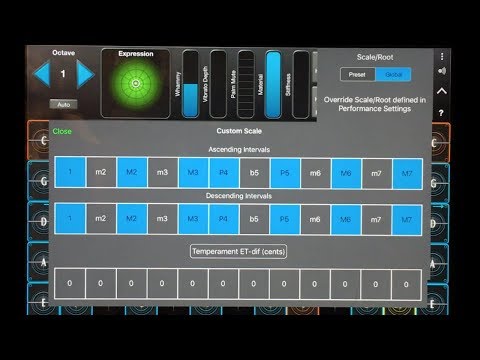
    We have a large playlist of application notes on how to do specific things. We add new FAQs based on user questions. You can find it from the root Help FAQ: http://www.moforte.com/geoShredAssets5.0/help/FAQs/#help

  • @Masanga said:
    Also, while I remain mightily chizzed off at the jailbreak detection (has any other iOS music software ever done this? – lines have been crossed here and a once invulnerable reputation now has a big dent in its fender), I can't not stand in my doorway and applaud that this update and these instruments work on iOS versions back to 9.3.

    Thanks for your feedback. This came out of Apple's recommended practice for validating receipts. Based on your feedback we will modify the detection.

  • @jasonpeter said:
    anyone know what the size requirements are for the various instruments? I had about 1.5 GB free as it turns out and installing one instrument (cello) was just sitting there for minutes and then the "Installing GeoCello" message would disappear but it is acting like it is not installed (cannot select, asks if I should want to buy etc). Tried uninstalling GeoShred and reinstalling but no luck. Then happened to check free space and I've deleted 8 more GB and it is still stuck "trying" to install for about 5 minutes as of yet.

    All 6 are under 200M.

  • McDMcD
    edited October 2020

    If you are on the fence because of the MIDI Controller/Generatorissue you should JUMP off and get one of these instruments.

    @cuscolima slipped me a clue. Just use MIDI channels greater than 1 and GeoShred will treat the input as valid MPE. So, set the AUM keyboard to channel 2 or Fugue Machine's output channels to 2-5 and use 4 copies of GeoShred for each input and you can get polyphonic GeoFlutes, etc.

    I tested PolyThemus which distributes incoming chords across channels 2-15 and started 4 GeoShreds and created a simple polyphonic demo using GeoViolin:

    This should be configurable in any DAW. So, you can use your typical MIDI workflows by avoiding Channel 1.

  • edited October 2020

    @moForte said:

    @jasonpeter said:
    anyone know what the size requirements are for the various instruments? I had about 1.5 GB free as it turns out and installing one instrument (cello) was just sitting there for minutes and then the "Installing GeoCello" message would disappear but it is acting like it is not installed (cannot select, asks if I should want to buy etc). Tried uninstalling GeoShred and reinstalling but no luck. Then happened to check free space and I've deleted 8 more GB and it is still stuck "trying" to install for about 5 minutes as of yet.

    All 6 are under 200M.

    Thanks.. One amazing thing about Physical Modeling is, it’s small file size...

  • Here’s another demo of GeoShred cello. Trying to demonstrate a couple velocities and articulations. I’m pretty excited about having these, and I may spring for the violins too.

  • @McD said:
    If you are on the fence because of the MIDI Controller/Generatorissue you should JUMP off and get one of these instruments.

    @cuscolima slipped me a clue. Just use MIDI channels greater than 1 and GeoShred will treat the input as valid MPE. So, set the AUM keyboard to channel 2 or Fugue Machine's output channels to 2-5 and use 4 copies of GeoShred for each input and you can get polyphonic GeoFlutes, etc.

    I tested PolyThemus which distributes incoming chords across channels 2-15 and started 4 GeoShreds and created a simple polyphonic demo using GeoViolin:

    This should be configurable in any DAW. So, you can use your typical MIDI workflows by avoiding Channel 1.

    @McD I know it isn't your usual goto, but do you know how to get this formula to work in Nanostudio 2?

  • @ion677 said:
    Here’s another demo of GeoShred cello.

    Very convincing and moving performance. I must get this... unfortunately my initial purchase
    can't be credited on the bundle so I'll pick 'em off 1 at a time.

  • @moForte said:

    @jasonpeter said:
    anyone know what the size requirements are for the various instruments? I had about 1.5 GB free as it turns out and installing one instrument (cello) was just sitting there for minutes and then the "Installing GeoCello" message would disappear but it is acting like it is not installed (cannot select, asks if I should want to buy etc). Tried uninstalling GeoShred and reinstalling but no luck. Then happened to check free space and I've deleted 8 more GB and it is still stuck "trying" to install for about 5 minutes as of yet.

    All 6 are under 200M.

    Any idea why I would be having trouble installing? iPad Pro 12.9” with iOS 14.0? Maybe I’ll try updating to 14.1. The behavior is that it says “installing GeoCello” for like a few minutes then that goes away - no success message. When I try then to select it from the list of patches it asks if I want to buy it. Then when I do buy it it says I already have it - get again for free? Just can’t seem to get it installed.

  • @Masanga said:

    @DSCB57 said:

    @Masanga said:

    @moForte said:

    @DSCB57 said:

    @Treaszure said:
    @moForte Since the Jamstik Studio MIDI guitar is an MPE device will it work flawlessly and will it be recognized as an MPE device or is it only certain MPE devices like Roli/Linnstrument that is compatible?

    I would ask the same about the Artiphon Instrument 1, also being an MPE controller - is it compatible?

    We have an Artiphone Instrument 1 MIDI configuration built into GeoShred. I don't recall if it was fully MPE. I'll pull It out next week and look.

    The I1 has been fully MPE-compliant since early 2017, though it may not have been yet when the GeoShred configuration was added. But the GeoSWAM instruments also seem to work fine with it using the other MPE configurations built in, including the Seaboard one. I haven't tested all parameters systematically, though.

    Thank you. I assume that these were implemented via firmware updates on the I1, so a 2016 model with the latest firmware should be good to go?

    Yes, the 2016 hardware remains (I think) the current revision, so you'll be good to go. Lay in some coconut oil or similar if you're likely to want to explore the slide mode (really beautiful on the string instruments here); the rubber surface is optimised for tapping and is a bit frictiony for sliding. Depending how much use your secondhand unit has seen, there may be some wear on the string ridges; this doesn't affect actual responsiveness and makes no difference whatever to either feel or response in tap playing, but can make unlubricated friction uneven over string length in slide modes. (My Eb on the second string has been particularly distressed by four years of daily use where the fingers seem to gravitate instinctively to C minor. But a dab of oil and I'm Fake Pablo Casals.)

    @Masanga said:

    @DSCB57 said:

    @Masanga said:

    @moForte said:

    @DSCB57 said:

    @Treaszure said:
    @moForte Since the Jamstik Studio MIDI guitar is an MPE device will it work flawlessly and will it be recognized as an MPE device or is it only certain MPE devices like Roli/Linnstrument that is compatible?

    I would ask the same about the Artiphon Instrument 1, also being an MPE controller - is it compatible?

    We have an Artiphone Instrument 1 MIDI configuration built into GeoShred. I don't recall if it was fully MPE. I'll pull It out next week and look.

    The I1 has been fully MPE-compliant since early 2017, though it may not have been yet when the GeoShred configuration was added. But the GeoSWAM instruments also seem to work fine with it using the other MPE configurations built in, including the Seaboard one. I haven't tested all parameters systematically, though.

    Thank you. I assume that these were implemented via firmware updates on the I1, so a 2016 model with the latest firmware should be good to go?

    Yes, the 2016 hardware remains (I think) the current revision, so you'll be good to go. Lay in some coconut oil or similar if you're likely to want to explore the slide mode (really beautiful on the string instruments here); the rubber surface is optimised for tapping and is a bit frictiony for sliding. Depending how much use your secondhand unit has seen, there may be some wear on the string ridges; this doesn't affect actual responsiveness and makes no difference whatever to either feel or response in tap playing, but can make unlubricated friction uneven over string length in slide modes. (My Eb on the second string has been particularly distressed by four years of daily use where the fingers seem to gravitate instinctively to C minor. But a dab of oil and I'm Fake Pablo Casals.)

    Thank you for the excellent advice as always ;)

  • Bought the sax,
    Saving up for the rest of em. What a realistic sound omg this is the shit for lofi and vaporwave

  • @moForte said:

    @DSCB57 said:

    @Masanga said:

    @moForte said:

    @DSCB57 said:

    @Treaszure said:
    @moForte Since the Jamstik Studio MIDI guitar is an MPE device will it work flawlessly and will it be recognized as an MPE device or is it only certain MPE devices like Roli/Linnstrument that is compatible?

    I would ask the same about the Artiphon Instrument 1, also being an MPE controller - is it compatible?

    We have an Artiphone Instrument 1 MIDI configuration built into GeoShred. I don't recall if it was fully MPE. I'll pull It out next week and look.

    The I1 has been fully MPE-compliant since early 2017, though it may not have been yet when the GeoShred configuration was added. But the GeoSWAM instruments also seem to work fine with it using the other MPE configurations built in, including the Seaboard one. I haven't tested all parameters systematically, though.

    Thank you. I assume that these were implemented via firmware updates on the I1, so a 2016 model with the latest firmware should be good to go?

    I want to reply very directly to both of your questions. I will look a the Instrument1 again next week. With the earlier firmware there was not a pitchRounding algorithm, and thus it was difficult to play in tune unless you used finger vibrato. Both the LinnStrument and the Seaboard have pitchRounding Algorithms.

    It's my opinion that controllers that deal with fluid pitch, really need to have pitchRounding, or the performer will struggle. That is why we made pitchRounding such a central part of how playing from the glass works (ie the GeoShred Keyboard).

    OK, thank you, I really appreciate all your help and attention - even to potential users like me.

  • @ion677 said:
    Here’s another demo of GeoShred cello. Trying to demonstrate a couple velocities and articulations. I’m pretty excited about having these, and I may spring for the violins too.

    Gorgeous! Great piece + performance.. 👏 I’d say you demoed the velocities + articulations quite well..

  • edited October 2020

    @jasonpeter said:

    @moForte said:

    @jasonpeter said:
    anyone know what the size requirements are for the various instruments? I had about 1.5 GB free as it turns out and installing one instrument (cello) was just sitting there for minutes and then the "Installing GeoCello" message would disappear but it is acting like it is not installed (cannot select, asks if I should want to buy etc). Tried uninstalling GeoShred and reinstalling but no luck. Then happened to check free space and I've deleted 8 more GB and it is still stuck "trying" to install for about 5 minutes as of yet.

    All 6 are under 200M.

    Any idea why I would be having trouble installing? iPad Pro 12.9” with iOS 14.0? Maybe I’ll try updating to 14.1. The behavior is that it says “installing GeoCello” for like a few minutes then that goes away - no success message. When I try then to select it from the list of patches it asks if I want to buy it. Then when I do buy it it says I already have it - get again for free? Just can’t seem to get it installed.

    This is mostly likely a network issue. The assets are hosted at Apple. Various Network providers have caching at their network edges. I was seeing this morning that I had no problems downloading the instruments on my phone (AT&T) but challenges from my iPad (ComCast). You can try rebooting your device and see if its better. Personally I rebooted my router to refresh it's Comcast IP. Sometimes waiting a few hours helps as well.

    If you can't solve this by tomorrow then let's switch to email ([email protected]) and try to figure it out.

  • @moForte do you know if there's anyway to get this to work in Nanostudio 2? Thanks

  • edited October 2020

    @ipadbeatmaking said:
    @moForte do you know if there's anyway to get this to work in Nanostudio 2? Thanks

    Nanostudio 2 is sending us the wrong window bounds, and there is an issue with how it's launching plugins. We have tried repeatedly to find a contact at Blip Interactive to try and solve this. I've posted many notes to their contact page with no response. If you have a contact there, can you please introduce us. -Pat Scandalis (CEO/CTO moForte Inc) [email protected]

    PS, thanks for the lovely review on youtube this morning.

  • @moForte said:

    @Masanga said:
    Also, while I remain mightily chizzed off at the jailbreak detection (has any other iOS music software ever done this? – lines have been crossed here and a once invulnerable reputation now has a big dent in its fender), I can't not stand in my doorway and applaud that this update and these instruments work on iOS versions back to 9.3.

    Thanks for your feedback. This came out of Apple's recommended practice for validating receipts. Based on your feedback we will modify the detection.

    Really appreciated, as is the story behind it. Thanks not just for that but for all your interaction here.

  • edited October 2020

    @moForte said:

    @DSCB57 said:

    @Masanga said:

    @moForte said:

    @DSCB57 said:

    @Treaszure said:
    @moForte Since the Jamstik Studio MIDI guitar is an MPE device will it work flawlessly and will it be recognized as an MPE device or is it only certain MPE devices like Roli/Linnstrument that is compatible?

    I would ask the same about the Artiphon Instrument 1, also being an MPE controller - is it compatible?

    We have an Artiphone Instrument 1 MIDI configuration built into GeoShred. I don't recall if it was fully MPE. I'll pull It out next week and look.

    The I1 has been fully MPE-compliant since early 2017, though it may not have been yet when the GeoShred configuration was added. But the GeoSWAM instruments also seem to work fine with it using the other MPE configurations built in, including the Seaboard one. I haven't tested all parameters systematically, though.

    Thank you. I assume that these were implemented via firmware updates on the I1, so a 2016 model with the latest firmware should be good to go?

    I want to reply very directly to both of your questions. I will look a the Instrument1 again next week. With the earlier firmware there was not a pitchRounding algorithm, and thus it was difficult to play in tune unless you used finger vibrato. Both the LinnStrument and the Seaboard have pitchRounding Algorithms.

    It's my opinion that controllers that deal with fluid pitch, really need to have pitchRounding, or the performer will struggle. That is why we made pitchRounding such a central part of how playing from the glass works (ie the GeoShred Keyboard).

    Artiphon have always been rather resistant to pitch rounding; it may be because their CEO is a string player, but this has been a big – probably the biggest – longstanding request in their forums, at least as an option. It's not terrible with the GeoSWAM instruments as is, and as you say, it's possible to cheat your way through it with judiciously outrageous use of vibrato; I've just spent an evening with the GeoCello and as often with the I1 you find yourself getting better at it without quite knowing what you're doing differently. But horribly off pitches are still easy to hit unless you stay timidly in tap mode (in which, in fairness, they're also lovely).

  • @moForte said:

    @ipadbeatmaking said:
    @moForte do you know if there's anyway to get this to work in Nanostudio 2? Thanks

    Nanostudio 2 is sending us the wrong window bounds, and there is an issue with how it's launching plugins. We have tried repeatedly to find a contact at Blip Interactive to try and solve this. I've posted many notes to their contact page with no response. If you have a contact there, can you please introduce us. -Pat Scandalis (CEO/CTO moForte Inc) [email protected]

    Thats very good to know! My point person for ALL things NanoStudio 2 is @dendy. He isn't officially 'Blip' but he's very close with him and does a great job with technical support and beyond for the NS2 user base. Hopefully he'll chime in here and some useful dialogs can begin.

    PS, thanks for the lovely review on youtube this morning.

    I'm glad you enjoyed it Pat, it is well deserved! What you and your team have put together on iOS is nothing short of incredible. I hope ya'll sell a gazillion of these apps and IAP's!

Sign In or Register to comment.