Loopy Pro: Create music, your way.

What is Loopy Pro?Loopy Pro is a powerful, flexible, and intuitive live looper, sampler, clip launcher and DAW for iPhone and iPad. At its core, it allows you to record and layer sounds in real-time to create complex musical arrangements. But it doesn’t stop there—Loopy Pro offers advanced tools to customize your workflow, build dynamic performance setups, and create a seamless connection between instruments, effects, and external gear.

Use it for live looping, sequencing, arranging, mixing, and much more. Whether you're a live performer, a producer, or just experimenting with sound, Loopy Pro helps you take control of your creative process.

Download on the App Store

Loopy Pro is your all-in-one musical toolkit. Try it for free today.

OneShot! By Klevgrand (Released on iOS)

1212224262731

Comments

  • edited July 2025

    @offbrands said:

    @ecou said:

    @gregsmith said:

    @ecou said:
    I made a drum kit with my custom samples but every time I open it from my saved presets it tells me that slots are currupted.

    I’m getting this whenever I bring my own samples in, then reload the project. Nearly every time.

    I’m not saving the kit into Oneshot, just changing a couple of samples in an auv3 instance.

    Anyone getting this? Have you reported it?

    Is anybody having succès creating kits with their own third party samples. I am still having this problem. I tought it was solved. I did put my samples in the One Shot folder.

    I bought these samples to create my own kit. https://bogrendigital.com/collections/mixing-drums-samples/products/krimh-drums-mix-samples

    I couldn’t tell on the sales page you shared, but are these multi sampled .wav? Like how when you open a slot on a sound in OneShot and there’s several of the same sample but slightly differently named per velocity?

    Yes they are. The kicks have 5 velocity levels and 8 samples per layer for a total of 40 samples.
    The snares have 7 velocity layers and 6 samples per layers for a total of 42.
    The Tom’s have 6 velocity layers and 8 samples per layers for a total of 48 samples.

    Each sample as a corresponding sample recorded from the back of the room and another recorded from above the kits (overhead) I am still trying to figure out how to use those within One Shot since it can only trigger one sample at a time. In the explanation video the producer says he uses those instead of using reverb.

    Anybody as a suggestion ?

  • @ecou said:

    @offbrands said:

    @ecou said:

    @gregsmith said:

    @ecou said:
    I made a drum kit with my custom samples but every time I open it from my saved presets it tells me that slots are currupted.

    I’m getting this whenever I bring my own samples in, then reload the project. Nearly every time.

    I’m not saving the kit into Oneshot, just changing a couple of samples in an auv3 instance.

    Anyone getting this? Have you reported it?

    Is anybody having succès creating kits with their own third party samples. I am still having this problem. I tought it was solved. I did put my samples in the One Shot folder.

    I bought these samples to create my own kit. https://bogrendigital.com/collections/mixing-drums-samples/products/krimh-drums-mix-samples

    I couldn’t tell on the sales page you shared, but are these multi sampled .wav? Like how when you open a slot on a sound in OneShot and there’s several of the same sample but slightly differently named per velocity?

    Yes they are. The kicks have 5 velocity levels and 8 samples per layer for a total of 40 samples.
    The snares have 7 velocity layers and 6 samples per layers for a total of 42.
    The Tom’s have 6 velocity layers and 8 samples per layers for a total of 48 samples.

    Each sample as a corresponding sample recorded from the back of the room and another recorded from above the kits (overhead) I am still trying to figure out how to use those within One Shot since it can only trigger one sample at a time. In the explanation video the producer says he uses those instead of using reverb.

    Anybody as a suggestion ?

    Bit of a waste, but maybe just layer 2 oneshot-instances, one for the direct samples and one for the overheads?

  • The user and all related content has been deleted.
  • @tyslothrop1 said:

    @ecou said:

    @offbrands said:

    @ecou said:

    @gregsmith said:

    @ecou said:
    I made a drum kit with my custom samples but every time I open it from my saved presets it tells me that slots are currupted.

    I’m getting this whenever I bring my own samples in, then reload the project. Nearly every time.

    I’m not saving the kit into Oneshot, just changing a couple of samples in an auv3 instance.

    Anyone getting this? Have you reported it?

    Is anybody having succès creating kits with their own third party samples. I am still having this problem. I tought it was solved. I did put my samples in the One Shot folder.

    I bought these samples to create my own kit. https://bogrendigital.com/collections/mixing-drums-samples/products/krimh-drums-mix-samples

    I couldn’t tell on the sales page you shared, but are these multi sampled .wav? Like how when you open a slot on a sound in OneShot and there’s several of the same sample but slightly differently named per velocity?

    Yes they are. The kicks have 5 velocity levels and 8 samples per layer for a total of 40 samples.
    The snares have 7 velocity layers and 6 samples per layers for a total of 42.
    The Tom’s have 6 velocity layers and 8 samples per layers for a total of 48 samples.

    Each sample as a corresponding sample recorded from the back of the room and another recorded from above the kits (overhead) I am still trying to figure out how to use those within One Shot since it can only trigger one sample at a time. In the explanation video the producer says he uses those instead of using reverb.

    Anybody as a suggestion ?

    Bit of a waste, but maybe just layer 2 oneshot-instances, one for the direct samples and one for the overheads?

    I did think about that too but it's pretty unpredictable and how would I know the room sample played was the same as the main sample.

  • @offbrands said:

    @ecou said:

    @offbrands said:

    @ecou said:

    @gregsmith said:

    @ecou said:
    I made a drum kit with my custom samples but every time I open it from my saved presets it tells me that slots are currupted.

    I’m getting this whenever I bring my own samples in, then reload the project. Nearly every time.

    I’m not saving the kit into Oneshot, just changing a couple of samples in an auv3 instance.

    Anyone getting this? Have you reported it?

    Is anybody having succès creating kits with their own third party samples. I am still having this problem. I tought it was solved. I did put my samples in the One Shot folder.

    I bought these samples to create my own kit. https://bogrendigital.com/collections/mixing-drums-samples/products/krimh-drums-mix-samples

    I couldn’t tell on the sales page you shared, but are these multi sampled .wav? Like how when you open a slot on a sound in OneShot and there’s several of the same sample but slightly differently named per velocity?

    Yes they are. The kicks have 5 velocity levels and 8 samples per layer for a total of 40 samples.
    The snares have 7 velocity layers and 6 samples per layers for a total of 42.
    The Tom’s have 6 velocity layers and 8 samples per layers for a total of 48 samples.

    Each sample as a corresponding sample recorded from the back of the room and another recorded from above the kits (overhead) I am still trying to figure out how to use those within One Shot since it can only trigger one sample at a time. In the explanation video the producer says he uses those instead of using reverb.

    Anybody as a suggestion ?

    If I understand correctly - I would use Patterning 3 since it can send audio/midi out so you can use it as the audio for those Back of the room samples and then using midi out function have it act as a sequencer to trigger the proper sample in OneShot.

    So does that mean that for the kick for instance there’s 40 back or the room samples? Or would there be 8 of them? Obviously less is better in the patterning case.

    Though maybe you could use the sequencer / timeline to make different drumkits of those corresponding samples. As the kits can follow the timeline in Patterning 3 assuming if MIDI out can be set to different notes per kit..

    A lot to test. Sorry I can’t think of an easier way off the top of my head.

    If I understand your idea. Might as well use 2 copies of One Shit.

  • edited July 2025
    The user and all related content has been deleted.
  • @offbrands said:

    @ecou said:

    @offbrands said:

    @ecou said:

    @offbrands said:

    @ecou said:

    @gregsmith said:

    @ecou said:
    I made a drum kit with my custom samples but every time I open it from my saved presets it tells me that slots are currupted.

    I’m getting this whenever I bring my own samples in, then reload the project. Nearly every time.

    I’m not saving the kit into Oneshot, just changing a couple of samples in an auv3 instance.

    Anyone getting this? Have you reported it?

    Is anybody having succès creating kits with their own third party samples. I am still having this problem. I tought it was solved. I did put my samples in the One Shot folder.

    I bought these samples to create my own kit. https://bogrendigital.com/collections/mixing-drums-samples/products/krimh-drums-mix-samples

    I couldn’t tell on the sales page you shared, but are these multi sampled .wav? Like how when you open a slot on a sound in OneShot and there’s several of the same sample but slightly differently named per velocity?

    Yes they are. The kicks have 5 velocity levels and 8 samples per layer for a total of 40 samples.
    The snares have 7 velocity layers and 6 samples per layers for a total of 42.
    The Tom’s have 6 velocity layers and 8 samples per layers for a total of 48 samples.

    Each sample as a corresponding sample recorded from the back of the room and another recorded from above the kits (overhead) I am still trying to figure out how to use those within One Shot since it can only trigger one sample at a time. In the explanation video the producer says he uses those instead of using reverb.

    Anybody as a suggestion ?

    If I understand correctly - I would use Patterning 3 since it can send audio/midi out so you can use it as the audio for those Back of the room samples and then using midi out function have it act as a sequencer to trigger the proper sample in OneShot.

    So does that mean that for the kick for instance there’s 40 back or the room samples? Or would there be 8 of them? Obviously less is better in the patterning case.

    Though maybe you could use the sequencer / timeline to make different drumkits of those corresponding samples. As the kits can follow the timeline in Patterning 3 assuming if MIDI out can be set to different notes per kit..

    A lot to test. Sorry I can’t think of an easier way off the top of my head.

    If I understand your idea. Might as well use 2 copies of One Shit.

    What DAW are you using?

    Cubasis

    Also the room samples for kick let’s say. Is it 40 room samples or 8?

    40 samples. When the record the sample they have a close mic, a mic in the back of the room and a mic above the kit. The one hit on the kit piece gets recorded by the 3 mics simultaneously.

  • The user and all related content has been deleted.
  • @offbrands said:

    @ecou said:

    @offbrands said:

    @ecou said:

    @offbrands said:

    @ecou said:

    @offbrands said:

    @ecou said:

    @gregsmith said:

    @ecou said:
    I made a drum kit with my custom samples but every time I open it from my saved presets it tells me that slots are currupted.

    I’m getting this whenever I bring my own samples in, then reload the project. Nearly every time.

    I’m not saving the kit into Oneshot, just changing a couple of samples in an auv3 instance.

    Anyone getting this? Have you reported it?

    Is anybody having succès creating kits with their own third party samples. I am still having this problem. I tought it was solved. I did put my samples in the One Shot folder.

    I bought these samples to create my own kit. https://bogrendigital.com/collections/mixing-drums-samples/products/krimh-drums-mix-samples

    I couldn’t tell on the sales page you shared, but are these multi sampled .wav? Like how when you open a slot on a sound in OneShot and there’s several of the same sample but slightly differently named per velocity?

    Yes they are. The kicks have 5 velocity levels and 8 samples per layer for a total of 40 samples.
    The snares have 7 velocity layers and 6 samples per layers for a total of 42.
    The Tom’s have 6 velocity layers and 8 samples per layers for a total of 48 samples.

    Each sample as a corresponding sample recorded from the back of the room and another recorded from above the kits (overhead) I am still trying to figure out how to use those within One Shot since it can only trigger one sample at a time. In the explanation video the producer says he uses those instead of using reverb.

    Anybody as a suggestion ?

    If I understand correctly - I would use Patterning 3 since it can send audio/midi out so you can use it as the audio for those Back of the room samples and then using midi out function have it act as a sequencer to trigger the proper sample in OneShot.

    So does that mean that for the kick for instance there’s 40 back or the room samples? Or would there be 8 of them? Obviously less is better in the patterning case.

    Though maybe you could use the sequencer / timeline to make different drumkits of those corresponding samples. As the kits can follow the timeline in Patterning 3 assuming if MIDI out can be set to different notes per kit..

    A lot to test. Sorry I can’t think of an easier way off the top of my head.

    If I understand your idea. Might as well use 2 copies of One Shit.

    What DAW are you using?

    Cubasis

    Also the room samples for kick let’s say. Is it 40 room samples or 8?

    40 samples. When the record the sample they have a close mic, a mic in the back of the room and a mic above the kit. The one hit on the kit piece gets recorded by the 3 mics simultaneously.

    Thank you for elaborating. Apologies if I missed that.

    What is the intended effect for utilizing separate samples for room noise? My initial reaction is to say resample them but obviously there’s a utility of having them separate that I’m not quite grasping 😅

    Do the sellers give any indication of how one would utilize a way of using their samples to do this in like Ableton or what do they recommend to use?

    The ideal way is using Steven Slate Trigger on Desktop.

    It's standard fair in recording live drum to have room and overhead mic mix with the close mic to give a more lively sound. It's basically the room reverb your recording and adding to your samples to taste rather than using a generic reverb.

  • The user and all related content has been deleted.
  • @offbrands said:

    @ecou said:

    @offbrands said:

    @ecou said:

    @offbrands said:

    @ecou said:

    @offbrands said:

    @ecou said:

    @offbrands said:

    @ecou said:

    @gregsmith said:

    @ecou said:
    I made a drum kit with my custom samples but every time I open it from my saved presets it tells me that slots are currupted.

    I’m getting this whenever I bring my own samples in, then reload the project. Nearly every time.

    I’m not saving the kit into Oneshot, just changing a couple of samples in an auv3 instance.

    Anyone getting this? Have you reported it?

    Is anybody having succès creating kits with their own third party samples. I am still having this problem. I tought it was solved. I did put my samples in the One Shot folder.

    I bought these samples to create my own kit. https://bogrendigital.com/collections/mixing-drums-samples/products/krimh-drums-mix-samples

    I couldn’t tell on the sales page you shared, but are these multi sampled .wav? Like how when you open a slot on a sound in OneShot and there’s several of the same sample but slightly differently named per velocity?

    Yes they are. The kicks have 5 velocity levels and 8 samples per layer for a total of 40 samples.
    The snares have 7 velocity layers and 6 samples per layers for a total of 42.
    The Tom’s have 6 velocity layers and 8 samples per layers for a total of 48 samples.

    Each sample as a corresponding sample recorded from the back of the room and another recorded from above the kits (overhead) I am still trying to figure out how to use those within One Shot since it can only trigger one sample at a time. In the explanation video the producer says he uses those instead of using reverb.

    Anybody as a suggestion ?

    If I understand correctly - I would use Patterning 3 since it can send audio/midi out so you can use it as the audio for those Back of the room samples and then using midi out function have it act as a sequencer to trigger the proper sample in OneShot.

    So does that mean that for the kick for instance there’s 40 back or the room samples? Or would there be 8 of them? Obviously less is better in the patterning case.

    Though maybe you could use the sequencer / timeline to make different drumkits of those corresponding samples. As the kits can follow the timeline in Patterning 3 assuming if MIDI out can be set to different notes per kit..

    A lot to test. Sorry I can’t think of an easier way off the top of my head.

    If I understand your idea. Might as well use 2 copies of One Shit.

    What DAW are you using?

    Cubasis

    Also the room samples for kick let’s say. Is it 40 room samples or 8?

    40 samples. When the record the sample they have a close mic, a mic in the back of the room and a mic above the kit. The one hit on the kit piece gets recorded by the 3 mics simultaneously.

    Thank you for elaborating. Apologies if I missed that.

    What is the intended effect for utilizing separate samples for room noise? My initial reaction is to say resample them but obviously there’s a utility of having them separate that I’m not quite grasping 😅

    Do the sellers give any indication of how one would utilize a way of using their samples to do this in like Ableton or what do they recommend to use?

    The ideal way is using Steven Slate Trigger on Desktop.

    It's standard fair in recording live drum to have room and overhead mic mix with the close mic to give a more lively sound. It's basically the room reverb your recording and adding to your samples to taste rather than using a generic reverb.

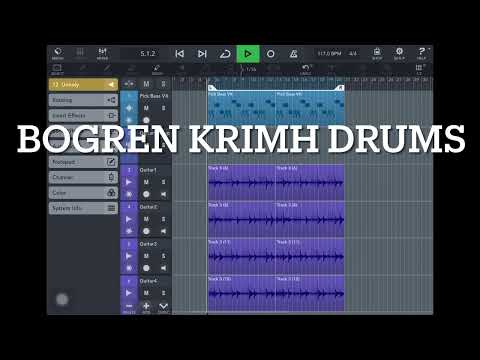
    Found this video where he recommends using Grooveagent in cubase for a way of triggering randomized velocities.

    I have a Drambo module I made to use this sort of effect. Either way from what I’m getting you’ll need two separate samplers or tracks loaded to trigger the sounds. if groove agent (no clue how it achieves this. doesn’t have what you’re looking for.

    Perhaps a Moziac script that filters specific triggers when the other is triggered? Kind of like the opposite of a choke.

    Interesting dilemma. I’m beyond curious though

    I just found another level of complexity. The snare have top and bottom samples on top of room and overhead 🤯

  • wimwim
    edited July 2025

    Sounds like a job for AudioLayer. A long and very tedious job.

  • The user and all related content has been deleted.
  • The user and all related content has been deleted.
  • @wim said:
    Sounds like a job for AudioLayer. A long and very tedious job.

    Thanks ! I’ll have a look. What have I gotten myself into. 😂

  • @offbrands said:
    Idk if you use Moziac @ecou but this Mutator patch is funky

    I just bought it. I’ll have a look. Thanks

  • @offbrands said:

    @ecou said:

    @offbrands said:

    @ecou said:

    @offbrands said:

    @ecou said:

    @offbrands said:

    @ecou said:

    @offbrands said:

    @ecou said:

    @offbrands said:

    @ecou said:

    @gregsmith said:

    @ecou said:
    I made a drum kit with my custom samples but every time I open it from my saved presets it tells me that slots are currupted.

    I’m getting this whenever I bring my own samples in, then reload the project. Nearly every time.

    I’m not saving the kit into Oneshot, just changing a couple of samples in an auv3 instance.

    Anyone getting this? Have you reported it?

    Is anybody having succès creating kits with their own third party samples. I am still having this problem. I tought it was solved. I did put my samples in the One Shot folder.

    I bought these samples to create my own kit. https://bogrendigital.com/collections/mixing-drums-samples/products/krimh-drums-mix-samples

    I couldn’t tell on the sales page you shared, but are these multi sampled .wav? Like how when you open a slot on a sound in OneShot and there’s several of the same sample but slightly differently named per velocity?

    Yes they are. The kicks have 5 velocity levels and 8 samples per layer for a total of 40 samples.
    The snares have 7 velocity layers and 6 samples per layers for a total of 42.
    The Tom’s have 6 velocity layers and 8 samples per layers for a total of 48 samples.

    Each sample as a corresponding sample recorded from the back of the room and another recorded from above the kits (overhead) I am still trying to figure out how to use those within One Shot since it can only trigger one sample at a time. In the explanation video the producer says he uses those instead of using reverb.

    Anybody as a suggestion ?

    If I understand correctly - I would use Patterning 3 since it can send audio/midi out so you can use it as the audio for those Back of the room samples and then using midi out function have it act as a sequencer to trigger the proper sample in OneShot.

    So does that mean that for the kick for instance there’s 40 back or the room samples? Or would there be 8 of them? Obviously less is better in the patterning case.

    Though maybe you could use the sequencer / timeline to make different drumkits of those corresponding samples. As the kits can follow the timeline in Patterning 3 assuming if MIDI out can be set to different notes per kit..

    A lot to test. Sorry I can’t think of an easier way off the top of my head.

    If I understand your idea. Might as well use 2 copies of One Shit.

    What DAW are you using?

    Cubasis

    Also the room samples for kick let’s say. Is it 40 room samples or 8?

    40 samples. When the record the sample they have a close mic, a mic in the back of the room and a mic above the kit. The one hit on the kit piece gets recorded by the 3 mics simultaneously.

    Thank you for elaborating. Apologies if I missed that.

    What is the intended effect for utilizing separate samples for room noise? My initial reaction is to say resample them but obviously there’s a utility of having them separate that I’m not quite grasping 😅

    Do the sellers give any indication of how one would utilize a way of using their samples to do this in like Ableton or what do they recommend to use?

    The ideal way is using Steven Slate Trigger on Desktop.

    It's standard fair in recording live drum to have room and overhead mic mix with the close mic to give a more lively sound. It's basically the room reverb your recording and adding to your samples to taste rather than using a generic reverb.

    Found this video where he recommends using Grooveagent in cubase for a way of triggering randomized velocities.

    I have a Drambo module I made to use this sort of effect. Either way from what I’m getting you’ll need two separate samplers or tracks loaded to trigger the sounds. if groove agent (no clue how it achieves this. doesn’t have what you’re looking for.

    Perhaps a Moziac script that filters specific triggers when the other is triggered? Kind of like the opposite of a choke.

    Interesting dilemma. I’m beyond curious though

    I just found another level of complexity. The snare have top and bottom samples on top of room and overhead 🤯

    Of course they do 😅

    This did lead me to mess with a patterning 3 instance sending both audio and midi while triggering another patterning 3 with the same song and pumping up the reverb on the second one to simulate this layered approach sort of thing you’re going for. I could set them up to send different midi notes to trigger oneshot. 2 could instances could trigger 16 slots in oneshot.

    A bit jank but doable. Once use probability and randomization with Patternings lfo layers and essentially have a set up of drum kits to play the variety of sound slots at different velocities. To trigger this randomiization you’re wanting.

    Or a couple instances of OCTACHRON. I can’t recall if their velocities can be randomly generated.

    Or one instance of Drambo midi out with that module I was telling I made. I’m sure there’s a more elegant one out there but works as intended - I might just make a 24 track Drambo midi out instance to do just this. Without multiple instances of oneshot you’re limited to 1 slot for reverb and one for the sound. So 12 in reality which in total for my needs

    I have say the per hit reverb sound on a separate track does add some texture and sounds to me more realistic. Who woulda thought.

    You really went all out 😉

  • The user and all related content has been deleted.
  • The user and all related content has been deleted.
  • @offbrands said:

    @ecou said:

    @wim said:
    Sounds like a job for AudioLayer. A long and very tedious job.

    Thanks ! I’ll have a look. What have I gotten myself into. 😂

    I swear I almost brought this app up.

    This thing you’re going for could be set up in Drambos Sampler as well but very tedious.

    You almost bought One Shot ?

  • Drambo's sampler can handle four velocity layers, which is one layer short of the five levels mentioned earlier.

  • @offbrands said:

    @ecou said:

    @offbrands said:

    @ecou said:

    @offbrands said:

    @ecou said:

    @offbrands said:

    @ecou said:

    @offbrands said:

    @ecou said:

    @offbrands said:

    @ecou said:

    @offbrands said:

    @ecou said:

    @gregsmith said:

    @ecou said:
    I made a drum kit with my custom samples but every time I open it from my saved presets it tells me that slots are currupted.

    I’m getting this whenever I bring my own samples in, then reload the project. Nearly every time.

    I’m not saving the kit into Oneshot, just changing a couple of samples in an auv3 instance.

    Anyone getting this? Have you reported it?

    Is anybody having succès creating kits with their own third party samples. I am still having this problem. I tought it was solved. I did put my samples in the One Shot folder.

    I bought these samples to create my own kit. https://bogrendigital.com/collections/mixing-drums-samples/products/krimh-drums-mix-samples

    I couldn’t tell on the sales page you shared, but are these multi sampled .wav? Like how when you open a slot on a sound in OneShot and there’s several of the same sample but slightly differently named per velocity?

    Yes they are. The kicks have 5 velocity levels and 8 samples per layer for a total of 40 samples.
    The snares have 7 velocity layers and 6 samples per layers for a total of 42.
    The Tom’s have 6 velocity layers and 8 samples per layers for a total of 48 samples.

    Each sample as a corresponding sample recorded from the back of the room and another recorded from above the kits (overhead) I am still trying to figure out how to use those within One Shot since it can only trigger one sample at a time. In the explanation video the producer says he uses those instead of using reverb.

    Anybody as a suggestion ?

    If I understand correctly - I would use Patterning 3 since it can send audio/midi out so you can use it as the audio for those Back of the room samples and then using midi out function have it act as a sequencer to trigger the proper sample in OneShot.

    So does that mean that for the kick for instance there’s 40 back or the room samples? Or would there be 8 of them? Obviously less is better in the patterning case.

    Though maybe you could use the sequencer / timeline to make different drumkits of those corresponding samples. As the kits can follow the timeline in Patterning 3 assuming if MIDI out can be set to different notes per kit..

    A lot to test. Sorry I can’t think of an easier way off the top of my head.

    If I understand your idea. Might as well use 2 copies of One Shit.

    What DAW are you using?

    Cubasis

    Also the room samples for kick let’s say. Is it 40 room samples or 8?

    40 samples. When the record the sample they have a close mic, a mic in the back of the room and a mic above the kit. The one hit on the kit piece gets recorded by the 3 mics simultaneously.

    Thank you for elaborating. Apologies if I missed that.

    What is the intended effect for utilizing separate samples for room noise? My initial reaction is to say resample them but obviously there’s a utility of having them separate that I’m not quite grasping 😅

    Do the sellers give any indication of how one would utilize a way of using their samples to do this in like Ableton or what do they recommend to use?

    The ideal way is using Steven Slate Trigger on Desktop.

    It's standard fair in recording live drum to have room and overhead mic mix with the close mic to give a more lively sound. It's basically the room reverb your recording and adding to your samples to taste rather than using a generic reverb.

    Found this video where he recommends using Grooveagent in cubase for a way of triggering randomized velocities.

    I have a Drambo module I made to use this sort of effect. Either way from what I’m getting you’ll need two separate samplers or tracks loaded to trigger the sounds. if groove agent (no clue how it achieves this. doesn’t have what you’re looking for.

    Perhaps a Moziac script that filters specific triggers when the other is triggered? Kind of like the opposite of a choke.

    Interesting dilemma. I’m beyond curious though

    I just found another level of complexity. The snare have top and bottom samples on top of room and overhead 🤯

    Of course they do 😅

    This did lead me to mess with a patterning 3 instance sending both audio and midi while triggering another patterning 3 with the same song and pumping up the reverb on the second one to simulate this layered approach sort of thing you’re going for. I could set them up to send different midi notes to trigger oneshot. 2 could instances could trigger 16 slots in oneshot.

    A bit jank but doable. Once use probability and randomization with Patternings lfo layers and essentially have a set up of drum kits to play the variety of sound slots at different velocities. To trigger this randomiization you’re wanting.

    Or a couple instances of OCTACHRON. I can’t recall if their velocities can be randomly generated.

    Or one instance of Drambo midi out with that module I was telling I made. I’m sure there’s a more elegant one out there but works as intended - I might just make a 24 track Drambo midi out instance to do just this. Without multiple instances of oneshot you’re limited to 1 slot for reverb and one for the sound. So 12 in reality which in total for my needs

    I have say the per hit reverb sound on a separate track does add some texture and sounds to me more realistic. Who woulda thought.

    You really went all out 😉

    Believe me I annoy myself more than anyone else. Apologies though if I’ve been a bit much 😅

    No your cool 😎

    I actually think this could help if set to Omni mode. - https://patchstorage.com/freakontrol/

  • The user and all related content has been deleted.
  • edited July 2025
    The user and all related content has been deleted.
  • @offbrands said:
    We both off @wim 😩

    5, 7, and 6 😅

    Not to mention ...

    @ecou said:
    I just found another level of complexity. The snare have top and bottom samples on top of room and overhead 🤯

  • wimwim
    edited July 2025

    I wonder how one deals with phasing issues with that many samples playing at the same time. I can see how the room samples might be OK, but the top, bottom, and overhead seem like they could introduce problems.

    Maybe it's not as big a deal with percussive samples.

  • @wim said:
    Drambo's sampler can handle four velocity layers, which is one layer short of the five levels mentioned earlier.

    This reads like a Perd Hapley line from Parks & Rec 🤣🤣

  • @offbrands said:

    @ecou said:

    @offbrands said:

    @ecou said:

    @wim said:
    Sounds like a job for AudioLayer. A long and very tedious job.

    Thanks ! I’ll have a look. What have I gotten myself into. 😂

    I swear I almost brought this app up.

    This thing you’re going for could be set up in Drambos Sampler as well but very tedious.

    You almost bought One Shot ?

    I almost brought up Audiolayer *

    I have OneShot and enjoy it and have the forest and Holy Drums expansions. Wish the kit creation situation wasn’t so buggy. Also not sure why there isn’t more audio out channels.

    No your cool 😎

    I actually think this could help if set to Omni mode. - https://patchstorage.com/freakontrol/

    🫡

    What problem are you having with the kit creation ?

  • The user and all related content has been deleted.
  • @offbrands said:

    @ecou said:

    @offbrands said:

    @ecou said:

    @offbrands said:

    @ecou said:

    @wim said:
    Sounds like a job for AudioLayer. A long and very tedious job.

    Thanks ! I’ll have a look. What have I gotten myself into. 😂

    I swear I almost brought this app up.

    This thing you’re going for could be set up in Drambos Sampler as well but very tedious.

    You almost bought One Shot ?

    I almost brought up Audiolayer *

    I have OneShot and enjoy it and have the forest and Holy Drums expansions. Wish the kit creation situation wasn’t so buggy. Also not sure why there isn’t more audio out channels.

    No your cool 😎

    I actually think this could help if set to Omni mode. - https://patchstorage.com/freakontrol/

    🫡

    What problem are you having with the kit creation ?

    The same behavior you mentioned - corrupted file slots whenever I’ve tried making my own slots / kits from outside sources.

    The expansions I purchased worked no problem as well so I find it odd.

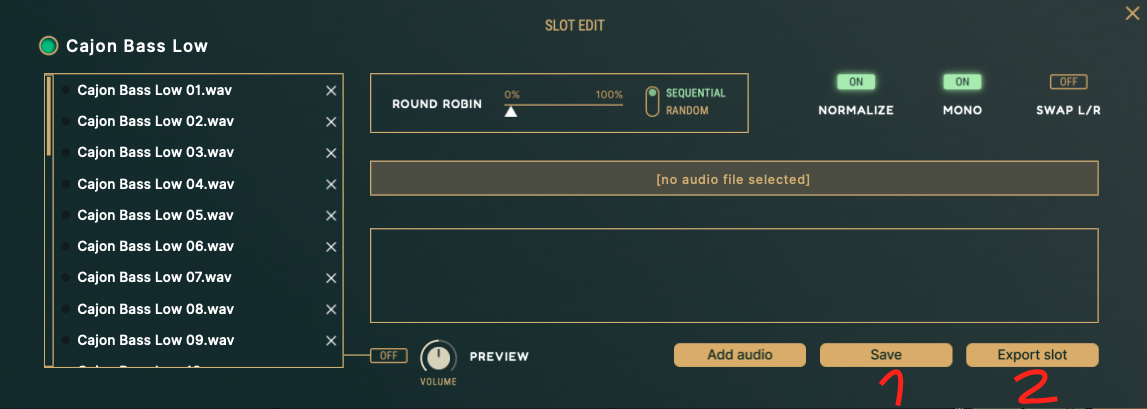
    I realized the problem I was doing was saving the presets is not enough. You also need to save each individual slot you create.

Sign In or Register to comment.