Loopy Pro: Create music, your way.
What is Loopy Pro? — Loopy Pro is a powerful, flexible, and intuitive live looper, sampler, clip launcher and DAW for iPhone and iPad. At its core, it allows you to record and layer sounds in real-time to create complex musical arrangements. But it doesn’t stop there—Loopy Pro offers advanced tools to customize your workflow, build dynamic performance setups, and create a seamless connection between instruments, effects, and external gear.
Use it for live looping, sequencing, arranging, mixing, and much more. Whether you're a live performer, a producer, or just experimenting with sound, Loopy Pro helps you take control of your creative process.
Download on the App StoreLoopy Pro is your all-in-one musical toolkit. Try it for free today.
Comments
Now that you mention I got a fitting chord progression going. It really works 👍
Can Drambo turn off automation recording on a track basis, whilst others not.
Turn off note recording on a track basis, whilst others not.
Iv made a cool system, with loads of live control
but what it sort of means if it cant ( my questions )
Iv got to delete an instrument on an ipad. This would have recorded to Drambo sequencer and overwite record but cant use this because every other track on this ipad, will also record to the sequncers, if record is left on.
On another ipad where I defo need to record and constant overwrite piano. So I dont also record automation ( knob movements from another synth ) I have to turn off the global automation recording.
There will be times when I want to automate a synth but not automate another synth but also keep record on ( for the piano overwrite )
What does it seem to mean.
I have to lose say a Vibraphone track on an ipad of swam tracks. The vibraphone track would have been in overwrite record mode but the Swams need not record.
The ipad with the piano in overwite mode cant contain any synths, apart from mononoke which I dont want to automate, unless I choose additional synth I dont automate record.
Im stuck with all the same instruments ( and not any synth I choose ) which is kind of ok.
So Drambo has provided a great host setup but is sort of hindering because of recording and all I realy need it to do, is record/overwrite a piano, whilst all other tracks are loopy recorded.
Can Drambo turn off automation recording on a track basis, whilst others not.
Turn off note recording on a track basis, whilst others not.
How do you crop measures in a sequence? I have a four measure sequence. I would like to crop it simply to the first measure. I don’t want to just clear the remaining three measures, I want them gone so I only have a one measure loop.
I can select the measure, but then I cannot figure out how to crop it. Alternatively, I could select the other measures, but I do not know how to delete them.
How do you do this?
Select the measure, long-press or swipe up on it, then select clear from the popup menu.
You can also swipe down specific bars from the little note preview, which I find most useful
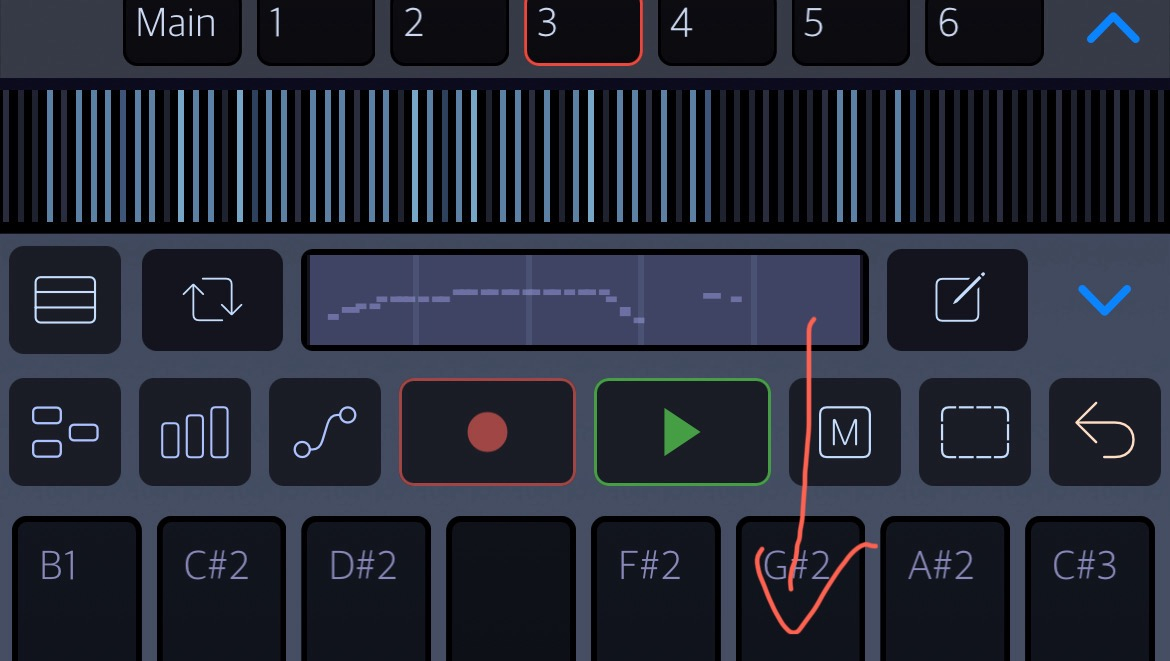
Sorry, I assumed we were talking about the little notes preview area that shows the measures (next to the pen icon). That's where to select the measure or measures, then long-press.
@wim : Are the pre Drambo 2.0 video tutorials worth watching ? Has it changed completely since before then?
Sorry, I'm not a good person to ask about that. I almost never watch YouTube video tutorials. My guess is they are still useful for basic concepts, but might get confusing when it comes to the sequencer. That's where the biggest changes have com in.
For any layout, sequencer or workflow stuff, earlier tutorial videos have been massively superseded. Tutorials for individual modules may be OK but even many of those now have additional functionality. If you can watch stuff from 2.0 onwards, it'll be much better. Is there anything in particular you want to learn about?
@Michael_R_Grant : Thanks for the tip. I’m a noob in Drambo so pretty much all of it . I checked some of your videos “Man who shouldn’t speak “.. Really great Michael … Much appreciated
No worries, glad you enjoyed!
@Michael_R_Grant :I’m watching now..Please keep them coming…