Loopy Pro: Create music, your way.
What is Loopy Pro? — Loopy Pro is a powerful, flexible, and intuitive live looper, sampler, clip launcher and DAW for iPhone and iPad. At its core, it allows you to record and layer sounds in real-time to create complex musical arrangements. But it doesn’t stop there—Loopy Pro offers advanced tools to customize your workflow, build dynamic performance setups, and create a seamless connection between instruments, effects, and external gear.
Use it for live looping, sequencing, arranging, mixing, and much more. Whether you're a live performer, a producer, or just experimenting with sound, Loopy Pro helps you take control of your creative process.
Download on the App StoreLoopy Pro is your all-in-one musical toolkit. Try it for free today.
Comments
Unfortunately, I can’t seem to record or sequence Dawnbeat in any hosts. I assume there has got to be a way to record the midi in a DAW, otherwise it would be useless unless playing live.
Is there a quantisizer in dawnbeat?
Difficult with the stripes in the sequencer instead of just squares for example.
agreed. i’d like to see the same thing
This app is really intriguing in a good way! Loving all the options!
Yes. And it’s easy to find your way.
A bit like Koala.
I think of it as “Koala Pro”
@mistercharlie :What can it do that Koala can’t?
Host Audio Units for one. And it has more control over fx parameters
Thanks @mistercharlie
. Can’t wait until it gets stem separation, if ever
Maybe if enough people leave appstore reviews, do you that might encourage the developer?
It can host Koala, so you could just do it there!
@mistercharlie ……Oh, I forgot it can host………
Does koala have a quantisizer?
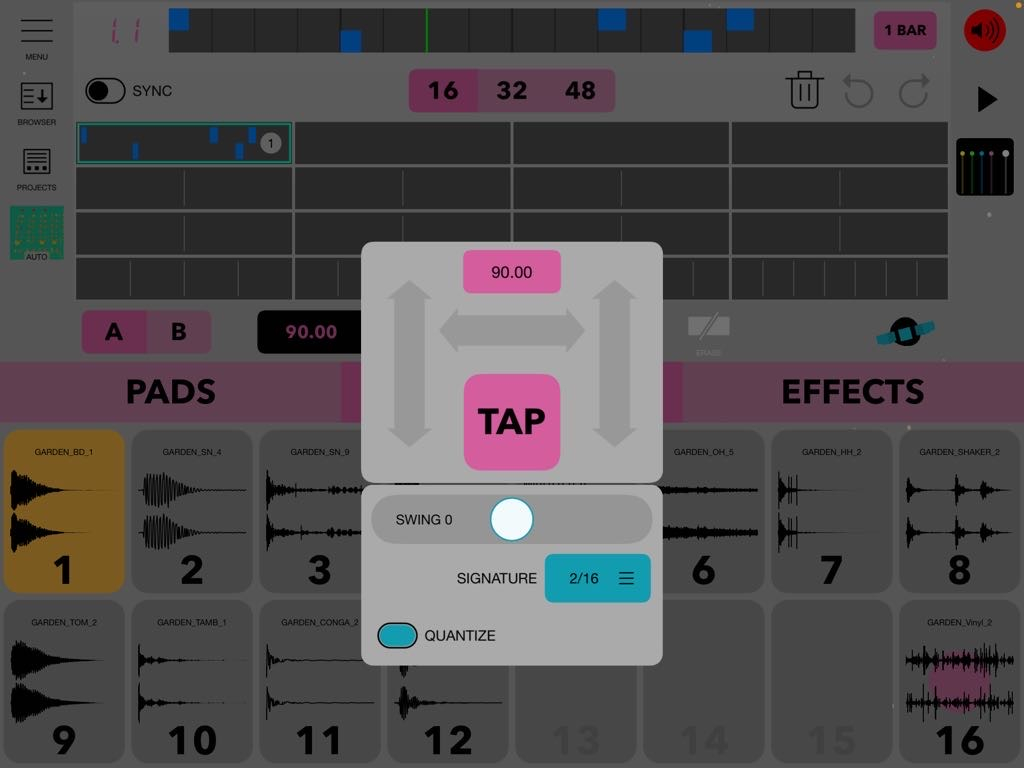
Record quantization in the sequencer - tap on tempo box and you’ll see this:
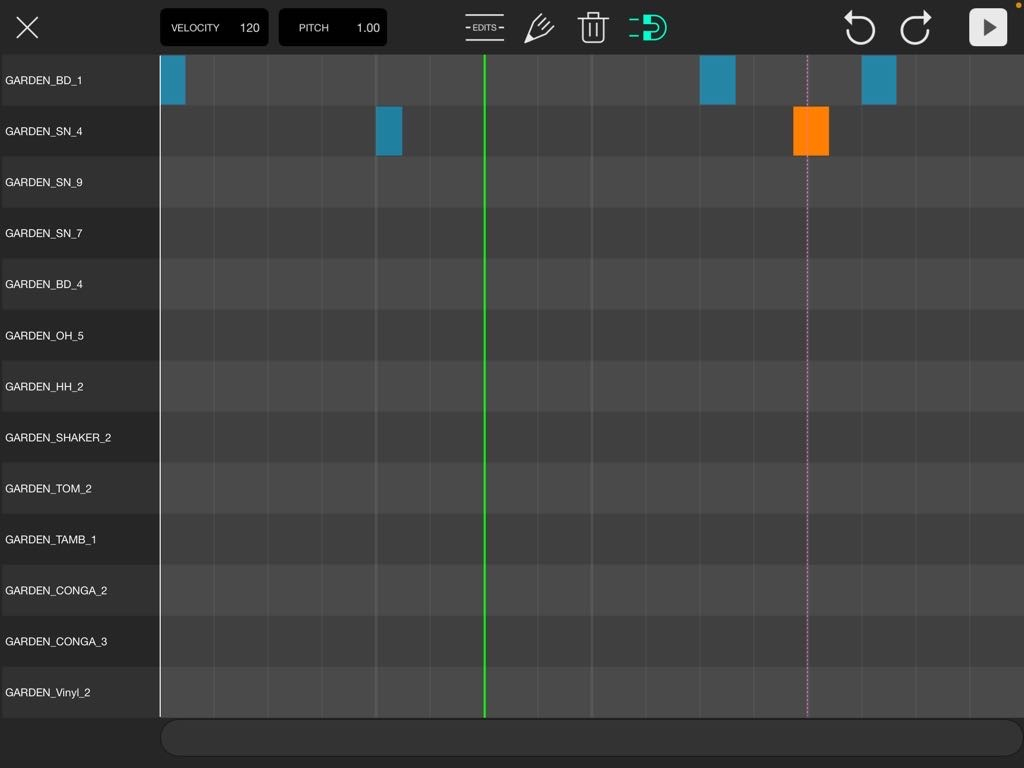
Drag notes around with the magnet engaged here to quantize what you’ve already played:
Thanks!
I dont understand how the magnet works but next to the magnet there is an edits button.
There you can choose “quantisize selected notes”
Stem separation is only available in Koala standalone, not the plugin.
😢
How does the magnet work then?
It seems it only makes the notes longer ,draging them to the right,
not repostioning it.
And i cant seem to find a simple export.
Now first i have to record the loop
and only recordings of a loop can be exported instead of the loop itself.
And for some reason I cant locate anymore where you could change the skins.
No one else have these problems?
I really like the app
Ha! I forgot about the edits menu.. I’m usually just moving a note or 2 around and I’m so used to holding my finger down for a moment and then making a selection area on the note(s) I want to move..
The magnet works by engaging the magnet + then selecting the notes.. then you simply drag the left side of a note in the direction you wish + it’ll magically snap to the next grid when you let go.. very difficult if your notes are very short and look like slivers compared to blocks before zooming in.. as you’ve already discovered, dragging the right side of a note will only lengthen or shorten the note..
Menu -> Configuration -> Appearance Tab -> Select Skin
I read in the description thats it supports Auv3 instruments (and effects).
Does this mean that it is a host?
It does.
Keeps getting better 🙂
big BUG:
It just updated and I still dont have sound in AUM for this...:(
nothing out as auv3 (neither fx or instr)
Works ok as standalone.
( iOS 17, Air 3 )
BUT
It works just fine on iOS 18.
I emailed Lois about this!
I can load ua3 fx with no problem.
Is there a way to map the pads to play with midi procesor in AUM?