Loopy Pro: Create music, your way.

What is Loopy Pro?Loopy Pro is a powerful, flexible, and intuitive live looper, sampler, clip launcher and DAW for iPhone and iPad. At its core, it allows you to record and layer sounds in real-time to create complex musical arrangements. But it doesn’t stop there—Loopy Pro offers advanced tools to customize your workflow, build dynamic performance setups, and create a seamless connection between instruments, effects, and external gear.

Use it for live looping, sequencing, arranging, mixing, and much more. Whether you're a live performer, a producer, or just experimenting with sound, Loopy Pro helps you take control of your creative process.

Download on the App Store

Loopy Pro is your all-in-one musical toolkit. Try it for free today.

LK - for Ableton Live & Midi by Imaginando - AUv3 Clip Launcher Finally Available in AUM!!

12223252728130

Comments

  • @cian said:
    I need to write a very nice review for this app. Extremely impressed by the rate of improvement.

    We would be very appreciated. Thanks for your feedback! :blush:

  • @echoopera said:
    @sinosoidal i was thinking, if you provided a little Spark line under the Midi Channel of the keyboard you're using which is mapped to the Clip it is playing to, this might be nice to help the user with timing and playing correctly to the length of the track/clip.

    I have news for you. This section will be added to MIDI PADS, KEYBOARD and CHORDER modules status bar.

  • @sinosoidal said:

    @echoopera said:
    @sinosoidal i was thinking, if you provided a little Spark line under the Midi Channel of the keyboard you're using which is mapped to the Clip it is playing to, this might be nice to help the user with timing and playing correctly to the length of the track/clip.

    I have news for you. This section will be added to MIDI PADS, KEYBOARD and CHORDER modules status bar.

    SWEEEEEET. I think everyone will love this! Thank you!

  • @echoopera said:
    SWEEEEEET. I think everyone will love this! Thank you!

    Available on TestFlight build 152! :wink:

  • @sinosoidal said:

    @echoopera said:
    SWEEEEEET. I think everyone will love this! Thank you!

    Available on TestFlight build 152! :wink:

    Can' wait sir! Thank you!

  • Can I somehow assign different midi channels to the parameters on the controller page?
    Also why can I not record the controller CCs into a clip? 🤔

  • @Artvarg said:
    Can I somehow assign different midi channels to the parameters on the controller page?

    Tap a controller, then tap channel at the top.

    Also why can I not record the controller CCs into a clip? 🤔

    I’m thinking they just didn’t get to adding them as a source yet? Up until just a bit ago, there was no CC parameter recording at all. Hopefully it’s on the todo list.

  • @Artvarg said:
    Can I somehow assign different midi channels to the parameters on the controller page?
    Also why can I not record the controller CCs into a clip? 🤔

    I'm not sure what you are trying to achieve. Can you please explain it better?

  • wimwim
    edited October 2020

    I don’t know if I interpreted it right, but I think the first question was simply about how to assign channels to the controls on the controller page. Simple answer there, if I understood the question correctly.

    The second question, it seemed to me, was about how to set the recording input to clips to be the midi controllers page. You can choose from LK Input, Midi Pads, Chorder, or Keyboard, but not to Controller.

  • ONE OF THE MOST BEST DEVS IN THE GAME~

  • @RUST( i )K said:
    ONE OF THE MOST BEST DEVS IN THE GAME~

    :heart:

  • @wim said:
    The second question, it seemed to me, was about how to set the recording input to clips to be the midi controllers page. You can choose from LK Input, Midi Pads, Chorder, or Keyboard, but not to Controller.

    Indeed! We have only added midi input from modules that could be played. Now that we have CC automations we should be receiving from controller and xy pad too.

    I will add this right away. It will get come out in the forthcoming 1.8.3

    Thanks for grabbing my attention to this :blush:

  • @sinosoidal Have you considered making a 'All-In-One' IAP for LK instead of segmenting the individual features?

    I admit I've not bought LK yet. Same with FRMS since my iPad Air 2 is starting to show its age and would likely not be fast enough to enjoy the apps(Ie. LK sequencing multiple instances of FRMS hosted in AUM).

    I do like the phase at which LK is evolving :)

  • @wim said:
    I don’t know if I interpreted it right, but I think the first question was simply about how to assign channels to the controls on the controller page. Simple answer there, if I understood the question correctly.

    The second question, it seemed to me, was about how to set the recording input to clips to be the midi controllers. You can choose from LK Input, Midi Pads, Chorder, or Keyboard, but not to “Controller”.

    Exactly. Thanks for explaining. Will try later. ☺️

    @sinosoidal Fantastic App. Pretty much what I was looking for for a long time. 😍 But you might want to consider a name change or at least a change of the App Store description. I think I was not the only one confused by the focus on Ableton Live, when I‘m exclusively on iOS/iPadOS. That actually kept me from looking in to the App earlier. 🙃 You should put something along the lines of „the complete AUv3 MIDI production environment - control, play, compose, arrange “ in the description.

  • OK I bought this app as a lot of folks seemed to like it. I bought all the IAP’s but for the life of me I cant get the pads or the keyboard to send midi in AUM. I can use the piano roll or sequence notes and its fine.... what am an Missing???

    Thanks

  • @Artvarg said:
    Exactly. Thanks for explaining. Will try later. ☺️

    @sinosoidal Fantastic App. Pretty much what I was looking for for a long time. 😍 But you might want to consider a name change or at least a change of the App Store description. I think I was not the only one confused by the focus on Ableton Live, when I‘m exclusively on iOS/iPadOS. That actually kept me from looking in to the App earlier. 🙃 You should put something along the lines of „the complete AUv3 MIDI production environment - control, play, compose, arrange “ in the description.

    Thanks for your feedback. We have indeed a communication challenge ahead. LK started as an Ableton Live controller but today is much more than that. But right now, our efforts are in improving LK. We hope that the community starts making videos on how to use LK to complement our own.

    We have just uploaded build 154, it seems that build 153 introduced a crash. As anyone experienced this? Thanks!

  • @onerez said:
    OK I bought this app as a lot of folks seemed to like it. I bought all the IAP’s but for the life of me I cant get the pads or the keyboard to send midi in AUM. I can use the piano roll or sequence notes and its fine.... what am an Missing???

    Do you want to send midi from LK's kerboard or pads to other apps in AUM?

  • @sinosoidal said:

    @onerez said:
    OK I bought this app as a lot of folks seemed to like it. I bought all the IAP’s but for the life of me I cant get the pads or the keyboard to send midi in AUM. I can use the piano roll or sequence notes and its fine.... what am an Missing???

    Do you want to send midi from LK's kerboard or pads to other apps in AUM?

    I would like to use chorder, the pads or the keyboard.... in AUM. It looks like I have it set right but no sound. I can use the mini piano roll inside a clip and it works but the others do not.

  • @onerez said:

    I would like to use chorder, the pads or the keyboard.... in AUM. It looks like I have it set right but no sound. I can use the mini piano roll inside a clip and it works but the others do not.

    When you have for example the Chorder on the screen select LK Output under Device and also a midi channel to transmit on.

  • @Samu said:

    @onerez said:

    I would like to use chorder, the pads or the keyboard.... in AUM. It looks like I have it set right but no sound. I can use the mini piano roll inside a clip and it works but the others do not.

    When you have for example the Chorder on the screen select LK Output under Device and also a midi channel to transmit on.

    Ugggggggggg. I am sorry. Thanks!!!!! That works. I cant believe I missed that. Thanks so much @Samu

  • @sinosoidal said:
    We have just uploaded build 154, it seems that build 153 introduced a crash. As anyone experienced this? Thanks!

    Yup, 153 standalone crashed, but 154 opens fine :)

  • Does LK now record incoming MIDI CCs in clips?

  • @espiegel123 said:
    Does LK now record incoming MIDI CCs in clips?

    Yes it can! select the desired midi input on the track, arm the track for recording, enable global recording and do it.

  • edited October 2020

    NM. Figured it out.

  • Wow...I love the Progress Spark Line in the latest Beta. I have less anxiety while entering notes in the Midi Pads and Chorder views :) Here's a little workflow process video of me using LK in AUM:
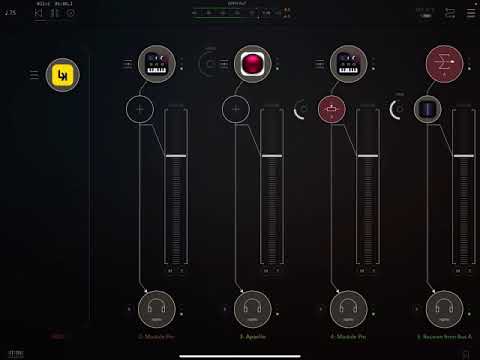
    Keep up the great work!

  • @echoopera said:
    Wow...I love the Progress Spark Line in the latest Beta. I have less anxiety while entering notes in the Midi Pads and Chorder views :) Here's a little workflow process video of me using LK in AUM:

    Keep up the great work!

    Awesome! I can see you have stumbled on a couple of issues along the way. This kind of videos are important to us too. We learn about the user workflow and what needs to be improved. :blush:

  • @sinosoidal said:

    Awesome! I can see you have stumbled on a couple of issues along the way. This kind of videos are important to us too. We learn about the user workflow and what needs to be improved. :blush:

    Noticed a few in the video as well :)

    Another 'gotcha' was the issue earlier in this thread when using LK as a midi-controller.

    Maybe the 'LK Output' could be enabled by default for pads, chorder etc. when loaded as an AUV3?
    (This way it would just be a matter of selecting LK as the input for an instrument and 'it just works').

    Still getting familiar with the app, thanks!
    Cheers!

  • edited October 2020

    @Samu said:
    Maybe the 'LK Output' could be enabled by default for pads, chorder etc. when loaded as an AUV3?
    (This way it would just be a matter of selecting LK as the input for an instrument and 'it just works').

    That's a simple but efficient suggestion! We will definitely make it happen. :blush:

  • edited October 2020

    @sinosoidal said:

    @echoopera said:
    Wow...I love the Progress Spark Line in the latest Beta. I have less anxiety while entering notes in the Midi Pads and Chorder views :) Here's a little workflow process video of me using LK in AUM:

    Keep up the great work!

    Awesome! I can see you have stumbled on a couple of issues along the way. This kind of videos are important to us too. We learn about the user workflow and what needs to be improved. :blush:

    Cool. I'll be recording a lot more for the next week...LK is now ready for me to focus on. I placed my M+ in its proper slot in the Studio and will focus on LK for the next week+

    Thanks again for this little Progress Spark Line...it helps so much to stay in the flow when composing :)

    Cheers!

  • @echoopera said:

    @sinosoidal said:

    @echoopera said:
    Wow...I love the Progress Spark Line in the latest Beta. I have less anxiety while entering notes in the Midi Pads and Chorder views :) Here's a little workflow process video of me using LK in AUM:

    Keep up the great work!

    Awesome! I can see you have stumbled on a couple of issues along the way. This kind of videos are important to us too. We learn about the user workflow and what needs to be improved. :blush:

    Cool. I'll be recording a lot more for the next week...LK is now ready for me to focus on. I placed my M+ in its proper slot in the Studio and will focus on LK for the next week+

    Thanks again for this little Progress Spark Line...it helps so much to stay in the flow when composing :)

    Cheers!

    That's so great! We are looking forward to hear your feedback (and music).

    We have just submitted version 1.8.3 for revision on App Store. Should be out tomorrow!

    :blush:

Sign In or Register to comment.