Loopy Pro: Create music, your way.

What is Loopy Pro?Loopy Pro is a powerful, flexible, and intuitive live looper, sampler, clip launcher and DAW for iPhone and iPad. At its core, it allows you to record and layer sounds in real-time to create complex musical arrangements. But it doesn’t stop there—Loopy Pro offers advanced tools to customize your workflow, build dynamic performance setups, and create a seamless connection between instruments, effects, and external gear.

Use it for live looping, sequencing, arranging, mixing, and much more. Whether you're a live performer, a producer, or just experimenting with sound, Loopy Pro helps you take control of your creative process.

Download on the App Store

Loopy Pro is your all-in-one musical toolkit. Try it for free today.

Ableton Move

17810121319

Comments

  • The user and all related content has been deleted.
  • edited October 2024

    I got mine - I love it…

    Edited myself.

  • @AudioGus said:

    @Tarekith said:
    No, via the Move manager there is only the option to render a stereo file of the set, not stems. I ‘think’ Move comes with a copy of Live Lite though if I remember right, so you don’t need to buy it if that’s what you’re worried about.

    Ahh crap. I can't install Live Light as it forces itself onto my C drive (even when I specify another drive) which is almost full. Heh, thought I could maybe sneak this in before the new computer.

    Actually comes with Live Intro

  • edited October 2024

    @Stuntman_mike said:

    @AudioGus said:

    @Tarekith said:
    No, via the Move manager there is only the option to render a stereo file of the set, not stems. I ‘think’ Move comes with a copy of Live Lite though if I remember right, so you don’t need to buy it if that’s what you’re worried about.

    Ahh crap. I can't install Live Light as it forces itself onto my C drive (even when I specify another drive) which is almost full. Heh, thought I could maybe sneak this in before the new computer.

    Actually comes with Live Intro

    Thought it was called Lite (so did Tarekith, heh and he should know better ;) ). 'Intro' then. But yah, I tried installing it a few years ago and it insisted on using my C drive which I currently can't afford to use just for stem exporting.

    Was also thinking since Move Manager works on iOS it could have been awesome for exporting stems more or less right into BM3. But yah, likely just more marketing department imposed 'ecosystem' based limitations. Everything sold has to support everything else sold, circle the wagons etc. "But iOS has Note, then users will feel compelled to get Live, then they get Push blah blah" bye bye

  • edited October 2024

    @AudioGus There aren't stems as such. When the set is uploaded to cloud and opened in Ableton the tracks are MIDI and loaded with the relevant instrument (DrumRack, Drift, Wavetable etc). Obviously these can be then exported to audio individually but I don't think it's the workflow you're describing.

  • Trying to work out MIDI capabilities is a bit of a headache. Move is really picky about how you connect your MIDI devices.

    Using a MIDI monitor with USB C connected there are 2 ports that show up, Live and User, but I can only seem to get these to pass MIDI when in Live control mode.

    Connecting via a dongle is a definite 'nope'.

    I've connected the Launchpad Pro via a dongle into USB A slot and it doesn't work. Direct into USB A and it works. The Launchpad pro will play the selected track.

    But connecting the iPad via USB A I don't see any ports or way to direct MIDI about.

  • edited October 2024

    @SpookyZoo said:
    @AudioGus There aren't stems as such. When the set is uploaded to cloud and opened in Ableton the tracks are MIDI and loaded with the relevant instrument (DrumRack, Drift, Wavetable etc). Obviously these can be then exported to audio individually but I don't think it's the workflow you're describing.

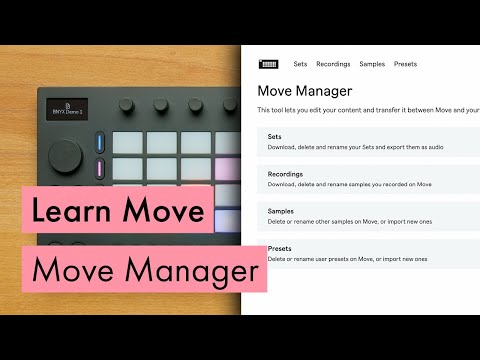
    Actually, Move Manager lets you save an audio file without Live (because it is active while Move hardware is connected) and in the marketing video for Move Manager they say "But because you can also always export your Audio directly from Move Manager, whether you combine Move with other Ableton products is completely up to you." That really does imply stem export from Move Manager (which again, I know is not possible). Who would want just a stereo wav of the set if they want to combine it with other non-Ableton products like they say is possible using only Move Manager?

    3:18
  • edited October 2024

    @AudioGus Yeah unfortunately it's just the main set mix, not individual stems.

    Aside from the few gripes I've listed, I really like the device. I can see them bringing new features to it over time. I'm 99% sure there will be no more than 4 tracks in future. I quite like the way it's set out even if it's a bit back to front from other Ableton products. Diving into Move it is it's own thing and the workflow works nicely for most tasks.

  • @SpookyZoo said:
    @AudioGus Yeah unfortunately it's just the main set mix, not individual stems.

    They really shouldn't say that in the video then, quite misleading.

  • @AudioGus said:

    They really shouldn't say that in the video then, quite misleading.

    Yeah, unfortunately that line of the script does feel deliberately ambiguous.

  • edited October 2024

    @SpookyZoo said:

    @AudioGus said:

    They really shouldn't say that in the video then, quite misleading.

    Yeah, unfortunately that line of the script does feel deliberately ambiguous.

    edit: deleted misdirected angst

  • Thank You very much

  • edited October 2024

    Ricky's take:..

    I think he does really well to cover all the Pros and Cons in just 7 mins and is the closest review I've seen to my own take on Move.

  • @gkillmaster said:
    I want it even though history has shown I'll never use it.

    could be me ;)

    I still have a Push 2 and have only used it a couple of times .. but yeah, Move looks tasty

    [will not buy, no no no]

  • Started this groove on the Move earlier today and continued to refine it in Note this evening:

  • The user and all related content has been deleted.
  • @Mountain_Hamlet said:
    Why would I want to send my files to the cloud and back when then the device I’m sending it to is sitting on the same table top?

    So the cloud can mine them for the AI generators 😉

  • edited October 2024

    I’ve never been so indecisive about a piece of gear in my life, this is painful!

    4 track limitation means more audio/sample based type work on the device, but that’s not a biggie. I’d hoped better audio/MIDI I/O connectivity, but it’s got the basics. MPE would have been nice but the pads it has are apparently very responsive. Good build quality. Weird layout, but workflow still ok. Big fun factor. No Note/iPad hardware control is disappointing.

    Basically I’m waiting on vids demonstrating its Live controller capabilities. Inevitably by the time I make a decision, they’ll have sold out!

  • edited October 2024

    @oldsynthguy said:
    ...but the pads it has are apparently very responsive. Good build quality.

    Yep, nice pads. Good response and feel great to play.

    Basically I’m waiting on vids demonstrating its Live controller capabilities.

    Anything specific you're wondering about with the Live control?

  • edited October 2024

    @SpookyZoo said:
    Anything specific you're wondering about with the Live control?

    I’m not a big user of the session view, so my requirements are pretty basic - to be able to select a track/instrument while I’m in the arrangement view, and basically play the pads and twiddle the knobs. As Move only has 4 tracks, just wondering if that is irrelevant in controller mode, and you can select any track on your computer that you want to control?

    Also audio/MIDI out to Live. Does this require an IDAM connection, or can you simply plug it in via a USB cable and it’s picked up automatically via the audio/MIDI preference section in Live? That’d be handy for playing in samples, and using the Move’s sequencer to play Live instruments.

    Plus I’m still on V11 (suite), so wondering about compatibility between devices. I’m going to test a few Note ideas later, and see how they transfer.

    Sorry for all the questions - the size and build quality could make this a perfect controller for my needs, the standalone functionality is a bit of a bonus 😀

    @yellow_eyez said:

    @oldsynthguy said:
    I’ve never been so indecisive about a piece of gear in my life, this is painful!

    4 track limitation means more audio/sample based type work on the device, but that’s not a biggie. I’d hoped better audio/MIDI I/O connectivity, but it’s got the basics. MPE would have been nice but the pads it has are apparently very responsive. Good build quality. Weird layout, but workflow still ok. Big fun factor. No Note/iPad hardware control is disappointing.

    Basically I’m waiting on vids demonstrating its Live controller capabilities. Inevitably by the time I make a decision, they’ll have sold out!

    You seem torn. I’m also intrigued in the same way you are hahaha u r not alone 😜 there must be others

    My thing is Ableton is massive and talented so I see the move as a mini big deal/is it a workflow adjustment? Maybe so, for the better? Test/fitting workflows ?

    I ALWAYS wanted to make Live happen, so maybe this would be a perfect Intro?

    I love working in Live. I’ve had/tried all the main DAW’s but Live is the one that’s clicked. Even just as a controller (my Launchkey keyboard is too clunky, little Korg keyboard doesn’t have pads or knobs) Move is a very tempting buy. I’d have been happy with a controller only option (with MPE), that’d tick all my boxes. But for an Ableton newcomer, the Move looks like a good introduction.

  • @oldsynthguy said:
    I’ve never been so indecisive about a piece of gear in my life, this is painful!

    4 track limitation means more audio/sample based type work on the device, but that’s not a biggie. I’d hoped better audio/MIDI I/O connectivity, but it’s got the basics. MPE would have been nice but the pads it has are apparently very responsive. Good build quality. Weird layout, but workflow still ok. Big fun factor. No Note/iPad hardware control is disappointing.

    Basically I’m waiting on vids demonstrating its Live controller capabilities. Inevitably by the time I make a decision, they’ll have sold out!

    Wait 6 months let the hype train die down, stock issues sorted. They are currently out of stock in Europe apparently. Let Ableton fix any bugs or hardware issues. ( one or 2 people having powering issues with move not charging properly). See how you feel then if GAS is still strong take the leap. That’s my take on it.

  • @oldsynthguy - I need to head out now so I'll add more later, but a quick few lines now:

    I'm not sure MOVE is the complete Live controller peeps may be after.

    • You can only select the first four tracks using left side pads, however if you select another track in ableton the knobs will affect the selected track

    • Audio is direct out to Ableton via USB C however MIDI is a bit of a mare and I'm still trying to figure it out.

    • Unfortunately I don't see a way to control additional parameter banks, The 8 encoder will control either the 1st 8 macros or the 1st 8 controls of device if no macros assigned.

    • Which Launchkey are you using and why do you find it clunky?

    More later.

  • @Jumpercollins said:

    @oldsynthguy said:
    I’ve never been so indecisive about a piece of gear in my life, this is painful!

    4 track limitation means more audio/sample based type work on the device, but that’s not a biggie. I’d hoped better audio/MIDI I/O connectivity, but it’s got the basics. MPE would have been nice but the pads it has are apparently very responsive. Good build quality. Weird layout, but workflow still ok. Big fun factor. No Note/iPad hardware control is disappointing.

    Basically I’m waiting on vids demonstrating its Live controller capabilities. Inevitably by the time I make a decision, they’ll have sold out!

    Wait 6 months let the hype train die down, stock issues sorted. They are currently out of stock in Europe apparently. Let Ableton fix any bugs or hardware issues. ( one or 2 people having powering issues with move not charging properly). See how you feel then if GAS is still strong take the leap. That’s my take on it.

    Yeah that’s the sensible option 😃

    I do have a genuine ‘gap’ in my hardware setup, Live is my main DAW, and I don’t have a suitable controller. I was going to buy the Push 3 when it was released but the price and amount of people reporting issues made me hesitate, and then it went out of stock anyway! I’ve only reconsidered that one since things seem to have stabilised, and there’s a dedicated UK stockist.

    Move is still listed as being in stock here, but it’ll inevitably sell out before I make a decision. That’s ok, if there are initial hardware issues it’ll be good to know about them, and maybe there’ll be a Black Friday deal on the Push 3, or even the Move, which will help me to make a more informed decision.

  • @oldsynthguy said:

    @Jumpercollins said:

    @oldsynthguy said:
    I’ve never been so indecisive about a piece of gear in my life, this is painful!

    4 track limitation means more audio/sample based type work on the device, but that’s not a biggie. I’d hoped better audio/MIDI I/O connectivity, but it’s got the basics. MPE would have been nice but the pads it has are apparently very responsive. Good build quality. Weird layout, but workflow still ok. Big fun factor. No Note/iPad hardware control is disappointing.

    Basically I’m waiting on vids demonstrating its Live controller capabilities. Inevitably by the time I make a decision, they’ll have sold out!

    Wait 6 months let the hype train die down, stock issues sorted. They are currently out of stock in Europe apparently. Let Ableton fix any bugs or hardware issues. ( one or 2 people having powering issues with move not charging properly). See how you feel then if GAS is still strong take the leap. That’s my take on it.

    Yeah that’s the sensible option 😃

    I do have a genuine ‘gap’ in my hardware setup, Live is my main DAW, and I don’t have a suitable controller. I was going to buy the Push 3 when it was released but the price and amount of people reporting issues made me hesitate, and then it went out of stock anyway! I’ve only reconsidered that one since things seem to have stabilised, and there’s a dedicated UK stockist.

    Move is still listed as being in stock here, but it’ll inevitably sell out before I make a decision. That’s ok, if there are initial hardware issues it’ll be good to know about them, and maybe there’ll be a Black Friday deal on the Push 3, or even the Move, which will help me to make a more informed decision.

    Yer I’m genuinely on the fence with it. I own a Push 2 and that takes care of my controller needs so would only use the Move as a standalone unit most of the time. Our probably dive a lot more into Note and see if that makes my mind up to get one next year.

  • edited October 2024

    @SpookyZoo said:
    @oldsynthguy - I need to head out now so I'll add more later, but a quick few lines now:

    I'm not sure MOVE is the complete Live controller peeps may be after.

    • You can only select the first four tracks using left side pads, however if you select another track in ableton the knobs will affect the selected track

    • Audio is direct out to Ableton via USB C however MIDI is a bit of a mare and I'm still trying to figure it out.

    • Unfortunately I don't see a way to control additional parameter banks, The 8 encoder will control either the 1st 8 macros or the 1st 8 controls of device if no macros assigned.

    • Which Launchkey are you using and why do you find it clunky?

    More later.

    Thanks for checking 🙂

    I’ve got a Launchkey 49 mk2. The connectivity is actually ok, but the keyboard is horrible, and it’s too big for my desk with the computer. Also missing drum pads.

    Selecting tracks via Move wouldn’t be a problem, as I’d just do that onscreen with the mouse. Lack of MIDI mapping though sounds a bit of an issue - even my cheap Launchkey can do that, and I’d like to be able to control VST’s and Max devices.

    Hmmm…

  • @Jumpercollins said:

    @oldsynthguy said:

    @Jumpercollins said:

    @oldsynthguy said:
    I’ve never been so indecisive about a piece of gear in my life, this is painful!

    4 track limitation means more audio/sample based type work on the device, but that’s not a biggie. I’d hoped better audio/MIDI I/O connectivity, but it’s got the basics. MPE would have been nice but the pads it has are apparently very responsive. Good build quality. Weird layout, but workflow still ok. Big fun factor. No Note/iPad hardware control is disappointing.

    Basically I’m waiting on vids demonstrating its Live controller capabilities. Inevitably by the time I make a decision, they’ll have sold out!

    Wait 6 months let the hype train die down, stock issues sorted. They are currently out of stock in Europe apparently. Let Ableton fix any bugs or hardware issues. ( one or 2 people having powering issues with move not charging properly). See how you feel then if GAS is still strong take the leap. That’s my take on it.

    Yeah that’s the sensible option 😃

    I do have a genuine ‘gap’ in my hardware setup, Live is my main DAW, and I don’t have a suitable controller. I was going to buy the Push 3 when it was released but the price and amount of people reporting issues made me hesitate, and then it went out of stock anyway! I’ve only reconsidered that one since things seem to have stabilised, and there’s a dedicated UK stockist.

    Move is still listed as being in stock here, but it’ll inevitably sell out before I make a decision. That’s ok, if there are initial hardware issues it’ll be good to know about them, and maybe there’ll be a Black Friday deal on the Push 3, or even the Move, which will help me to make a more informed decision.

    Yer I’m genuinely on the fence with it. I own a Push 2 and that takes care of my controller needs so would only use the Move as a standalone unit most of the time. Our probably dive a lot more into Note and see if that makes my mind up to get one next year.

    The current Note beta is really good, almost proper onscreen MIDI note editing.

  • There is a bundle if you want to migrate to Ableton 12…this can help in the decision. It’s a cornelian choice for me too

  • @Danny_Mammy said:

    @cam said:

    @SpookyZoo said:
    I'll be digging in tonight (so in about 6 hours).

    Let me know if you have any questions. I'll try and answer those I can. With pics and vids if possible.

    Feels great btw. Build quality is awesome. Good weight to it.

    I have some questions… can you help me?

    Will move and an iPad will work together?
    I have live 9 so probably move and Ableton live wouldn’t be a good combination. Am I right?

    Besides move’s Ableton integration are similarities between the sp404 Mii and move?

    Thanks 🙏

    Move and Ipad don't work together unless you want to sync both via link (Move is not a controller for note), you can transfer your projects from Move to note via cloud and carry on in note. Note has 8 tracks so you can only transfer 4 tracks to move.

    you have to have live 12.1

    (Move is not a controller for note) I’ve been reading about Move and this is the biggest flaw, just don’t get it.
    I guess you can’t control Note with a Push either. Right?. Why would you not implement this?. I guess the only reason is you want to sell more Ableton Live licenses. But you need a computer for that.

  • @tahiche or they just decided it wasn't a priority and they might add it later. But for sure their priority is a workflow that ends up in Live - and to be fair you get a free Live Lite licence to finish your tracks.

  • @tahiche said:

    @Danny_Mammy said:

    @cam said:

    @SpookyZoo said:
    I'll be digging in tonight (so in about 6 hours).

    Let me know if you have any questions. I'll try and answer those I can. With pics and vids if possible.

    Feels great btw. Build quality is awesome. Good weight to it.

    I have some questions… can you help me?

    Will move and an iPad will work together?
    I have live 9 so probably move and Ableton live wouldn’t be a good combination. Am I right?

    Besides move’s Ableton integration are similarities between the sp404 Mii and move?

    Thanks 🙏

    Move and Ipad don't work together unless you want to sync both via link (Move is not a controller for note), you can transfer your projects from Move to note via cloud and carry on in note. Note has 8 tracks so you can only transfer 4 tracks to move.

    you have to have live 12.1

    (Move is not a controller for note) I’ve been reading about Move and this is the biggest flaw, just don’t get it.
    I guess you can’t control Note with a Push either. Right?. Why would you not implement this?. I guess the only reason is you want to sell more Ableton Live licenses. But you need a computer for that.

    Yah, there are a ton of people who want to be DAWless with this sort of stuff but I guess they know Live is a base to build on so they started there. Hopefully marketing ecosystem corporate rules don't have their hooks in the process too cripplingly deep. These things can be updated just like apps these days so i wager a good many things are possible yet.

Sign In or Register to comment.